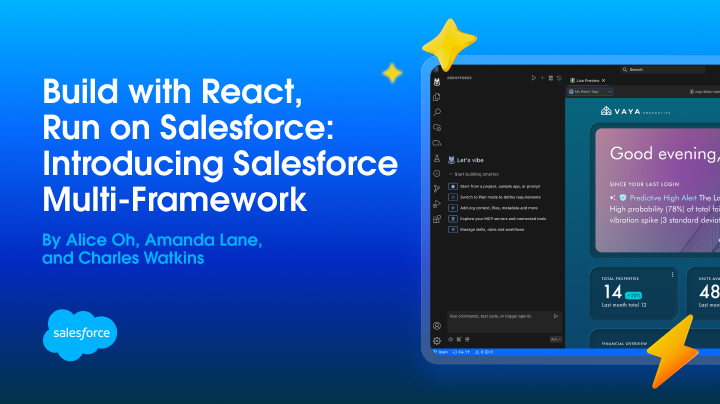
You can now build native Salesforce apps in React. Salesforce Multi-Framework is a framework-agnostic runtime on the Agentforce 360 Platform that lets developers build native Salesforce apps using React and other frontend frameworks — with authentication, security, and governance built in. It’s now in open beta for scratch orgs and sandboxes that use English as the default language. React is supported today; additional frameworks are coming.
Bring your hooks, your component libraries, your existing toolchain, and build on Salesforce without having to choose between your framework and your platform.
Why React on Salesforce?
Until now, building on Salesforce meant adopting Lightning Web Components (LWC) or Aura. You got base components, declarative tools, Lightning Data Service, and UI API access, but you gave up the broader ecosystem. Open-source libraries had to be managed as static resources, and there was no way to use your own framework without losing platform features. Salesforce Multi-Framework eliminates that trade-off.
Starting today, you can bring your existing React apps, dashboards, and micro-frontends and run them natively on the Agentforce 360 Platform. Multi-Framework apps can retrieve and mutate records with GraphQL, invoke Apex methods, and use UI APIs to get user information and context, all with the same security and governance model you already know.
Build your first React app on Salesforce
Before you start, you’ll need the Salesforce CLI, Node.js v18 or later, and a scratch org or sandbox. Multi-Framework is not available in production orgs during beta.
Generate your first app
The easiest way to get started is with the new React project template in the Agentforce Vibes welcome screen. Click the React App tile and select Internal App to generate a new employee-facing React app.
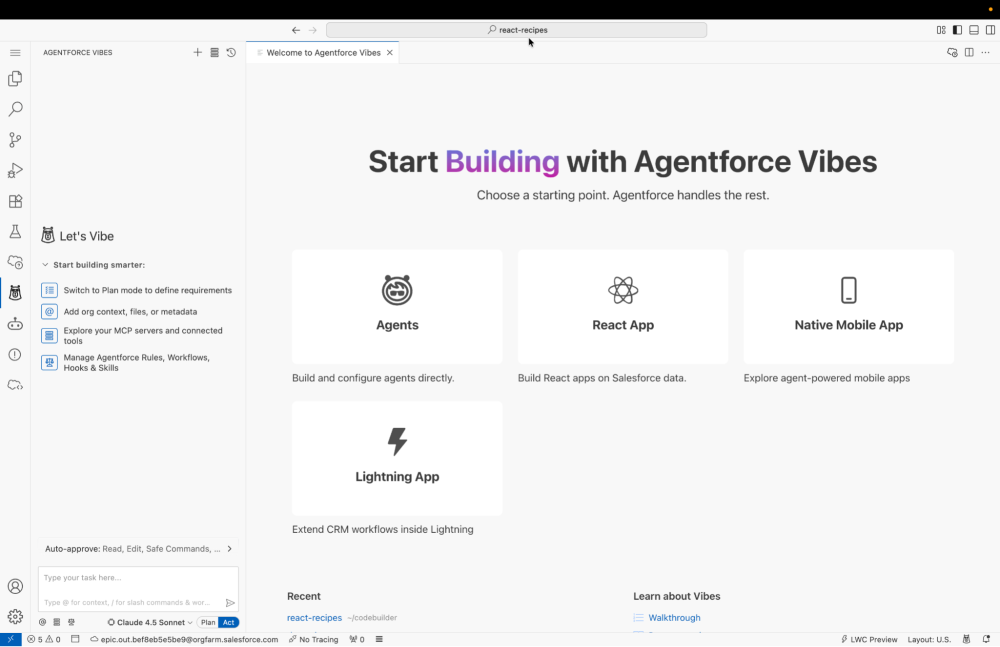
Alternatively, you can generate an app using the SFDX CLI:
1sf plugins install @salesforce/plugin-ui-bundle-dev
2
3# Generate the project
4
5sf template generate project --name my-react-project
6
7# Switch to the project directory
8
9cd my-react-project
10
11# Generate the web app using the reactbasic template
12
13sf template generate ui-bundle -n myreactapp -d "./force-app/main/default/uiBundles" -t reactbasic
The sf template generate ui-bundle command generates a starter React app in force-app/main/default/uiBundles. The React template comes preconfigured with:
- Salesforce Multi-Framework SDK for accessing Salesforce APIs and services
- Vite for bundling
- Vitest for testing
- shadcn/ui for components
- Tailwind CSS for styling
Running the app locally
The underlying project is just a React app, so you can run and preview it locally like any other:
1# Switch to the web app folder
2
3cd force-app/main/default/uiBundles/myreactapp
4
5# Install the react app dependencies
6
7npm install
8
9# Run the project in local dev
10
11npm run dev
Open your browser and navigate to the local app (default: localhost:5173) to see the app.
![Starter React app running locally at localhost:5173]](https://d259t2jj6zp7qm.cloudfront.net/images/20260414134125/image1-e1776195703953.png?w=1000)
Deploying to Salesforce
When you’re ready to deploy the app to your org, build the React app and push it:
1# Build the project with Vite
2
3# This creates a /dist folder or overwrites its contents
4
5npm run build
6
7# Deploy the metadata file and the build to Salesforce
8
9sf project deploy start --target-org my-org
Search for “myreactapp” in the App Launcher to see the app live. You can update the app label from the app meta xml file. You now have a React-based app hosted on Salesforce with built-in authentication, security, and governance.
Access Salesforce data from React
Once your app is deployed, you’ll want to pull live data from your org. The @salesforce/sdk-data package provides hooks for querying records via GraphQL and invoking Apex methods. Here’s a React component that fetches a Contact record:
1import { useEffect, useState } from 'react';
2import { createDataSDK, gql } from '@salesforce/sdk-data';
3
4const QUERY = gql`
5  query GetContact {
6    uiapi {
7      query {
8        Contact(first: 1) {
9          edges {
10            node {
11              Name { value }
12              Title { value }
13              Picture__c { value }
14            }
15          }
16        }
17      }
18    }
19  }
20`;
21
22export default function SingleRecord() {
23  const [contact, setContact] = useState(null);
24
25  useEffect(() => {
26    const fetchData = async () => {
27      const sdk = await createDataSDK();
28      const response = await sdk.graphql(QUERY);
29
30      // Navigate the UI API tree to get the first record
31      const record = response.data?.uiapi?.query?.Contact?.edges[0]?.node;
32
33      if (record) {
34        setContact({
35          name: record.Name.value,
36          title: record.Title.value,
37          picture: record.Picture__c.value
38        });
39      }
40    };
41    fetchData();
42  }, []);
43
44  if (!contact) return <p>Loading...</p>;
45
46  return (
47    <div style={{ border: '1px solid #ccc', padding: '1rem' }}>
48      {contact.picture && (
49        <img src={contact.picture} alt={contact.name} width="50" />
50      )}
51      <h1>{contact.name}</h1>
52      <p>{contact.title}</p>
53    </div>
54  );
55}
The createDataSDK() utility handles authentication automatically so no token management is required in the application code. You can also call Apex methods directly using the SDK’s fetch() method for server-side logic that goes beyond CRUD operations. See the Multi-Framework Beta Documentation for the full API reference.
Build React Apps with Agentforce Vibes
Agentforce Vibes 2.0 generates Multi-Framework React apps from natural language prompts. Describe the component you need to Agentforce Vibes — a dashboard showing open Opportunities by stage, for example — and Vibes produces the React code, GraphQL queries, and Salesforce metadata.
Vibes has a variety of tools to make it easy to build React apps:
- React and Apex templates to scaffold apps without starting from scratch
- Salesforce MCP server for retrieving and deploying metadata directly from the IDE
- Live Preview to see your React app update in real time as you build
- Einstein Trust Layer to ensure prompts and responses are never used to train future models
React and Lightning Web Components on Salesforce
Salesforce Multi-Framework doesn’t replace LWC; it runs alongside it. Your existing Lightning Web Components continue to work. On Lightning, React components can be embedded as micro-frontends, with the platform providing the shared data and permissions layer between them. Micro-frontend support is in developer preview.
Choosing React does not mean leaving the platform capabilities that make Salesforce useful. We’re bringing those enterprise features to React through framework-agnostic libraries:
- Efficient Data Management: React developers can use
@salesforce/sdk-data, which provides API client methods for GraphQL and Apex that manage record querying and mutation efficiently, ensuring your app stays within API limits. - Built-in Governance: The
createDataSDK()utility handles authentication automatically, removing the need for manual token management. - Security and Accessibility: While LWC has accessibility baked in, Multi-Framework apps can use Agentforce Vibes 2.0 templates, tools, and skills to embed enterprise-grade accessibility and security into every component.
Where they differ is in the developer experience and tooling:
| Capability | React (Multi-Framework) | Lightning Web Components |
|---|---|---|
| Data access | GraphQL queries, Apex invocations, UI API | @wire decorators, Lightning Data Service with built-in caching |
| Component library | Bring your own (Shadcn, MUI, Ant Design, etc.) or use Agentforce Vibes-generated components | Salesforce Base Components (80+ out of the box) |
| Styling | Tailwind CSS, CSS Modules, or any CSS-in-JS library | Salesforce Lightning Design System (SLDS) tokens and classes |
| Security and standards | Delivered via SDK and Agentforce Vibes governed “vibe coding” | Built directly into the LWC compiler and base components |
| App Builder support | Not yet available (planned for GA) | Full drag-and-drop support with property panels |
| Cross-platform reuse | Share components across Salesforce and non-Salesforce apps | Salesforce-only; can run on LWR sites and Experience Cloud |
| Ecosystem tooling | npm, Vite, Vitest, React DevTools, full open-source ecosystem | Salesforce CLI, LWC Local Dev, limited third-party tooling |
Which should you choose?
Choose React when you need to share components across Salesforce and non-Salesforce surfaces, or use the broader React ecosystem.
Choose LWC when you want declarative data access with @wire and Lightning Data Service, the base component library, and the drag-and-drop Lightning App Builder.
Beta limitations
This has been one of the most requested capabilities by the developer community, and we’re excited to finally get it into your hands. Multi-Framework is in open beta now in scratch orgs and sandboxes, and your feedback will shape where it goes from here.
A few constraints to know before you start: beta apps cannot be deployed to production orgs, Lightning App Builder drag-and-drop placement is not yet supported for React components, and some platform APIs are not available in the beta runtime. Check the Beta Documentation for the full list of known limitations.
Looking ahead, micro-frontend support for embedding React components directly into Lightning pages is in closed pilot for Spring 2026. In the meantime, we encourage you to try it out, file issues, and tell us what’s missing and what you want to see in the future.
Resources
- Demo: Introducing: Salesforce Multi-Framework
- Multi-Framework Beta Documentation — Setup guide, API reference, and known limitations
- Salesforce Multi-Framework Recipes – A collection of 20+ easy-to-digest code samples for React on the Agentforce 360 Platform
- TDX Session Recording: Building React Apps on the Agentforce 360 Platform — Live demo walkthrough. Session recording will be available after April 15 — check back here or bookmark the link.
About the Authors
Amanda Lane leads product marketing for privacy, developer tools, and Agentforce at Salesforce. Before Salesforce, she worked in finance at PwC and the KIPP Foundation. She holds an MBA in consumer analytics from Georgetown and brings a dual background in psychology and economics to product strategy.
Alice Oh is a Director of Product at Salesforce building foundational products that enable flexible and extensible ways to create, vibe code, and surface apps across the Salesforce ecosystem. In her free time, she bikes around the Bay Area in search of the flakiest croissants. Follow and connect with her on LinkedIn.
Charles Watkins is a self-taught software developer and Lead Developer Advocate at Salesforce. He spends his time blogging, crafting code samples, and finding new places to hike in the Pacific Northwest. You can follow him on LinkedIn.