AJAX Toolkit Developer's Guide
 j
j
No Results
Search Tips:
- Please consider misspellings
- Try different search keywords
Newer Version Available
The AJAX Toolkit
- The AJAX Toolkit is available for any organization that has API access.
- The AJAX Toolkit supports Microsoft® Internet Explorer® versions 7, 8, 9, 10, and 11 with the latest Microsoft hot fixes applied, and Mozilla® Firefox®, most recent stable version.
- The AJAX Toolkit is based on the partner WSDL. Because there is no type checking in JavaScript, the type information available in the enterprise WSDL is not needed.
- You can execute any call in the API, and access any API object that you normally have access to.
- You can issue asynchronous calls, and use callback functions to handle the results. For more information, see API Calls and the AJAX Toolkit.
- You can use header options with a different syntax than in the API. For more information, see Using SOAP Header Options with the AJAX Toolkit.
- You can handle errors with the AJAX Toolkit. For more information, see Error Handling with the AJAX Toolkit.
- The AJAX Toolkit supports relationship queries. See Synchronous Examples for examples of relationship queries.
This document explains how to use the AJAX Toolkit in JavaScript to embed API calls and processes, such as within a Visualforce page.
When to Use the AJAX Toolkit
Because information is delivered via a browser, AJAX works best with relatively small amounts of data (up to 200 records, approximately six fields with 50 characters of data each). The larger the data set returned, the more time it will take to construct and deconstruct a SOAP message, and as the size of an individual record gets larger, the impact on performance becomes greater. Also, as more HTML nodes are created from the data, the potential for poor performance increases. Because browsers are not efficient, careful consideration needs to be given to browser memory management if you intend to display a large amount of data.
- Display or modify a single record.
- Display two or three fields from many records.
- Perform one or more simple calculations, then update a record.
- Update more than 200 records.
- Update records that are unusually large. For example, what happens if the user clicks the browser stop button?
- Recalculate a complex value for more than 200 records.
An example of inappropriate usage is providing a sortable grid of many records. This would require too much processing time, and browser rendering would be too slow.
AJAX Toolkit Support Policy
The current release of the AJAX Toolkit is the only version that receives bug fixes and enhancements. When a new version is released, the previous version continues to be available, but is not supported.
Other Resources
- Eclipse plug-in: Force.com IDE
- Message boards: Developer Force
AJAX Typographical Conventions
| Convention | Description |
|---|---|
| <script src="/soap/ajax/30.0/connection.js" type="text/javascript"></script> | In an example, Courier font indicates items that you should type the information as shown. This includes sample code, literals, methods, calls, functions, and events from a variety of languages. |
| sforce.connection.header_option_name="value"; | In an example or syntax statement, italics represent variables. You supply the actual value. |
Sample Visualforce Page Using the AJAX Toolkit
To add JavaScript to an Visualforce page, use the following procedure:
- Create the Visualforce page. For more information on this, see the Visualforce Developer's Guide.
- Cut and paste the following sample code into your Visualforce page.
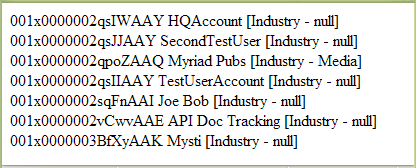
The JavaScript code queries your organization and returns every account ID, account name, and industry type, if any:
1swfobject.registerObject("clippy.codeblock-0", "9");<apex:page >
2    <script type="text/javascript">
3    var __sfdcSessionId = '{!GETSESSIONID()}';
4    </script>
5    <script src="../../soap/ajax/30.0/connection.js"
6          type="text/javascript"></script>
7    <script type="text/javascript">     window.onload = setupPage;
8    function setupPage() {
9      //function contains all code to execute after page is rendered
10
11      var state = { //state that you need when the callback is called
12          output : document.getElementById("output"),
13          startTime : new Date().getTime()};
14
15      var callback = {
16          //call layoutResult if the request is successful
17          onSuccess: layoutResults,
18
19          //call queryFailed if the api request fails
20          onFailure: queryFailed,
21          source: state};
22
23      sforce.connection.query(
24          "Select Id, Name, Industry From Account order by Industry",
25           callback);
26  }
27
28  function queryFailed(error, source) {
29    source.output.innerHTML = "An error has occurred: " + error;
30  }
31
32  /**
33  * This method will be called when the toolkit receives a successful
34  * response from the server.
35  * @queryResult - result that server returned
36  * @source - state passed into the query method call.
37  */
38  function layoutResults(queryResult, source) {
39    if (queryResult.size > 0) {
40      var output = "";
41
42      //get the records array
43      var records = queryResult.getArray('records');
44
45      //loop through the records and construct html string
46      for (var i = 0; i < records.length; i++) {
47        var account = records[i];
48
49        output += account.Id + " " + account.Name +
50            " [Industry - " + account.Industry + "]<br>";
51      }
52
53    //render the generated html string
54    source.output.innerHTML = output;
55    }
56  }
57  </script>
58
59    <div id="output"> </div>
60
61</apex:page>
62
After creating and navigating to the aboveVisualforce page, you should see text similar to this image: