Starting with B2C Commerce version 26.1, the passwordless login flow supports customer registration. By passing additional parameters in the authorization request and validating a time-based one-time password (TOTP), create a B2C Commerce customer profile without requiring a password.
Overview
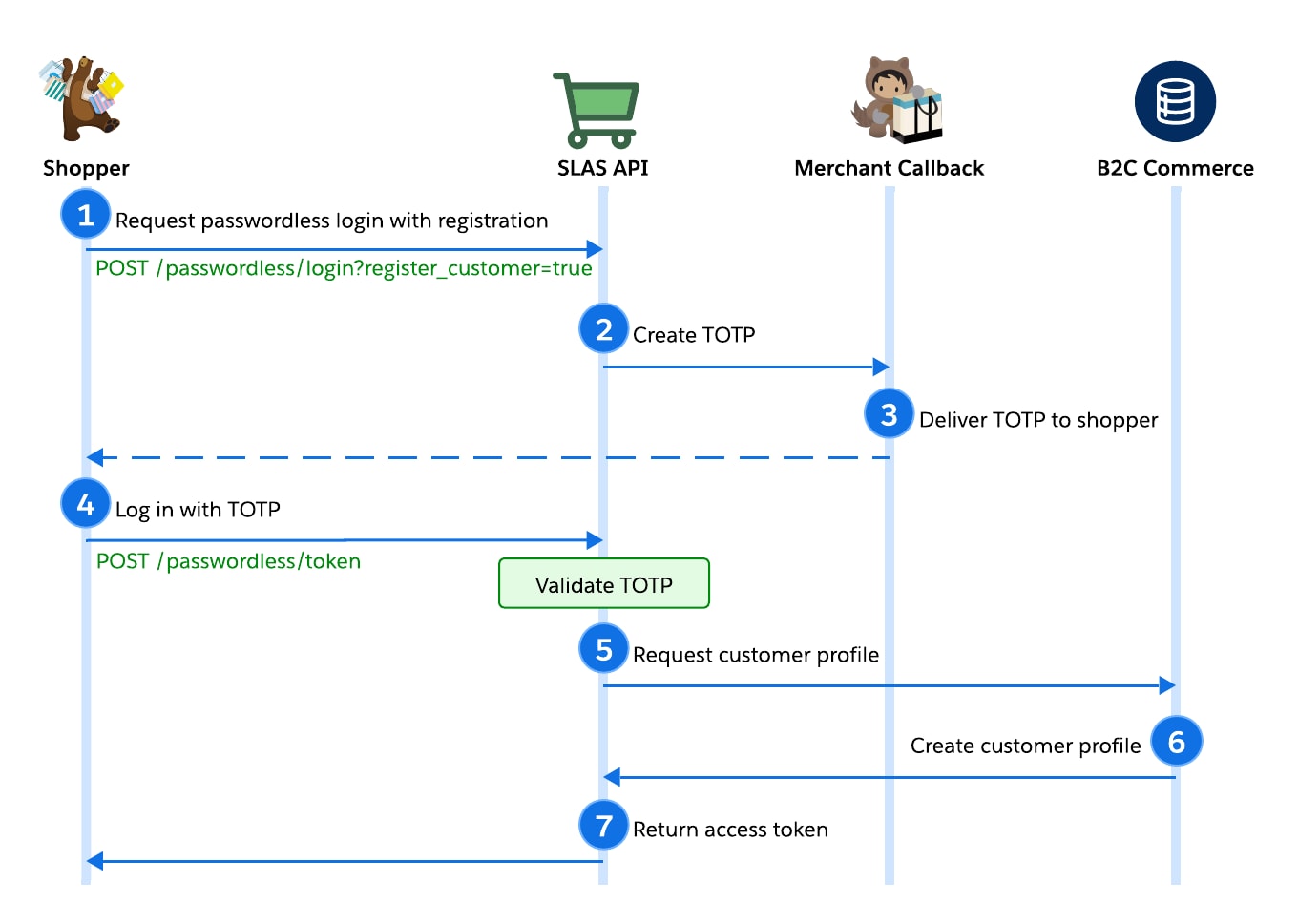
To understand how passwordless login with registration works, let’s look at an overview of the process.
The shopper requests a passwordless login and registers as a new customer. Your app calls the authorizePasswordlessCustomer endpoint and provides a callback URI.
SLAS makes an HTTP POST request to your callback URI, including the shopper’s contact information and an eight-digit TOTP.
The app sends the TOTP to the shopper over email, SMS, or another mechanism.
The shopper provides the TOTP to the app either by clicking a link or entering it manually. Your app calls the getPasswordLessAccessToken endpoint to authenticate the shopper.
After successful validation of the pwdless_login_token (TOTP), or login_id + pwdless_login_token, SLAS requests a new customer profile.
B2C Commerce creates the new customer profile.
SLAS returns the access and refresh tokens. The access token can be used to make authorized requests on behalf of the shopper.
Configure Passwordless Login with Registration
To implement passwordless login with customer registration, first authorize the customer and then validate the TOTP.
1. Authorize the Passwordless Customer with Registration
Call the authorizePasswordlessCustomer endpoint with the register_customer query parameter set to true. For customer registration, the request body requires the additional parameters email (unless the user_id parameter already provides an email) and last_name. The phone_number, first_name, and customer_no parameters are optional, but recommended if available.
As described in the passwordless login flow without registration, SLAS then makes an HTTP POST request to the specified callback URI. The JSON payload includes a TOTP to send to the shopper.
The B2C Commerce customer profile isn’t created by the call to authorizePasswordlessCustomer. After you call the authorizePasswordlessCustomer endpoint, exchange the TOTP from the callback for an access token (step 2) to complete registration.
Important
2. Validate the TOTP and Create Customer Profile
To register the customer, call the [getPasswordLessAccessToken](https://developer.salesforce.com/docs/commerce/commerce-api/references/auth?meta=getPasswordLessAccessToken) endpoint. This call exchanges the TOTP for an access token.
The optional login_id parameter is used for stronger validation using login_id + pwdless_login_token (TOTP).
After successful validation of the pwdless_login_token (TOTP) or login_id + pwdless_login_token, SLAS makes a request to create the customer profile in B2C Commerce. The B2C Commerce response includes the new customer profile. Then, SLAS creates the access token (Shopper JWT).


 j
j