Agent Metadata: A Shallow Dive
Knowing the basic metadata types associated with agents is helpful as you develop them.
An authoring bundle contains the blueprint of an agent. An authoring bundle is represented by the AiAuthoringBundle metadata type and is stored in the aiAuthoringBundles/<bundle-api-name> directory of your DX project's package directory, such as force-app/main/default/aiAuthoringBundles/My_Bundle.
The AiAuthoringBundle metadata type consists of two parts:
<bundle-api-name>.bundle-meta.xml: Standard Metadata API XML file.<bundle-api-name>.agent: File that uses the Agent Script language to define the predictable, context-aware workflows for your agent. Agent Script is the language underlying the new generation of Agentforce agents.
If you're familiar with Apex and how it's represented by metadata, you might notice that AiAuthoringBundle is similar in structure to ApexClass. Apex classes are represented by these two files:
<apex-class-name>.cls-meta.xml: Standard Metadata API XML file.<apex-class-name>.cls: File that contains the Apex class code.
See AiAuthoringBundle for details about this metadata type.
When you finish coding your authoring bundle and you think it's ready to go, you publish it to your org, which creates the actual agent. Agents are made of metadata, just like any other Salesforce customization. But a single agent is a collection of multiple metadata components linked together. This simple graphic shows the major metadata types:

-
Bot: A Bot is the top-level representation of an Einstein Bot, or chatbot, which is a basic computer program that conducts a conversation via auditory or textual methods.
-
BotVersion: A BotVersion represents the configuration for a specific Einstein Bot version. A single Einstein Bot can have many versions, but only one version can be active.
-
GenAiPlannerBundle is a reasoning engine for agents. It uses a large language model (LLM) and a reasoning strategy to break down a task into smaller parts, find the best actions for each part, and use them. An agent has a single GenAiPlannerBundle component.
Bot and BotVersion components together define simple chatbots. But when you add a GenAiPlannerBundle, the chatbot becomes an agent!
-
GenAiPlugin: Represents an agent topic, which is a category of actions related to a particular job to be done by the agent. An agent can have multiple GenAiPlugin components.
-
GenAiFunction: Represents an agent action. An agent can have multiple GenAiFunction components.
There are other GenAi metadata types that can be associated with your agent, such as GenAiPromptTemplate, which represents a prompt template. This guide doesn’t dive deeply into all the metadata. It only provides a simple overview to get you started.
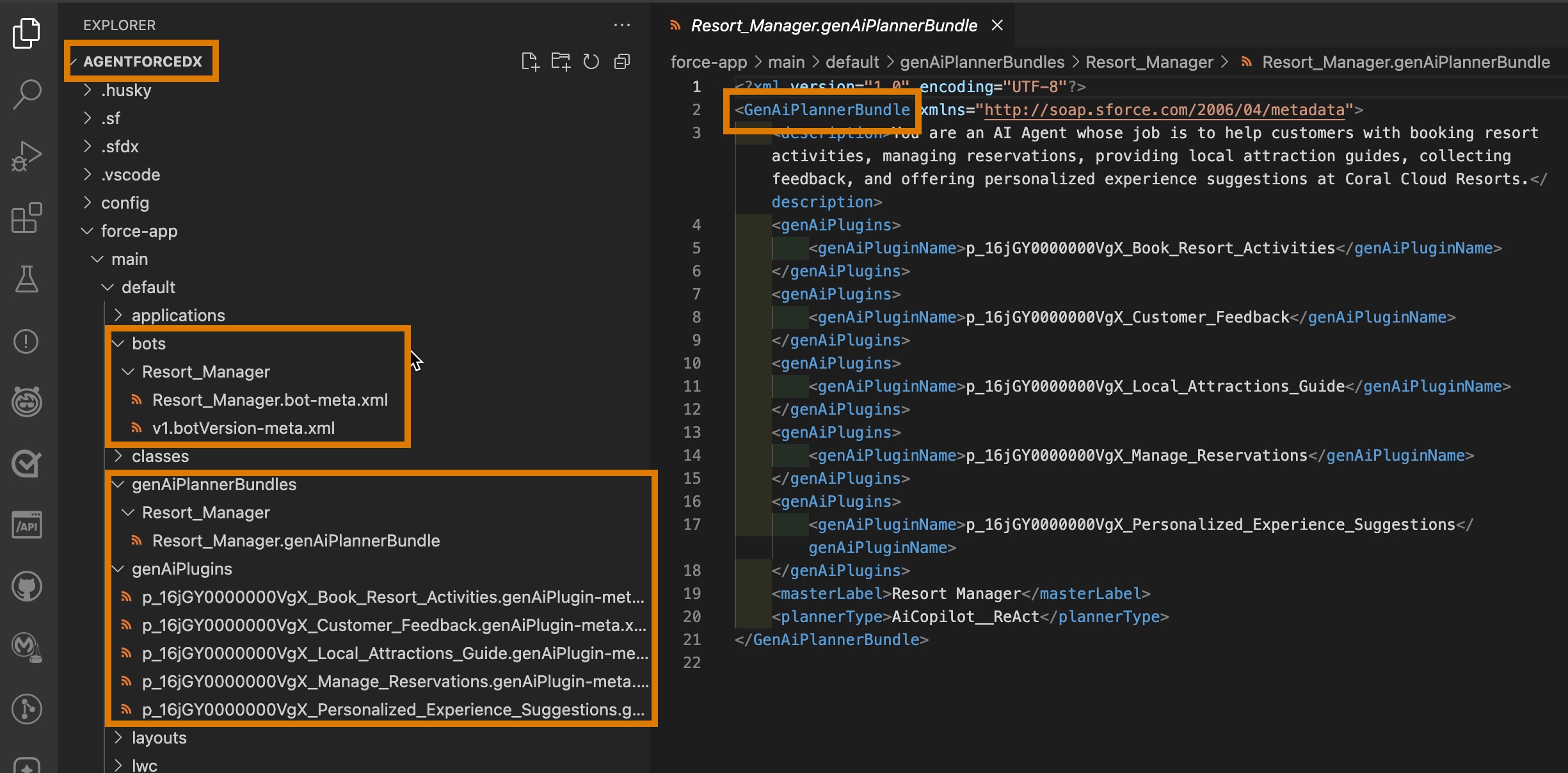
In your DX project, agent metadata is stored in a package directory just like other Salesforce metadata. In this screenshot of VS Code, the DX project is called agentforcedx and the agent metadata is stored in the default force-app package directory.