Get Started
Mobile Integrations
Ingesting Data into Marketing Cloud Personalization
Boolean Property
String Property
Number Property
Color Property
DateTime Property
Complex Object
Select Property
Multiselect Property
Arrays
Decorators
Static Values
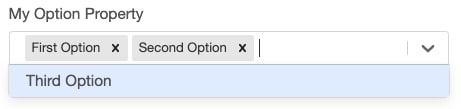
Multiselect input properties are configured similarly to Select Properties by using an @options, @lookupOptions, or @searchOptions decorator. The only difference is that the property value for a Multiselect property input is defined as an array.
1export class SimpleTemplate implements CampaignTemplate {
2 @options(["First Option", "Second Option", "Third Option"])
3 myOptionProperty: string[];
4}
You can also configure Multiselect input properties using Complex Types as option values.
1export class ComplexType {
2 firstProperty: string;
3 secondProperty: number;
4 label: string;
5}
6
7export class SimpleTemplate implements CampaignTemplate {
8 @options([
9 { firstProperty: "one", secondProperty: 1, label: "First Option" },
10 { firstProperty: "two", secondProperty: 2, label: "Second Option" },
11 { firstProperty: "three", secondProperty: 3, label: "Third Option" },
12 ])
13 myOptionProperty: ComplexType[];
14}
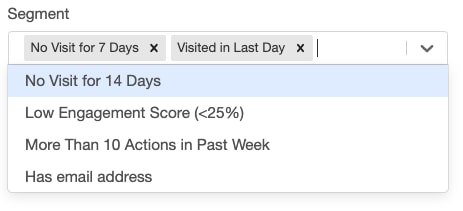
An example of a multiselect with dynamic options.
1export class SegmentReference {
2 value: string;
3 label: string;
4}
5
6export class SegmentLookup implements Lookup<SegmentReference> {
7 lookup(context: GearLifecycleContext): SegmentReference[] {
8 let segments = context.services.config.findSegments("User");
9
10 return segments.map((segment) => {
11 return <SegmentReference>{ value: segment.id, label: segment.name };
12 });
13 }
14}
15
16export class SimpleTemplate implements CampaignTemplate {
17 @lookupOptions(() => new SegmentLookup())
18 segment: SegmentReference[];
19}