This example creates a custom property editor component named CreateAccountActionEditor for an invocable action that uses Account input parameters. In Flow Builder, an admin uses text fields to set the invocable action’s account input parameters. When users run a flow for this example, the invocable action creates a collection of accounts.
This Apex class file defines the CreateAccountAction method, which can run as an invocable action, and its input variables. The @InvocableMethod annotation identifies the method that can run as an invocable action. The @InvocableVariable annotation identifies the variables used by the invocable method.
The invocable method registers the custom property editor component in the configurationEditor modifier. For this example, the name of the component is c-create-accounts-action-editor.
The component namespace is c unless the org has a custom namespace. If the org has a custom namespace, use that namespace to register the custom property editor component.
1public with sharing class CreateAccountAction {
2   @InvocableMethod(
3       label='Create Accounts via Custom Property Editor'
4       configurationEditor='c:accountEditor'
5       category='Account'
6   )
7   public static void createAccounts(List<Request> requests) {
8       for (Request request : requests) {
9           insert request.accounts;
10       }
11   }
12
13   // Nested class to hold invocable variables
14   public class Request {
15       @InvocableVariable(label='accounts' description='The accounts to create.')
16       public Account[] accounts;
17   }
18}
Here’s the configuration file for CreateAccountAction.
1<?xml version="1.0" encoding="UTF-8"?>
2<ApexClass xmlns="urn:metadata.tooling.soap.sforce.com" fqn="CreateAccountAction">
3   <apiVersion>66.0</apiVersion>
4   <status>Active</status>
5</ApexClass>
These HTML, JavaScript, and configuration files define the custom property editor component CreateAccountActionEditor for the action.
The component’s HTML template defines the UI for the custom property editor in Flow Builder.
1<template>
2 <lightning-card title="Create Account Action Editor">
3
4 <div class="slds-p-horizontal_small slds-p-vertical_x-small">
5 <lightning-button
6 label="Add Account"
7 variant="brand"
8 onclick="{handleAddRow}"
9 ></lightning-button>
10 </div>
11
12 <div class="slds-p-horizontal_small slds-m-bottom_small">
13 <template for:each="{accounts}" for:item="row" for:index="index">
14 <div
15 key="{row.key}"
16 class="slds-grid slds-gutters slds-var-m-vertical_x-small slds-align_absolute-center"
17 >
18 <div class="slds-col slds-size_1-of-2">
19 <lightning-input
20 type="text"
21 name="Name"
22 label="Name"
23 value="{row.Name}"
24 data-index="{index}"
25 onchange="{handleFieldChange}"
26 required
27 >
28 </lightning-input>
29 </div>
30 <div class="slds-col slds-size_1-of-2">
31 <lightning-input
32 type="tel"
33 name="Phone"
34 label="Phone"
35 value="{row.Phone}"
36 data-index="{index}"
37 onchange="{handleFieldChange}"
38 >
39 </lightning-input>
40 </div>
41 </div>
42 <hr key="{row.key}" class="slds-m-vertical_x-small" />
43 </template>
44 <div>
45 <lightning-button
46 variant="brand"
47 label="Save"
48 data-index="{index}"
49 onclick="{handleSaveAccountConfig}"
50 >
51 </lightning-button>
52 </div>
53 </div>
54 </lightning-card>
55</template>
This example shows the custom property editor UI.
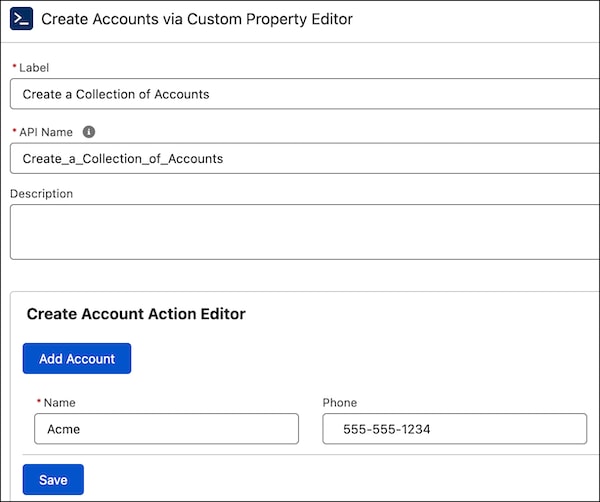
When the custom property editor component is initialized, the component instance receives a copy of the flow metadata from Flow Builder. When the admin changes a value in the custom property editor, the custom property editor component dispatches an event to propagate the change back to Flow Builder.
Use @api properties to capture data from flows. Use events to report changes to flows at run time.
1//createAccountsActionEditor.js
2import { LightningElement, api, track } from "lwc";
3
4export default class CreateAccountsActionEditor extends LightningElement {
5  @track _accounts = [];
6  @track _inputVariables = [];
7
8  @api
9  get inputVariables() {
10    return this._inputVariables;
11  }
12
13  set inputVariables(variables) {
14    this._inputVariables = variables || [];
15  }
16
17  get accounts() {
18    if (this._accounts.length === 0) {
19      const param = this._inputVariables?.find(({ name }) => name === "accounts");
20      this._accounts = this.populateAccountRows(Array.isArray(param?.value) ? param.value : []);
21    }
22    return this._accounts;
23  }
24
25  populateAccountRows(accounts) {
26    const rows = accounts.map((r) => {
27      return {
28        Name: r.Name,
29        Phone: r.Phone,
30        key: "tmp-" + Date.now() + "-" + Math.random().toString(36).slice(2),
31      };
32    });
33    return rows;
34  }
35
36  handleAddRow() {
37    const key = "tmp-" + Date.now() + "-" + Math.random().toString(36).slice(2);
38    this._accounts = [{ key, Name: "", Phone: "" }, ...this._accounts];
39  }
40
41  handleFieldChange(event) {
42    const index = Number(event.currentTarget.dataset.index);
43    const field = event.target.name; // 'Name' or 'Phone'
44    const value = event.target.value;
45    const next = [...this._accounts];
46    next[index] = { ...next[index], [field]: value };
47    this._accounts = next;
48  }
49
50  getAccountsFromRows() {
51    let accs = [];
52    this._accounts.map((r) => {
53      accs.push({
54        Name: r.Name,
55        Phone: r.Phone,
56        attributes: {
57          type: "Account",
58        },
59      });
60    });
61    return JSON.stringify(accs);
62  }
63
64  @api
65  validate() {
66    const errors = [];
67    if (!this._accounts.some((r) => r.Name)) {
68      errors.push({
69        message: "Name is required",
70        severity: "error",
71      });
72    }
73    return errors;
74  }
75
76  handleSaveAccountConfig(event) {
77    const newValue = this.getAccountsFromRows();
78    const valueChangedEvent = new CustomEvent("configuration_editor_input_value_changed", {
79      bubbles: true,
80      cancelable: false,
81      composed: true,
82      detail: {
83        name: "accounts",
84        newValue,
85        newValueDataType: "SObject",
86      },
87    });
88    this.dispatchEvent(valueChangedEvent);
89  }
90}
Flow Builder has a JavaScript interface for communicating with a custom property editor. This JavaScript class uses the inputVariables interface.
When the custom property editor is initialized, inputVariables receives the value of the input variable in the invocable action from Flow Builder. When you use a literal value for an input that’s an sObject data type, specify the type value such as Account.
The newValue data structure includes the sObject type and field and value mappings in JSON format.
1[
2  {
3    "attributes": {
4      "type": "Account"
5    },
6    "Name": "Acme",
7    "Phone": 5555551234
8  }
9]
The get accounts() method gets the preexisting value for the input variable saved in flow metadata for use in the custom property editor.
When an admin enters a value for an input in the custom property editor, and clicks the Save button, the handleSaveAccountConfig method dispatches a configuration_editor_input_value_changed event to Flow Builder. Flow Builder receives the event and updates the value in the flow.
Here’s the configuration file for CreateAccountsActionEditor.
1
2<?xml version="1.0" encoding="UTF-8"?>
3<LightningComponentBundle xmlns="http://soap.sforce.com/2006/04/metadata">
4 <apiVersion>66.0</apiVersion>
5 <isExposed>true</isExposed>
6</LightningComponentBundle>
See Also
This release is in preview. Features described here don't become generally available until the latest general availability date that Salesforce announces for this release. Before then, and where features are noted as beta, pilot, or developer preview, we can't guarantee general availability within any particular time frame or at all. Make your purchase decisions only on the basis of generally available products and features.


 j
j