What if performance analysis started before deployment instead of after it? That is the shift ApexGuru now enables through the Salesforce DX MCP Server. (Model Context Protocol, or MCP, serves as an interface between AI assistants and external data sources.) ApexGuru is the Salesforce AI-powered capability for identifying and helping you fix performance-related issues in your code. If you’ve read our earlier posts on specialized AI models and agentic code fixing, this is the next step: bringing ApexGuru performance analysis directly into the developer workflow in agentic IDEs and MCP-compatible clients so you can catch performance bottlenecks while the code is still in front of you. In this post, you’ll learn what ApexGuru adds to the agentic developer experience, why this changes the day-to-day Apex workflow, and how to start using it in your MCP client.
Why this matters to developers
Most teams treat performance analysis as a late-stage activity. Code gets written, reviewed, tested, and deployed, and only then do the costly problems show up: SOQL in loops, unbounded queries, expensive schema lookups, or queries that fetch more data than the code actually uses. By that point, fixing those issues often means rework, delay, and production cleanup.
ApexGuru changes that sequence. In the Agentic DX MCP workflow, performance analysis can happen in the same loop as writing code, reviewing code, and preparing changes for deployment. That means developers can catch issues before they become runtime incidents or technical debt. This is especially useful because ApexGuru is not just a generic static check. In Salesforce DX MCP Server, the scale-products toolset includes the GA tool scan_apex_class_for_antipatterns, which analyzes Apex classes for performance antipatterns and then returns detections grouped by severity along with fix guidance. When connected to an org where ApexGuru is enabled, the severity assessment can also reflect runtime-informed context rather than static structure alone.
From Code Analyzer to Salesforce DX MCP Server
The shift-left journey of ApexGuru did not start with MCP. It had already begun moving into the developer workflow through its integration with Code Analyzer, where developers could authorize an ApexGuru-enabled org and scan a selected Apex class directly from the editor for performance issues. Unlike Code Analyzer, however, ApexGuru itself is available only in Production and Full Copy Sandbox orgs for Unlimited, Enterprise, Professional, and Signature Editions.
ApexGuru Insights in Code Analyzer can still be surfaced in earlier-stage environments when ApexGuru has already been activated in Production or Full Copy Sandbox orgs. In practice, this allows developers to view ApexGuru Insights through Code Analyzer in Developer Sandbox, Partial Copy Sandbox, and Scratch Orgs where the Developer Hub is backed by a Production or Full Copy org. That brought ApexGuru from an app experience into an IDE-assisted workflow and extended performance analysis further left in the development lifecycle.
Salesforce DX MCP Server builds on that foundation. ApexGuru first established a runtime-aware, specialized AI approach to detecting Apex performance antipatterns, then moved closer to the developer workflow through Code Analyzer integration in Visual Studio Code (VS Code). With DX MCP, ApexGuru takes the next step by expanding into broader MCP-based and agentic workflows across clients such as Agentforce Vibes, Claude Code, Cursor, Cline, and other MCP-compatible developer environments. Code Analyzer brought ApexGuru into the IDE, while Salesforce DX MCP Server broadens its reach and makes ApexGuru available as part of a more flexible, agent-driven development experience.
What ApexGuru adds to Salesforce DX MCP Server
ApexGuru is especially useful in Salesforce DX MCP Server because it brings performance analysis into the same workflow where developers are already writing and reviewing code. A class can compile, pass tests, and still carry avoidable CPU cost, query inefficiency, or scalability risk. ApexGuru helps surface those issues earlier, before they turn into runtime incidents or costly cleanup later.
With Salesforce DX MCP Server, the flow becomes much simpler. You write code, ask your MCP client to scan the class, review the antipatterns and severity, and apply the recommended fixes before you commit or deploy. Performance is no longer a separate destination. It becomes part of the development loop.
Designing performance guidance for agentic workflows
To truly empower an AI agent to act as a performance engineer, we had to move beyond simple API wrappers and design for context exchange. That is, we had to design for a workflow that combines local code context with org-side runtime context. The core challenge in bringing ApexGuru to agentic IDEs was bridging two completely different environments: the developer’s local machine (where the unsaved code lives) and the Salesforce org (where the runtime telemetry lives).
To solve this, we mapped ApexGuru to the MCP as an executable tool within the Salesforce DX MCP Server. The Salesforce DX MCP Server runs locally, so it can inspect the developer’s file directly while also using Salesforce CLI authentication to access org-side runtime context.
When an agent invokes the scan_apex_class_for_antipatterns tool, the invocation requires specific parameters: the className and the absolute apexFilePath. Behind the scenes, the tool does not rely on simple regular expressions; it utilizes Abstract Syntax Tree (AST) parsing to accurately analyze the local code’s syntax, tracking method context and loop depth.
The real magic happens when this local static analysis is combined with remote telemetry. The tool connects to your authorized org to see if the detected pattern (such as a Schema.getGlobalDescribe() call) is actually causing high CPU usage in a Production or a Full Copy Sandbox org. It then returns a JSON-structured payload to the agent containing the antipattern type, the runtime-informed severity level, the problematic code snippet, and explicit fix instructions. Because the output is structured, an MCP-compatible client can reliably summarize the finding, explain why it matters, and help display a potential fix in the editor.
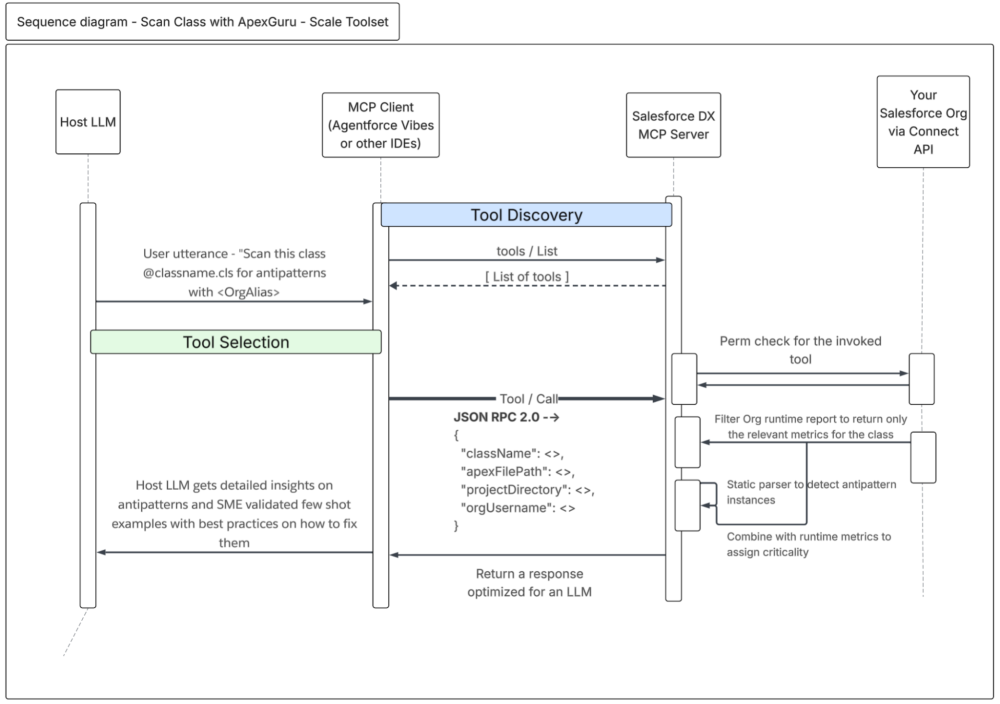
To enable this agentic experience in an MCP-compatible client, simply define the Salesforce DX MCP Server in your configuration file and pass the --toolsets scale-products flag.
Much more than a static scan wrapped in chat, ApexGuru in Salesforce DX MCP Server provides a way to bring local code analysis and org-aware prioritization into the same workflow, so developers can decide what to fix first while they are still coding.
What the experience looks like in practice
ApexGuru in Salesforce DX MCP Server does more than flag a pattern; it can show you runtime-informed findings directly in the coding surface. In the following two screenshots from Agentforce Vibes, the first scan view shows the detected antipatterns, their severity, and a short explanation of why each one matters. The second, deeper view expands the issue into a more detailed explanation with telemetry-backed reasoning, expected improvement after remediation, and the likely impact on performance and stability.
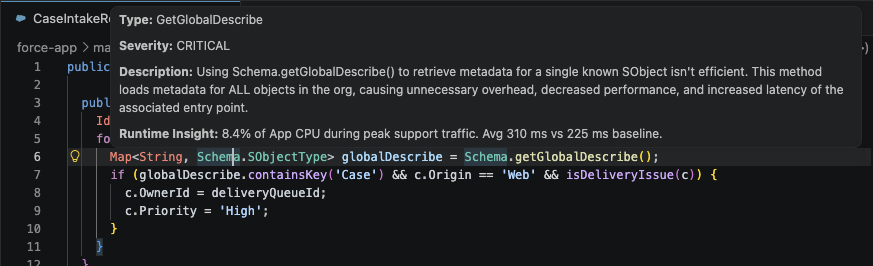
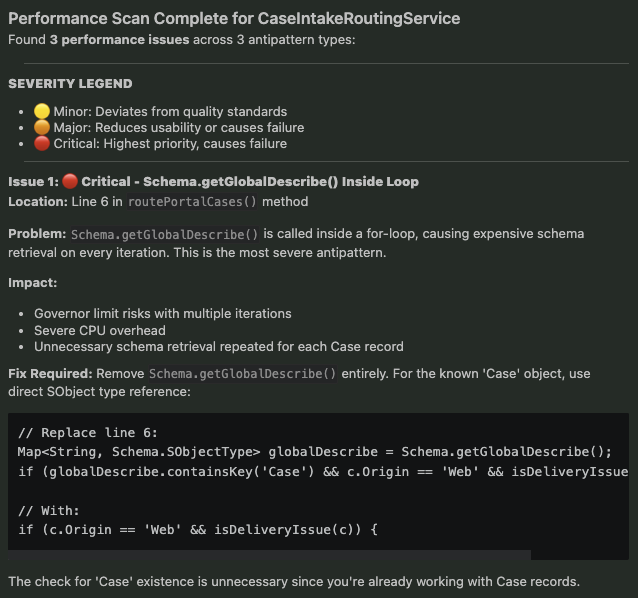
Whereas a traditional code check might tell you that something is risky, ApexGuru goes further by helping answer three more useful questions: why this issue hurts, why it matters in this org, and what the likely benefit is if you fix it now. That is what makes the developer experience feel closer to performance guidance than to using a simple linter.
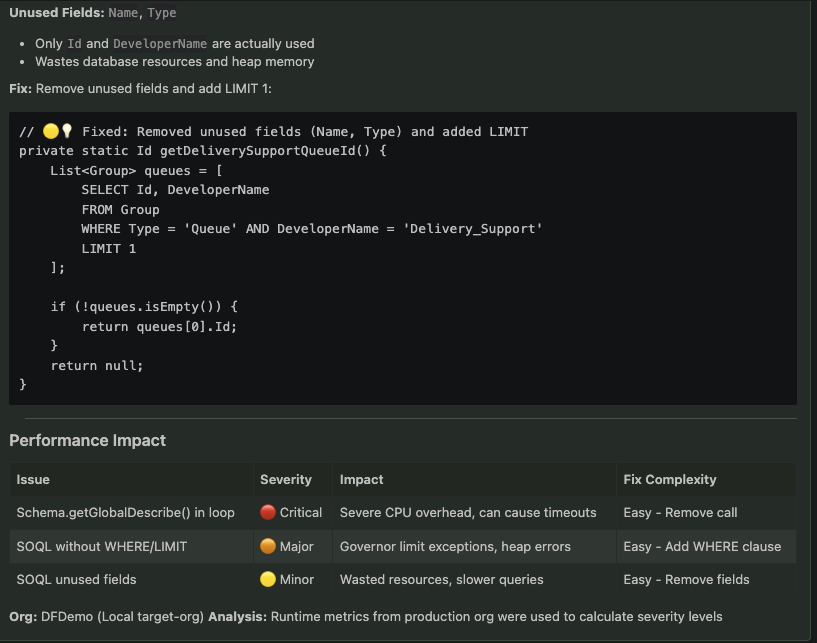
For example, if you are editing an Apex class that queries inside a loop or retrieves far more fields than the code actually uses, the code may still work functionally, but the pattern can become expensive as data volume grows. With ApexGuru in Salesforce DX MCP Server, you can ask your MCP client to scan the file for performance issues in your prompt; for example, “Scan the class for performance issues.”” A typical result includes a grouped antipattern type, a fix instruction, one or more detected instances, and severity for each instance.
Conclusion
Performance-first development is not just about catching issues earlier. It is about making performance review a natural part of how code gets written and refined. ApexGuru in Salesforce DX MCP Server moves performance analysis closer to the moment where developers can still act on it quickly. Instead of discovering costly bottlenecks after deployment, developers can now surface telemetry-backed findings while they are still coding, understand why those findings matter, and fix them before they become larger problems.
That is the real promise of this integration. ApexGuru is no longer limited to a separate app surface or a single IDE extension flow. It is becoming part of a broader developer workflow where performance, code quality, and remediation come together in the same loop.
Resources
- Help documentation ApexGuru
- ApexGuru in DX MCP Server: Demo video
- ApexGuru or Scale Products MCP README
- The ApexGuru AI Engine, Explained
- Inside ApexGuru: Agentic Code Fixing
- Salesforce DX MCP Server repository and tool documentation
- Optimize Your Apex for Apps and Agentforce with ApexGuru
- Code Analyzer VS Code extension documentation
About the Authors
Mayuresh Verma is a Senior AI Product Manager at Salesforce working on the Scalability Products portfolio, including ApexGuru. Reach out to him on Linkedin.
Samarth Arora is a Member of Technical Staff at Salesforce working on ApexGuru. Reach out to him on LinkedIn.