The new Agentforce Builder (GA Spring ’26) introduces a completely revamped experience for authoring and testing AI agents. It provides a high-velocity, “safe-to-fail” environment where you can iterate on complex logic without worrying about breaking your live production agents.
As a Salesforce developer, you know that a new building experience usually means changes under the hood. To support this faster, safer way of working, the underlying metadata had to evolve. This post walks through the new developer workflow, why the metadata changed, and how to structure your packages for deployment.
The new authoring workflow: from script to metadata
To understand the metadata changes, it helps to understand the new mental model for building agents. The new Agentforce Builder introduces a clear separation between your “intent” (what you want the agent to do) and the engine’s “execution” (the active metadata).
Here is how the lifecycle works:
- Write and build: You author your agent using the Agentforce Builder UI or directly via an Agent Script. This human-readable script is saved as a single
.agentfile within a newAiAuthoringBundlemetadata type, representing your agent’s configuration. At this stage, your work is a draft. - Iterate and preview: You test your draft using preview modes (like Simulation mode, which safely isolates your tests from org data).
- Publish: When you are happy with the draft, you commit your version. This is the crucial moment. It is only during commit that the platform translates your
.agentscript into the activeBotandGenAiPlannerBundlemetadata that is actually used to run your agent.
Why the metadata changed: bundling local assets
So, why did we change the GenAiPlannerBundle metadata structure for this new builder? The answer comes down to isolation and deployment reliability.
Historically, Agentforce assets were global. If you modified a shared subagent for one agent, you triggered a “global ripple” that instantly impacted every other agent using that subagent. To solve this, Salesforce introduced Local Assets (including local subagents and local actions), which clone a global asset and anchor it specifically to one agent version. Once local, you can edit it safely without breaking anything else.
While Local Assets have been available for a while, the GenAiPlannerBundle metadata needed to be updated to fully support them in CI/CD pipelines. Previously, agent metadata was distributed across metadata types. The main change in the new GenAiPlannerBundle is bundleization. In short, we restructured the metadata to ensure that all dependent agent assets related to any given version are deployed and available in one centralized folder structure. This prevents deployment errors and ensures your agent has everything it needs to function exactly as it did in preview.
Under the hood: the new metadata structure
Instead of scattered files, the directory structure now cleanly encapsulates everything specific to each agent version.
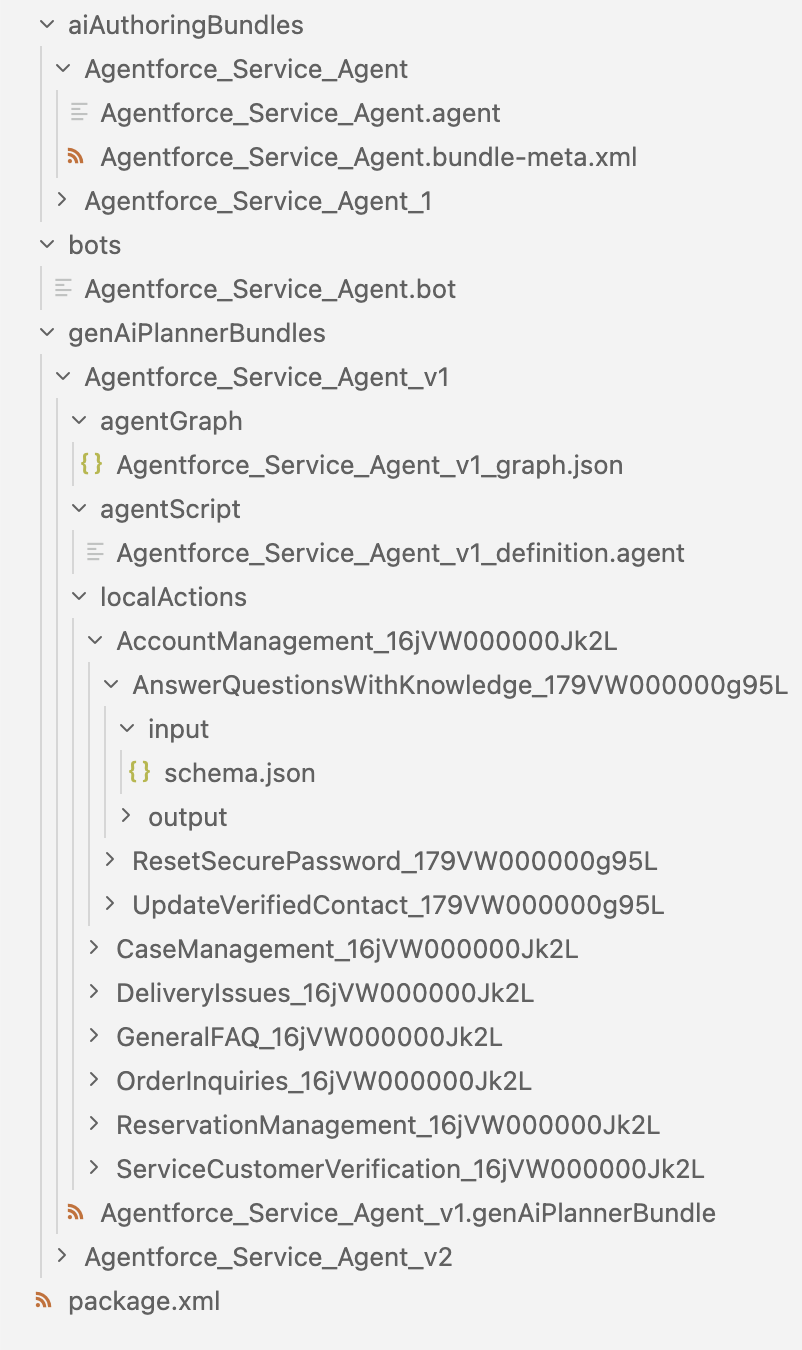
AiAuthoringBundles is a directory that contains all the design-time artifacts for the agent. The bundle supports multiple versioned subdirectories (e.g., AgentName_1, AgentName_2, etc.), each with its own .agent file and .bundle-meta.xml descriptor. These correspond to different lifecycle states such as draft and committed versions of the agent. Within each version:
- The
.agentfile holds the agent’s configuration written in Agent Script: name, label, description, system instructions, subagent definitions, reasoning instructions, variables, conditionals, and tool/action references. - The metadata descriptor (
.bundle-meta.xml)declares the bundleType (e.g., AGENT) and the target agent version it points to.
Bot contains information common to all versions of the agent, such as the agent type and useful settings like whether to log private data. It also holds agent-level context variables, which are distinct from the conversation variables that live inside each BotVersion. BotVersion details include conversation variables, welcome message, and transfer conversation message.
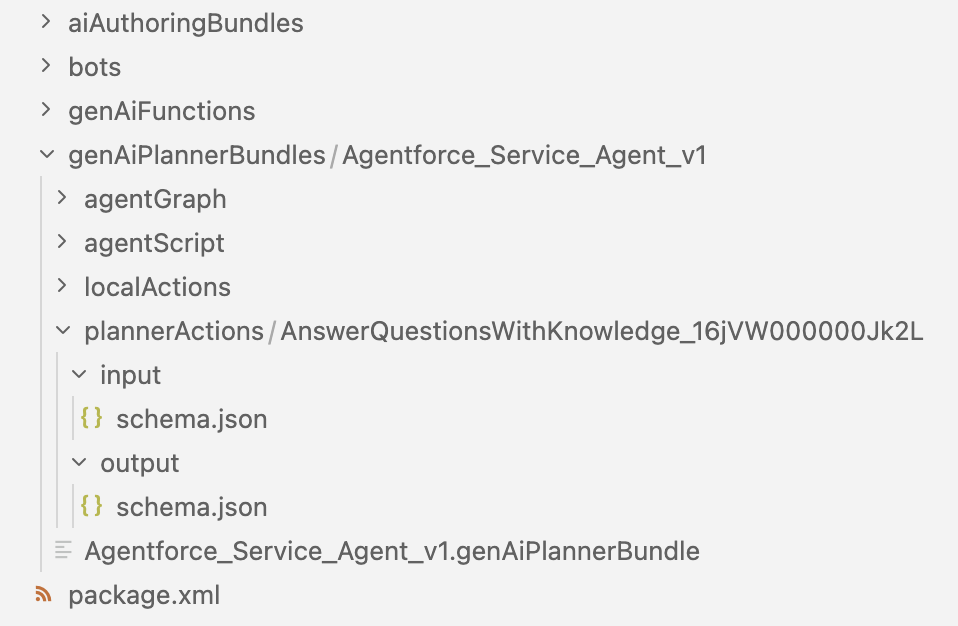
GenAiPlannerBundle contains all data relevant to each published version of an agent. Within each version you can find:
.genAiPlannerBundle, which is the main metadata file containing the agent’s runtime configuration: subagents, instructions, actions, and orchestration logic.agentGraph, a.jsonfile encoding all transitions and conditions between subagents.agentScript, an encoded copy of the version agent script. This is a snapshot kept for sync-detection purposes, so Agent Builder can tell the user if the script is out of sync with the published/committed metadata.plannerActions, agent-level actions (not tied to any specific subagent).localActions, subagent-scoped actions, nested under their subagent folder. Theinput/schema.jsonandoutput/schema.jsonfiles define the typed parameters for each action.
Note: GenAiPlannerBundle versions are auto-incremented in commit order, so they won’t necessarily match AiAuthoringBundle version numbers.
Remember that both Bot and GenAiPlannerBundle metadata are created automatically when a version is committed, and AiAuthoringBundle, agentScript, and agentGraph are only present on the new Agentforce Builder agent metadata.
Example: GenAiPlannerBundle XML
When you look at the XML, you’ll see it now clearly reflects these localized subagents and actions:
1<GenAiPlannerBundle>
2   <description>New agent description</description>
3   <localTopicLinks>
4       <genAiPluginName>Retrieve_data_from_the_Knowledge_Base_16jxx0000001234</genAiPluginName>
5   </localTopicLinks>
6   <localTopics>
7       <fullName>Retrieve_data_from_the_Knowledge_Base_16jxx0000001234</fullName>
8       <description>Use the retriever action</description>
9       <pluginType>Topic</pluginType>
10       <masterLabel>Retrieve data from Knowledge Base</masterLabel>
11       <genAiPluginInstructions>
12           <description>You are an AI Agent.</description>
13           <sortOrder>1</sortOrder>
14       </genAiPluginInstructions>
15       <localActionLinks>
16            <functionName>File_test_retriever_179xx0000001234</functionName>
17       </localActionLinks>
18       <localActions>
19           <fullName>File_test_retriever_179xx0000001234</fullName>
20           <invocationTarget>File_test_retriever_1234</invocationTarget>
21           <invocationTargetType>apex:testRetriever</invocationTargetType>
22           <source>File_test_retriever</source>
23       </localActions>
24   </localTopics>
25   <plannerType>AiCopilot__ReAct</plannerType>
26</GenAiPlannerBundle>
Each <localTopics> block defines a subagent’s full configuration: its unique API name, description, plugin type, deterministically ordered instructions, and all the local actions available to it. Optionally, a reference to the source subagent may also be present.
Each <localActions> block defines the action’s name, master label, invocation target and type, and optionally a source reference to the global action it was cloned from. Additional UX-related settings, such as confirmation behavior and loading text configuration, may also be included.
Sample package.xml with metadata of new model
To successfully retrieve and deploy your agents built with the new Agentforce Builder, ensure your package.xml includes the new bundle types. Below is a sample manifest designed for the Spring ’26 metadata structure.
1<?xml version="1.0" encoding="UTF-8"?>
2<Package xmlns="http://soap.sforce.com/2006/04/metadata">
3    <types>
4        <members>*</members>
5        <name>GenAiFunction</name>
6    </types>
7    <types>
8        <members>*</members>
9        <name>Bot</name>
10    </types>
11    <types>
12        <members>*</members>
13        <name>GenAiPlannerBundle</name>
14    </types>
15    <types>
16        <members>*</members>
17        <name>GenAiPlugin</name>
18    </types>
19    <types>
20        <members>*</members>
21        <name>AiAuthoringBundle</name>
22    </types>
23    <version>66.0</version>
24</Package>
Note: This manifest uses API version 66.0, which is required to support GenAiPlannerBundle and the new agent metadata types in this example.
Developer tips for the new Agentforce Builder
Here are two ways to take advantage of development lifecycle improvements enabled by this new architecture:
- Use human-readable script files to streamline code reviews. In the legacy Agentforce Builder world, reviewing agent changes meant comparing complex, scattered XML files in your pull requests. Now, you can compare the human-readable
.agentscript files. This makes peer reviews significantly faster and easier to understand. - Use
AiAuthoringBundleto simplify CI/CD. For most pipelines, you can keep just theAiAuthoringBundlein your source control. When you need the agent in a new org, you deploy it, version commit to generate the runtime metadata, and finally activate it. This can be done automatically using the following commands:sf project deploy start --metadata AiAuthoringBundle --target-org my-orgsf agent publish authoring-bundle --api-name MyAuthoringBundle --target-org my-org
sf agent activate --api-name MyAuthoringBundle --version 2 --target-org my-orgAiAuthoringBundleandGenAiPlannerBundlein your source control and deploy them simultaneously, achieving a committed state. The system recognizes the incoming script alongside its pre-realized metadata and skips the manual commit step entirely, so your agent is live immediately after deployment.sf project deploy start --metadata AiAuthoringBundle,GenAiPlannerBundle --target-org my-org
Conclusion
The bundleized metadata structure is what makes the isolated, version-safe authoring possible in the new Agentforce Builder. With it, your metadata is cleaner, your code reviews are easier, and your deployments are more reliable.
Get started with Agent Script and the new Agentforce Builder by completing this Trailhead module, reading more on our blog, watching our Agent Script decoded playlist on YouTube, or registering for one of the upcoming Agentforce Builder workshops.
Resources
- Release Notes:
- Help Docs:
- Packaging:
- Metadata updates:
Shreyas is a Lead Software Engineer at Salesforce AI in San Francisco and a Fellow of the Institute of Analytics (FIoA). As a lead member of the Agentforce Core Platform team, he co-designed and led the Agentforce Versioning System and Local Assets Configuration changes to bring enterprise-grade ALM to Agentforce. You can follow him on Linkedin.
Alba Rivas works as a Principal Developer Advocate at Salesforce. You can follow her on Linkedin.