If you’ve ever built a Salesforce mobile app, you know the drill. You start with an idea, then spend the first two weeks wiring up authentication, setting up sync targets, and debugging offline behavior, long before you write a single line of the business logic your customer actually asked for.
What if you could skip all of that and just describe what you want? In this post, we’ll walk through how the new Mobile Skills can accelerate your mobile app development, from initial project setup all the way through building real features and functionality.
Getting past the mobile learning curve
Most Salesforce Developers are comfortable with business logic. What trips them up is everything around it, including OAuth handshakes, SDK version mismatches, Xcode build settings, and Gradle configurations. Native mobile development involves significant infrastructure overhead that has nothing to do with the app’s actual purpose, and it can take days just to get a project into a state where real work can begin.
Mobile Skills take that entire bootstrapping phase off your plate. They generate a clean, modern project structure with authentication and SDK integration already wired up, so your first task is building a feature, not fighting a toolchain.
Built for developers who live in IDEs, not GUIs
Mobile Skills output standard source files organized the way a professional iOS or Android project should be. You get a real Xcode workspace or Android Studio project that you can read, refactor, and push to Git. The code is yours from the moment it’s generated.
Skills: How agents go from generic to useful
An Agent Skill is a packaged, reusable capability that an AI agent can invoke. Think of it as a well-documented function your AI assistant knows how to call, except instead of returning a string, it can scaffold a project, generate code, configure SDKs, or run commands on your behalf.
Each skill ships with:
- A clear contract — what it does, what inputs it expects, what it produces
- Domain knowledge — the patterns, APIs, and conventions for the task
- Executable instructions — so the agent can actually do the work, not just talk about it
Skills are how you turn a general-purpose AI into a domain expert. A generic LLM might know that the Salesforce Mobile SDK exists. A skill knows the right project template, the right dependencies, and exactly which boilerplate to generate for your org’s auth flow.
Introducing Mobile Skills
Mobile Skills give your AI agent everything it needs to build production-quality native mobile apps using Salesforce Mobile SDK, the same SDK that powers Salesforce mobile apps.
Here’s what the Mobile Skills are capable of today:
-
Create a Mobile SDK app from scratch
Describe the app you want, for example “Build me a native iOS app for field reps with offline access to Accounts and Contacts”, and Mobile Skills scaffold a fresh Mobile SDK project, configured for your org, ready to run.
-
Add Mobile SDK to an existing app
Already have an iOS or Android app? Mobile Skills can integrate Mobile SDK into your existing codebase without forcing you to start over. They handle dependencies, configuration, and the integration patterns that often trip people up.
-
SmartStore sync
Configure encrypted, on-device storage with a single prompt. Mobile Skills know the soup definitions, indexing strategies, and query patterns that work, so there’s no more digging through docs to figure out what IndexSpec to use.
-
Mobile sync
Set up bidirectional sync between your app and your org with the right sync targets, sync down/up policies, and conflict resolution, and do it all declaratively, from a prompt.
-
Offline-first behavior
Tell your agent “this app needs to work offline” and Mobile Skills wire up the right combination of SmartStore + MobileSync, sets up appropriate cache policies, and handles the edge cases (for example, network transitions, failed syncs, and dirty records) that can take weeks to get right by hand.
-
Authentication and login
Basic auth, OAuth flows, and login screens are all generated correctly the first time, following the secure patterns Salesforce recommends.
-
Biometric authentication
Add Face ID, Touch ID, or Android biometrics to your app with a single instruction. Mobile Skills handles the platform differences, the fallback flows, and the security best practices.
-
Agentforce chat panel integration
Drop a fully-wired Agentforce chat experience into your mobile app. Your end users get an intelligent, contextual agent inside their app, configured to talk to your org, and you don’t have to read a single integration guide.
Getting started with Mobile Skills
Mobile Skills are part of forcedotcom/sf-skills, the open-source collection of Salesforce Agent Skills for platform development. The repository is public: you can browse it, fork it, contribute to it, and pull skills into whatever agentic tool you’re already using. Think of it as a growing catalog of things AI agents should know how to do on Salesforce.
Works wherever you work
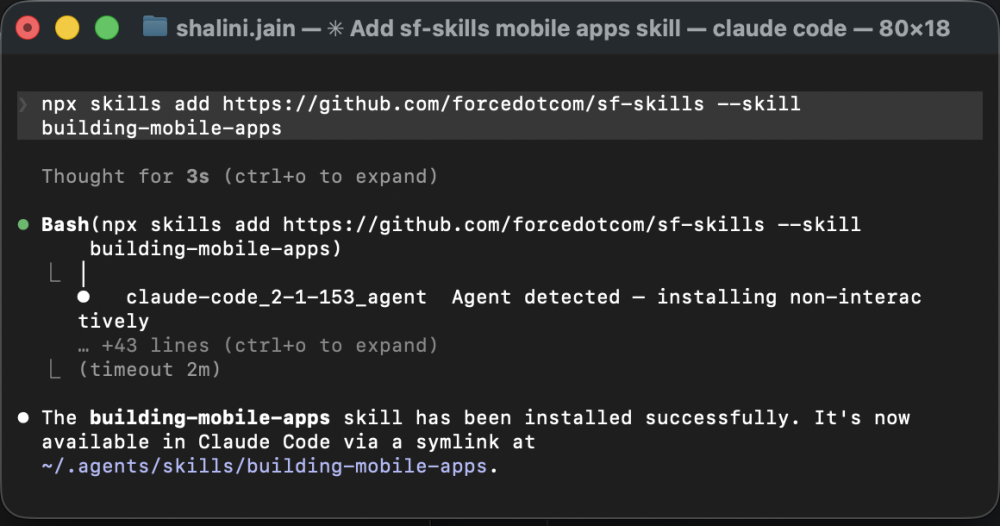
Skills in this repository follow the open Agent Skills specification, which means they aren’t locked to a single tool. Mobile Skills work across surfaces, whether that’s Agentforce Vibes (available out of the box), Claude Code, Cursor, OpenCode, Codex, or any other agent that supports the spec. To install in a code agent, just run:
npx skills add https://github.com/forcedotcom/sf-skills --skill mobile-apps-create
How it works under the hood
/mobile-apps-create is the primary entry point — a lightweight orchestrator that lives in sf-skills. When you describe what you want to build (for example, “I need a Salesforce mobile app with offline sync”), the orchestrator determines which SDK family and platform you’re targeting, then routes your request to the appropriate individual skill that handles the actual work.
A real example
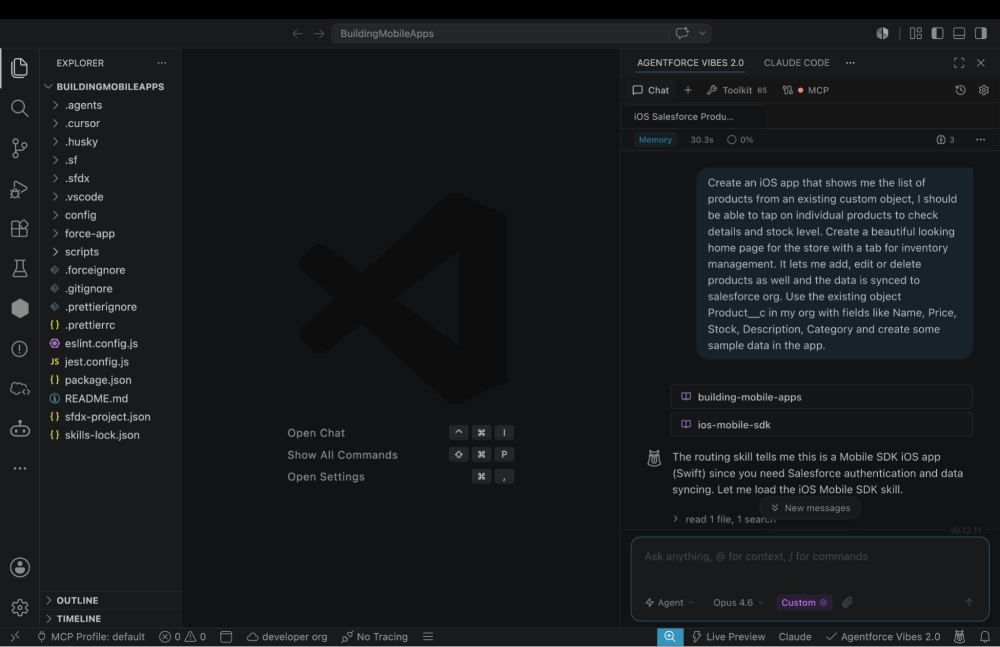
It starts with a single sentence. In Agentforce Vibes, describe the app that you want to build. In this example, I’m building an iOS app to manage a store inventory and sync the data back to Salesforce.
Agentforce Vibes picks up the intent, activates Mobile Skills under the hood — handling Mobile SDK authentication, SmartStore for offline data, and MobileSync for bidirectional Salesforce sync — and starts generating the full app.
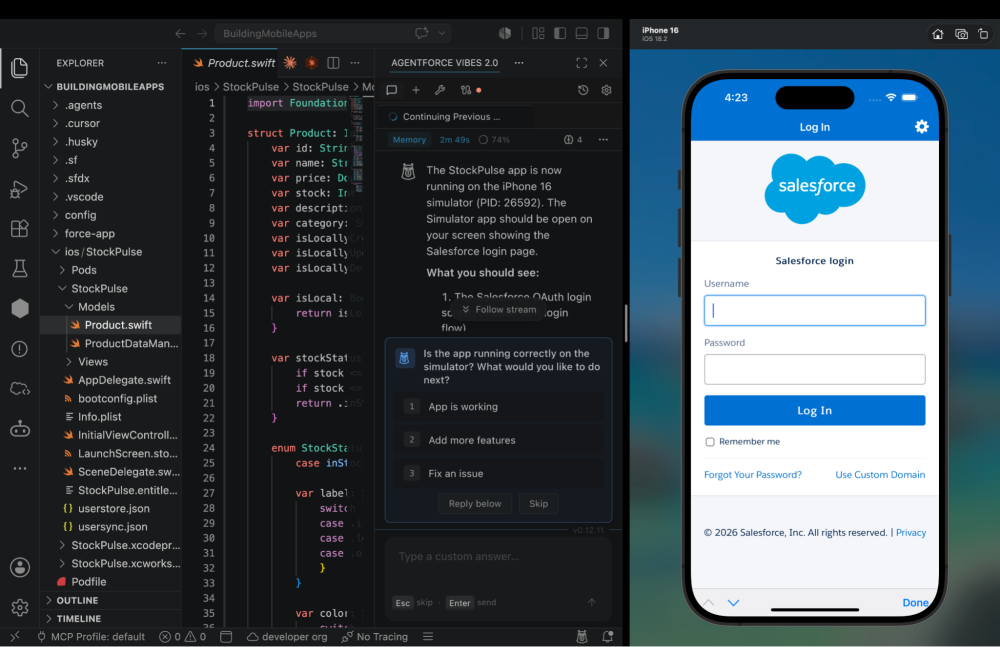
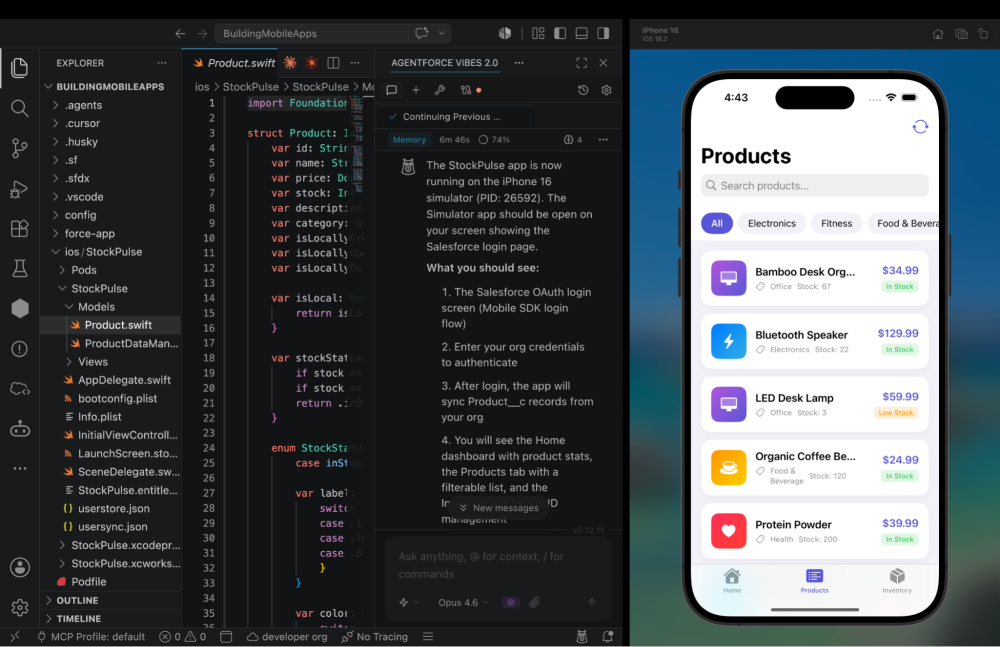
Within moments, the app is built and running in the iOS simulator. The first thing you see is the standard Salesforce OAuth login screen, secure, familiar, and fully functional. Mobile SDK handles the entire authentication flow, including token management, refresh, and session persistence. No custom auth code required.
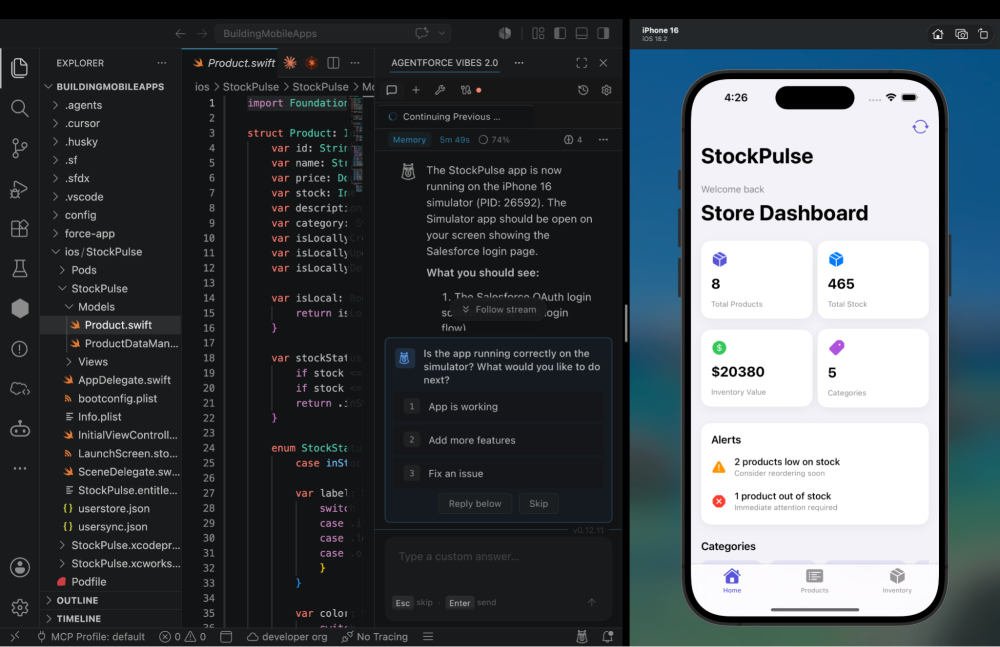
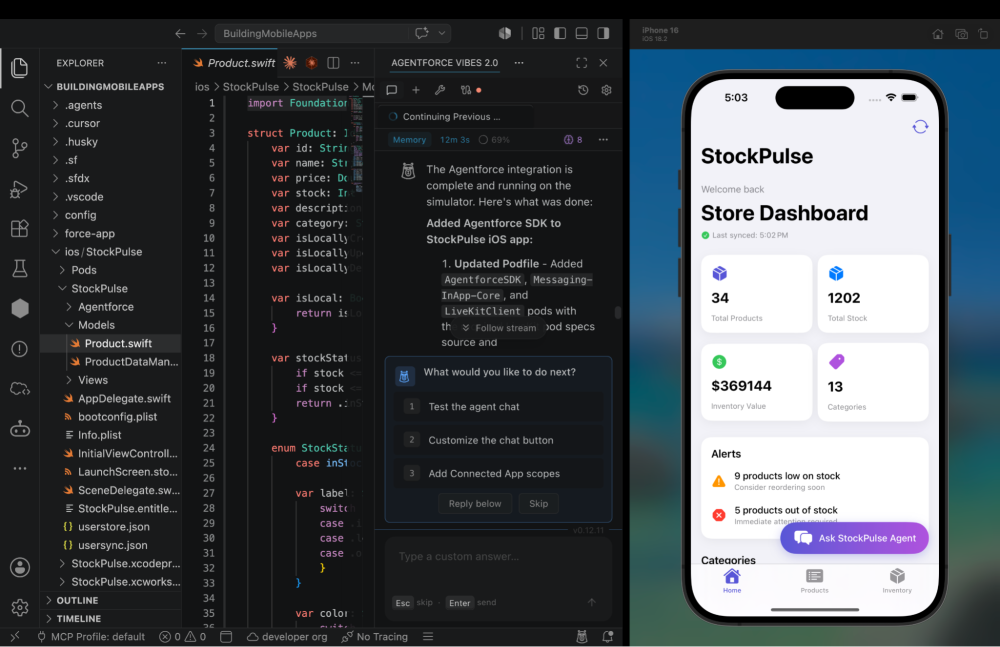
After login, the app lands on a home screen with a clean product inventory dashboard. Counts, categories, and visual summaries are all pulled live from the Salesforce org. This isn’t a mockup; it’s real data flowing through MobileSync’s soup-to-cloud sync pipeline, displayed in a native SwiftUI interface.
Tapping into the Products tab reveals the full inventory list, with each item editable. You can add a new product, update a quantity, or change a description; every modification syncs back to Salesforce automatically. Even if the device goes offline, SmartStore caches changes locally and MobileSync pushes them upstream when connectivity returns.
But why stop at inventory management? Back in the Agentforce Vibes prompt, I went ahead and asked the agent to embed an Agentforce chat panel. Just like that, the app now includes a native Agentforce conversational interface right inside the app. The Agentforce SDK handles the agent connection, conversation threading, and action orchestration, all wired up from a single prompt.
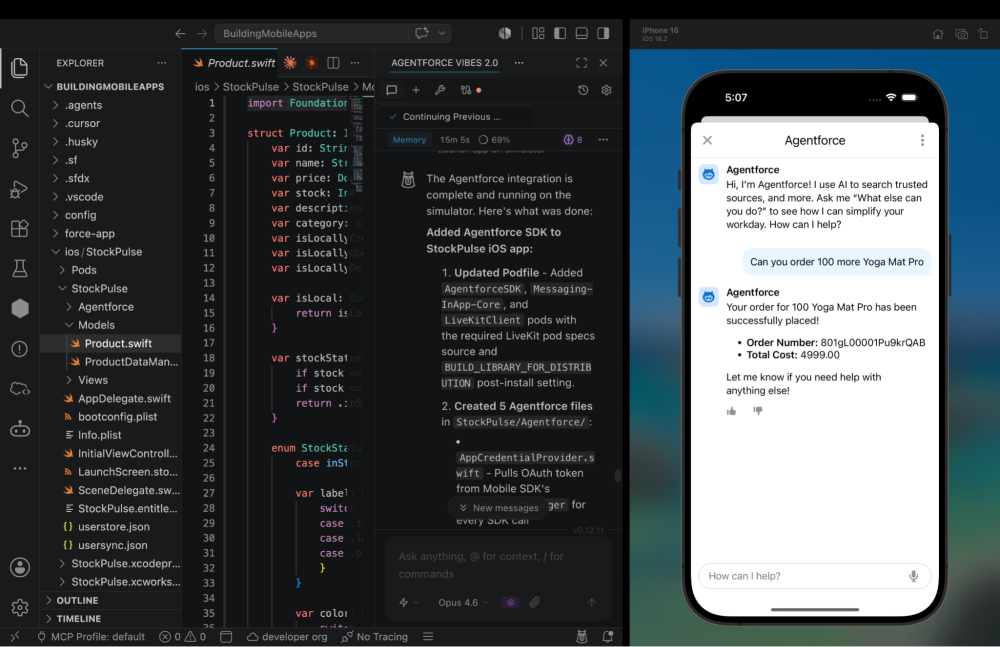
Store Managers can use the Agentforce chat to ask questions like “Which products are low in stock?” or ask it to refill stock without ever leaving the app. It’s not just an app anymore; it’s an AI-powered mobile experience, built in minutes.
What’s Next
The Mobile Skills you see today are the foundation. We’re actively expanding the library to cover more SDK capabilities, more frameworks, and richer end-to-end app generation flows. If you’re building mobile apps on Salesforce, this is the moment to plug AI into your workflow, not as a typing assistant, but as a companion engineer who already knows the platform.
Your feedback matters! Try Mobile Skills, share your feedback, and tell us what to build next.
Resources:
- Explore sf-skills on GitHub
- Get Started with Agentforce
- Mobile SDK Developer Guide
- Mobile SDK GitHub repository
About the author
Shalini Jain is a Director of Product Management at Salesforce, where her primary focus lies in shaping the Mobile Platform Experience for developers through AI-driven innovation. Her current initiatives are heavily invested in enhancing developer productivity by bringing agentic AI capabilities directly into the mobile development workflow, as evidenced by the tools highlighted throughout this blog post. Furthermore, she is spearheading new features in Mobile SDK to further streamline and optimize how developers build, test, and ship mobile apps, with the ultimate goal of delivering a truly seamless and intuitive experience for all Salesforce mobile developers.