


Support Agentforce Voice with SIP
When transmitting voice calls to Agentforce agents, customers can select from multiple types of communication protocols: Public Switched Telephone Network (PSTN), Session Initiation Protocol (SIP), or Dynamic Voice Routing. To fully support customers who want to implement and use Agentforce Voice with SIP protocol, you must become a verified Agentforce Voice with SIP partner.
If you’re a verified Agentforce Voice with SIP partner, to get started, your customers can start setting up Agentforce Voice with SIP by referring to the Create a Voice-Enabled Service Agent Help page.
If you’re not an Agentforce Voice with SIP partner, perform the steps in this document to obtain verification.
Becoming a Verified Agentforce Voice with SIP Partner
The flowchart represents a high-level flow of the Agentforce Voice with SIP setup process for the Contact Center as a Service (CCaaS) partner. The process starts when you contact your Salesforce team with a request to support Agentforce Voice with SIP and ends when the Salesforce team endorses you as a verified Agentforce Voice with SIP partner.
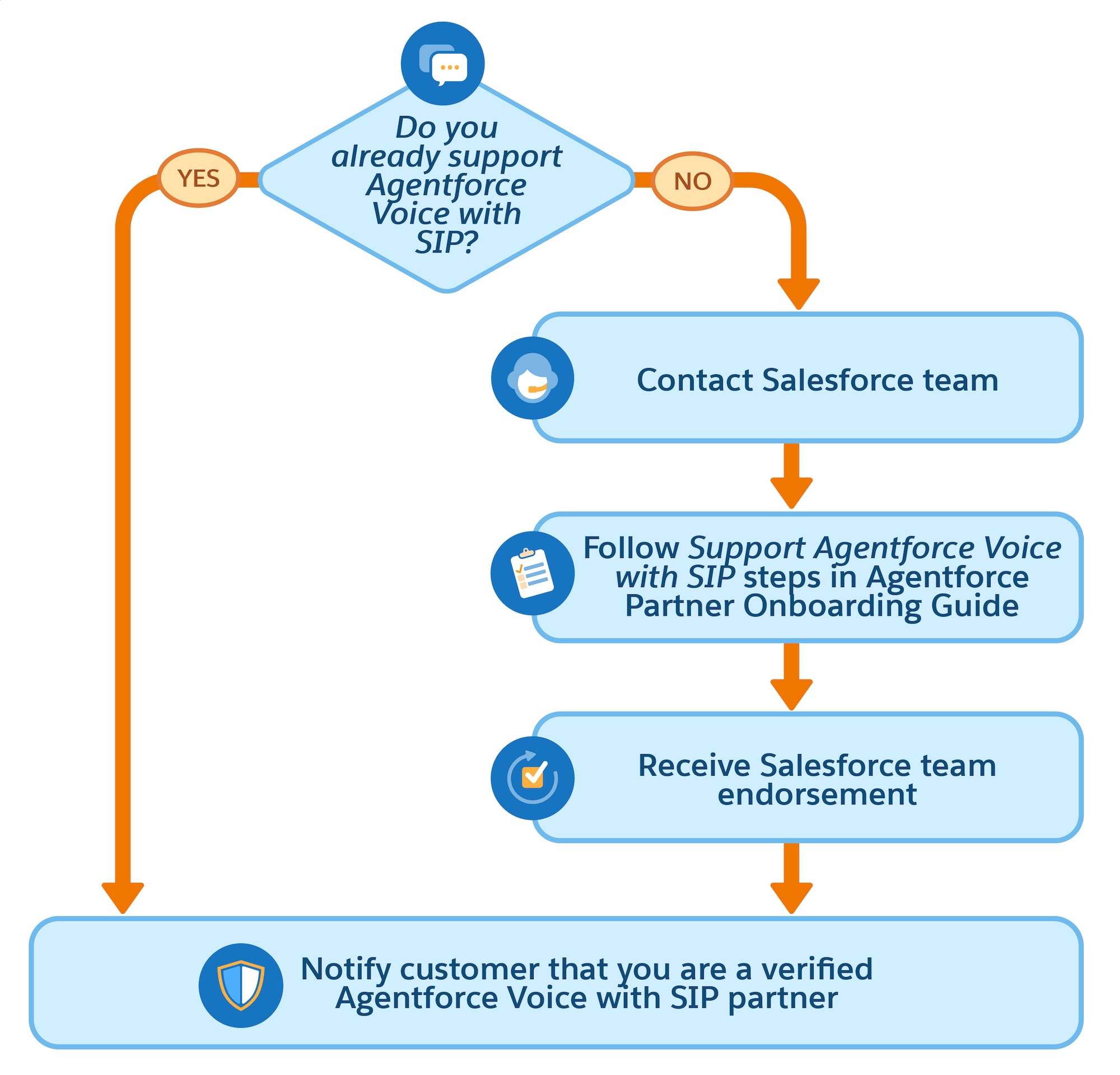
Step 1: Perform Initial Assessment
Review and complete the SIP support and header requirements before you begin the Agentforce Voice with SIP partner-verification process.
SIP Support Requirements
To ensure a successful SIP integration, verify that you meet the support requirements.
Understand the connectivity standards required to establish a SIP trunk.
- SIP over TLS (mTLS isn’t supported)
- Media over SRTP
- Static signaling and media IP addresses
- Codecs Supported: G.711 PCMU and PCMA
- SIP INVITE header fields (SIP REFER isn’t supported. For call ending, SIP BYE is used to terminate an existing SIP session.)
Perform the verification steps to ensure your environment is prepared.
- Verify that real-time communication systems are set up to support the SIP standard.
- Verify that user-to-user information (UUI) headers with Hex encoding are supported.
- Verify that you have the full public address range by regions for allowlisting.
Provide your partner name and the customer’s data center location.
- Partner name, such as Genesys
- Customer data center location, such as London
UUI and SIP Standard Header Fields and Values
Gather the values for the UUI and SIP header fields.
To transfer an incoming call to an Agentforce agent using SIP, Salesforce uses UUI headers to pass call context and authentication data over SIP trunks. The UUI header carries key parameters that Salesforce uses to route the call.
During this setup process, you’ll use the header fields to perform basic SIP connectivity and end-to-end verification tests.
For a list of UUI and SIP header fields, refer to Configure Inbound Call Transfers When Using SIP.
Step 2: Gather SIP Configuration Details
To collect the information that Salesforce requires to start the SIP integration process, complete the SIP Signaling Configuration Form.
-
Make a copy of the SIP Signaling Configuration Form and complete it.
-
Send the completed document to your Salesforce team, who then submits a request to the development team to integrate you as an Agentforce Voice with SIP partner.
-
Wait for your Salesforce team to confirm that the integration has completed so that you can move on to the next step.
Step 3: Perform Basic SIP Connectivity and End-To-End Verification Tests
After your Salesforce team confirms that the integration has completed, perform basic SIP connectivity and end-to-end verification tests.
Connectivity Test
-
Use the UUI header (in Hex code) to initiate a test call to the Salesforce Session Border Controller (SBC).
1{"orgId":"echo-test-org","scrt2Domain":"afv-wss-echo:7442"} -
To confirm that connectivity is successful, after you initiate the call, listen for the ECHO.
-
To verify that signaling works as expected, perform basic call tests and verify the SIP traces at both ends.
The sample SIP INVITE message is used to initiate a user-to-user call.
1INVITE sip:+11060321122@10.10.1.148:5060;user=phone SIP/2.0 2Via: SIP/2.0/UDP 10.41.152.80:5060;branch=z9hG4bK10Bf15a9a98700aeb9c 3From: <sip:+919247XX8773@afv.thb-perf06.unified-engagement1.perf2-uswest2.aws.sfdc.is>;tag=gK103154c4 4To: <sip:+11060321122@afv.thb-perf06.unified-engagement1.perf2-uswest2.aws.sfdc.is>;transport=TLS 5Call-ID: 608213684_125667659@10.41.152.80 6CSeq: 850640 INVITE 7Max-Forwards: 68 8Allow: INVITE, ACK, CANCEL, BYE, REGISTER, REFER, INFO, SUBSCRIBE, NOTIFY, PRACK, UPDATE, OPTIONS, MESSAGE, PUBLISH 9Contact: <sip:+919247XX8773@10.41.152.80:5060> 10User-to-User: 7B226F72674964223A226563686F2D746573742D6F7267222C227363727432446F6D61696E223A226166762D7773732D6563686F3A37343432227D;encoding=hex 11User-Agent: VineProx-v2.3 12Supported: timer, 100rel, precondition, replaces 13Session-Expires: 1800 14Min-SE: 90 15Content-Length: 235 16Content-Disposition: session; handling=required 17Content-Type: application/sdp 18 19, msgLen = 1504. 20324 12092025 042639.296880:1.01.00.22619.Info .SIPCM: SipFeSocketSendMsg - msg = v=0 21o=Sonus_UAC 520733 642062 IN IP4 10.22.88.80 22s=SIP Media Capabilities 23c=IN IP4 10.22.88.80 24t=0 0 25m=audio 1072 RTP/AVP 0 101 26a=rtpmap:0 PCMU/8000 27a=rtpmap:101 telephone-event/8000 28a=fmtp:101 0-15 29a=sendrecv 30a=maxptime:20 31, msgLen = 224. -
Repeat the steps for each mapped region that you support.
End-To-End Testing
- Configure a Salesforce org with partner telephony fully set up.
- Set up Agentforce Voice with SIP. For the steps, see the Create a Voice-Enabled Service Agent Help page and then the Connect a Service Agent to Partner Telephony Help page.
- Perform an inbound call that enters your partner telephony system.
- Transfer the call to Salesforce via SIP.
- After the call connects to the Agentforce Voice agent, escalate the call to a service rep.
- Return the call back to your partner telephony system and route the call to the service rep inside Salesforce via Salesforce Voice. Verify that the Agentforce Voice Call record is linked to the Voice Call routed to the service rep.
Step 4: Final Review with Salesforce
Schedule a call with Salesforce to review your end-to-end setup. To facilitate this review, share documentation of your setup, such as a recording. The documentation should explain:
- Your telephony provider configuration for Agentforce Voice with SIP
- The flow used to transfer the call to an agent and escalate the call to a rep
- How you link related calls to pass call context
Step 5: Publish Supported Agentforce Voice Regions
After you’ve thoroughly tested the connection, wait for Salesforce to notify you that you’re endorsed as a supported Agentforce Voice with SIP partner.
Congratulations. As a verified Agentforce Voice with SIP partner, you can work with your customers to implement Agentforce Voice with SIP in their orgs. Your customers can refer to the Create a Voice-Enabled Service Agent Help page to get started with Agentforce Voice.
See Also
- SIP Partner Regional Availability Chart
- SIP Signaling Configuration Form
- TLS Certificate Management Requirements
- Salesforce Help: Create a Voice-Enabled Service Agent
- Salesforce Help: Configure Telephony Vendor Settings When Using SIP
 j
j