


Force.com Apex Code Developer's Guide
 j
j
No Results
Search Tips:
- Please consider misspellings
- Try different search keywords
Newer Version Available
Setting Debug Log Filters
| User Permissions Needed | |
|---|---|
| To use the Developer Console: | “View All Data” |
| To execute anonymous Apex: | “Author Apex” |
| To use code search and run SOQL or SOSL on the query tab: | “API Enabled” |
| To save changes to Apex classes and triggers: | “Author Apex” |
| To save changes to Visualforce pages and components: | “Customize Application” |
When using the Developer Console or monitoring
a debug log, you can specify the level of information that gets included
in the log.
- Log category
- The type of information logged, such as information from Apex or workflow rules.
- Log level
- The amount of information logged.
- Event type
- The combination of log category and log level that specify which events get logged. Each event can log additional information, such as the line and character number where the event started, fields associated with the event, duration of the event in milliseconds, and so on.
Debug Log Categories
You can specify the following log categories. The amount of information logged for each category depends on the log level:
Debug Log Levels
You can specify the following log levels.
The levels are listed from lowest to highest. Specific events are logged based on the combination of category and levels. Most
events start being logged at the INFO level. The level is cumulative,
that is, if you select FINE, the log will also include all events
logged at DEBUG, INFO, WARN and ERROR levels.
- ERROR
- WARN
- INFO
- DEBUG
- FINE
- FINER
- FINEST
Debug Event Types
The following is an example of what
is written to the debug log. The event is USER_DEBUG. The format is timestamp | event identifier:
- timestamp: consists of the time when the event occurred and a value between parentheses. The time is in the user's time zone and in the format HH:mm:ss.SSS. The value represents the time elapsed in milliseconds since the start of the request. The elapsed time value is excluded from logs reviewed in the Developer Console.
- event identifier: consists of the specific event that triggered the debug log being written to, such as SAVEPOINT_RESET or VALIDATION_RULE, and any additional information logged with that event, such as the method name or the line and character number where the code was executed.
Debug Log Line Example
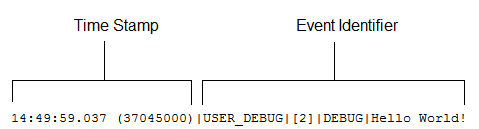
In this example, the event identifier is made up of the
following:
- Event name:
1USER_DEBUG - Line number of the event in the code:
1[2] - Logging level the System.Debug method was set to:
1DEBUG - User-supplied string for the System.Debug method:
1Hello world!
The following example of a log line is triggered by this
code snippet.
Debug Log Line Code Snippet

The following log line is recorded when the test reaches
line 5 in the code:
115:51:01.071 (55856000)|DML_BEGIN|[5]|Op:Insert|Type:Invoice_Statement__c|Rows:1In this example, the event identifier is made up of the following:
- Event name:
1DML_BEGIN - Line number of the event in the code:
1[5] - DML operation type—Insert:
1Op:Insert - Object name:
1Type:Invoice_Statement__c - Number of rows passed into the DML operation:
1Rows:1
The following table lists the event types that are logged, what fields or other information get logged with each event, as well as what combination of log level and category cause an event to be logged.
| Event Name | Fields or Information Logged with Event | Category Logged | Level Logged |
|---|---|---|---|
| BULK_HEAP_ALLOCATE | Number of bytes allocated | Apex Code | FINEST |
| CALLOUT_REQUEST | Line number and request headers | Callout | INFO and above |
| CALLOUT_RESPONSE | Line number and response body | Callout | INFO and above |
| CODE_UNIT_FINISHED | None | Apex Code | ERROR and above |
| CODE_UNIT_STARTED | Line number and code unit name, such as MyTrigger on Account trigger event BeforeInsert for [new] | Apex Code | ERROR and above |
| CONSTRUCTOR_ENTRY | Line number, Apex class ID, and the string <init>() with the types of parameters, if any, between the parentheses | Apex Code | DEBUG and above |
| CONSTRUCTOR_EXIT | Line number and the string <init>() with the types of parameters, if any, between the parentheses | Apex Code | DEBUG and above |
| CUMULATIVE_LIMIT_USAGE | None | Apex Profiling | INFO and above |
| CUMULATIVE_LIMIT_USAGE_END | None | Apex Profiling | INFO and above |
| CUMULATIVE_PROFILING | None | Apex Profiling | FINE and above |
| CUMULATIVE_PROFILING_BEGIN | None | Apex Profiling | FINE and above |
| CUMULATIVE_PROFILING_END | None | Apex Profiling | FINE and above |
| DML_BEGIN | Line number, operation (such as Insert, Update, and so on), record name or type, and number of rows passed into DML operation | DB | INFO and above |
| DML_END | Line number | DB | INFO and above |
| EMAIL_QUEUE | Line number | Apex Code | INFO and above |
| ENTERING_MANAGED_PKG | Package namespace | Apex Code | INFO and above |
| EXCEPTION_THROWN | Line number, exception type, and message | Apex Code | INFO and above |
| EXECUTION_FINISHED | None | Apex Code | ERROR and above |
| EXECUTION_STARTED | None | Apex Code | ERROR and above |
| FATAL_ERROR | Exception type, message, and stack trace | Apex Code | ERROR and above |
| FLOW_ASSIGNMENT_DETAIL | Interview ID, Reference, Operator, and Value | Workflow | FINER and above |
| FLOW_BULK_ELEMENT_BEGIN | Interview ID and Element type | Workflow | FINE and above |
| FLOW_BULK_ELEMENT_DETAIL | Interview ID, Element type, Element name, Number of records, and Execution time | Workflow | FINER and above |
| FLOW_BULK_ELEMENT_END | Interview ID, Element type, Element name, and Number of records | Workflow | FINE and above |
| FLOW_CREATE_INTERVIEW_BEGIN | Organization ID, Definition ID, and Version ID | Workflow | INFO and above |
| FLOW_CREATE_INTERVIEW_END | Interview ID and Flow name | Workflow | INFO and above |
| FLOW_CREATE_INTERVIEW_ERROR | Message, Organization ID, Definition ID, and Version ID | Workflow | ERROR and above |
| FLOW_ELEMENT_BEGIN | Interview ID, Element type, and Element name | Workflow | FINE and above |
| FLOW_ELEMENT_END | Interview ID, Element type, and Element name | Workflow | FINE and above |
| FLOW_ELEMENT_ERROR | Message, Element type, and Element name (Flow runtime exception) | Workflow | ERROR and above |
| FLOW_ELEMENT_ERROR | Message, Element type, and Element name (Spark not found) | Workflow | ERROR and above |
| FLOW_ELEMENT_ERROR | Message, Element type, and Element name (Designer exception) | Workflow | ERROR and above |
| FLOW_ELEMENT_ERROR | Message, Element type, and Element name (Designer limit exceeded) | Workflow | ERROR and above |
| FLOW_ELEMENT_ERROR | Message, Element type, and Element name (Designer runtime exception) | Workflow | ERROR and above |
| FLOW_ELEMENT_FAULT | Message, Element type, and Element name (Fault path taken) | Workflow | WARNING and above |
| FLOW_ELEMENT_FAULT | Message, Element type, and Element name (Element deferred) | Workflow | FINER and above |
| FLOW_RULE_DETAIL | Interview ID, Rule name, and Result | Workflow | FINER and above |
| FLOW_START_INTERVIEW_BEGIN | Interview ID and Flow name | Workflow | INFO and above |
| FLOW_START_INTERVIEW_END | Interview ID and Flow name | Workflow | INFO and above |
| FLOW_START_INTERVIEWS_BEGIN | Requests | Workflow | INFO and above |
| FLOW_START_INTERVIEWS_END | Requests | Workflow | INFO and above |
| FLOW_START_INTERVIEWS_ERROR | Message, Interview ID, and Flow name | Workflow | ERROR and above |
| FLOW_SUBFLOW_DETAIL | Interview ID, Name, Definition ID, and Version ID | Workflow | FINER and above |
| FLOW_VALUE_ASSIGNMENT | Interview ID, Key, and Value | Workflow | FINER and above |
| HEAP_ALLOCATE | Line number and number of bytes | Apex Code | FINER and above |
| HEAP_DEALLOCATE | Line number and number of bytes deallocated | Apex Code | FINER and above |
| IDEAS_QUERY_EXECUTE | Line number | DB | FINEST |
| LIMIT_USAGE_FOR_NS | Namespace and the following limits: |
Apex Profiling | FINEST |
| METHOD_ENTRY | Line number, the Force.com ID of the class, and method signature | Apex Code | DEBUG and above |
| METHOD_EXIT | Line number, the Force.com ID of the
class, and method signature. For constructors, the following information is logged: Line number and class name. |
Apex Code | DEBUG and above |
| POP_TRACE_FLAGS | Line number, the Force.com ID of the class or trigger that has its log filters set and that is going into scope, the name of this class or trigger, and the log filter settings that are now in effect after leaving this scope | System | INFO and above |
| PUSH_TRACE_FLAGS | Line number, the Force.com ID of the class or trigger that has its log filters set and that is going out of scope, the name of this class or trigger, and the log filter settings that are now in effect after entering this scope | System | INFO and above |
| QUERY_MORE_BEGIN | Line number | DB | INFO and above |
| QUERY_MORE_END | Line number | DB | INFO and above |
| QUERY_MORE_ITERATIONS | Line number and the number of queryMore iterations | DB | INFO and above |
| SAVEPOINT_ROLLBACK | Line number and Savepoint name | DB | INFO and above |
| SAVEPOINT_SET | Line number and Savepoint name | DB | INFO and above |
| SLA_END | Number of cases, load time, processing time, number of case milestones to insert/update/delete, and new trigger | Workflow | INFO and above |
| SLA_EVAL_MILESTONE | Milestone ID | Workflow | INFO and above |
| SLA_NULL_START_DATE | None | Workflow | INFO and above |
| SLA_PROCESS_CASE | Case ID | Workflow | INFO and above |
| SOQL_EXECUTE_BEGIN | Line number, number of aggregations, and query source | DB | INFO and above |
| SOQL_EXECUTE_END | Line number, number of rows, and duration in milliseconds | DB | INFO and above |
| SOSL_EXECUTE_BEGIN | Line number and query source | DB | INFO and above |
| SOSL_EXECUTE_END | Line number, number of rows, and duration in milliseconds | DB | INFO and above |
| STACK_FRAME_VARIABLE_LIST | Frame number and variable list of the form: Variable
number | Value. For example: |
Apex Profiling | FINE and above |
| STATEMENT_EXECUTE | Line number | Apex Code | FINER and above |
| STATIC_VARIABLE_LIST | Variable list of the form: Variable number | Value. For example: |
Apex Profiling | FINE and above |
| SYSTEM_CONSTRUCTOR_ENTRY | Line number and the string <init>() with the types of parameters, if any, between the parentheses | System | DEBUG |
| SYSTEM_CONSTRUCTOR_EXIT | Line number and the string <init>() with the types of parameters, if any, between the parentheses | System | DEBUG |
| SYSTEM_METHOD_ENTRY | Line number and method signature | System | DEBUG |
| SYSTEM_METHOD_EXIT | Line number and method signature | System | DEBUG |
| SYSTEM_MODE_ENTER | Mode name | System | INFO and above |
| SYSTEM_MODE_EXIT | Mode name | System | INFO and above |
| TESTING_LIMITS | None | Apex Profiling | INFO and above |
| TOTAL_EMAIL_RECIPIENTS_QUEUED | Number of emails sent | Apex Profiling | FINE and above |
| USER_DEBUG | Line number, logging level, and user-supplied string | Apex Code | DEBUG and above by default. If the user sets the log level for the System.Debug method, the event is logged at that level instead. |
| VALIDATION_ERROR | Error message | Validation | INFO and above |
| VALIDATION_FAIL | None | Validation | INFO and above |
| VALIDATION_FORMULA | Formula source and values | Validation | INFO and above |
| VALIDATION_PASS | None | Validation | INFO and above |
| VALIDATION_RULE | Rule name | Validation | INFO and above |
| VARIABLE_ASSIGNMENT | Line number, variable name, a string representation of the variable's value, and the variable's address | Apex Code | FINEST |
| VARIABLE_SCOPE_BEGIN | Line number, variable name, type, a value that indicates if the variable can be referenced, and a value that indicates if the variable is static | Apex Code | FINEST |
| VARIABLE_SCOPE_END | None | Apex Code | FINEST |
| VF_APEX_CALL | Element name, method name, and return type | Apex Code | INFO and above |
| VF_DESERIALIZE_VIEWSTATE_BEGIN | View state ID | Visualforce | INFO and above |
| VF_DESERIALIZE_VIEWSTATE_END | None | Visualforce | INFO and above |
| VF_EVALUATE_FORMULA_BEGIN | View state ID and formula | Visualforce | FINER and above |
| VF_EVALUATE_FORMULA_END | None | Visualforce | FINER and above |
| VF_PAGE_MESSAGE | Message text | Apex Code | INFO and above |
| VF_SERIALIZE_VIEWSTATE_BEGIN | View state ID | Visualforce | INFO and above |
| VF_SERIALIZE_VIEWSTATE_END | None | Visualforce | INFO and above |
| WF_ACTION | Action description | Workflow | INFO and above |
| WF_ACTION_TASK | Task subject, action ID, rule, owner, and due date | Workflow | INFO and above |
| WF_ACTIONS_END | Summary of actions performed | Workflow | INFO and above |
| WF_APPROVAL | Transition type, EntityName: NameField Id, and process node name | Workflow | INFO and above |
| WF_APPROVAL_REMOVE | EntityName: NameField Id | Workflow | INFO and above |
| WF_APPROVAL_SUBMIT | EntityName: NameField Id | Workflow | INFO and above |
| WF_ASSIGN | Owner and assignee template ID | Workflow | INFO and above |
| WF_CRITERIA_BEGIN | EntityName: NameField Id, rule name, rule ID, and trigger type (if rule respects trigger types) | Workflow | INFO and above |
| WF_CRITERIA_END | Boolean value indicating success (true or false) | Workflow | INFO and above |
| WF_EMAIL_ALERT | Action ID and rule | Workflow | INFO and above |
| WF_EMAIL_SENT | Email template ID, recipients, and CC emails | Workflow | INFO and above |
| WF_ENQUEUE_ACTIONS | Summary of actions enqueued | Workflow | INFO and above |
| WF_ESCALATION_ACTION | Case ID and business hours | Workflow | INFO and above |
| WF_ESCALATION_RULE | None | Workflow | INFO and above |
| WF_EVAL_ENTRY_CRITERIA | Process name, email template ID, and Boolean value indicating result (true or false) | Workflow | INFO and above |
| WF_FIELD_UPDATE | EntityName: NameField Id and the object or field name | Workflow | INFO and above |
| WF_FLOW_ACTION_BEGIN | ID of flow trigger | Workflow | INFO and above |
| WF_FLOW_ACTION_DETAIL | ID of flow trigger, object type and ID of record whose creation or update caused the workflow rule to fire, name and ID of workflow rule, and the names and values of flow variables or sObject variables | Workflow | FINE and above |
| WF_FLOW_ACTION_END | ID of flow trigger | Workflow | INFO and above |
| WF_FLOW_ACTION_ERROR | ID of flow trigger, ID of flow definition, ID of flow version, and flow error message | Workflow | ERROR and above |
| WF_FLOW_ACTION_ERROR_DETAIL | Detailed flow error message | Workflow | ERROR and above |
| WF_FORMULA | Formula source and values | Workflow | INFO and above |
| WF_HARD_REJECT | None | Workflow | INFO and above |
| WF_NEXT_APPROVER | Owner, next owner type, and field | Workflow | INFO and above |
| WF_NO_PROCESS_FOUND | None | Workflow | INFO and above |
| WF_OUTBOUND_MSG | EntityName: NameField Id, action ID, and rule | Workflow | INFO and above |
| WF_PROCESS_NODE | Process name | Workflow | INFO and above |
| WF_REASSIGN_RECORD | EntityName: NameField Id and owner | Workflow | INFO and above |
| WF_RESPONSE_NOTIFY | Notifier name, notifier email, and notifier template ID | Workflow | INFO and above |
| WF_RULE_ENTRY_ORDER | Integer and indicating order | Workflow | INFO and above |
| WF_RULE_EVAL_BEGIN | Rule type | Workflow | INFO and above |
| WF_RULE_EVAL_END | None | Workflow | INFO and above |
| WF_RULE_EVAL_VALUE | Value | Workflow | INFO and above |
| WF_RULE_FILTER | Filter criteria | Workflow | INFO and above |
| WF_RULE_INVOCATION | EntityName: NameField Id | Workflow | INFO and above |
| WF_RULE_NOT_EVALUATED | None | Workflow | INFO and above |
| WF_SOFT_REJECT | Process name | Workflow | INFO and above |
| WF_SPOOL_ACTION_BEGIN | Node type | Workflow | INFO and above |
| WF_TIME_TRIGGER | EntityName: NameField Id, time action, time action container, and evaluation Datetime | Workflow | INFO and above |
| WF_TIME_TRIGGERS_BEGIN | None | Workflow | INFO and above |