


Force.com Platform Fundamentals
 j
j
No Results
Search Tips:
- Please consider misspellings
- Try different search keywords
Try It Out: Set Org-Wide Defaults
Now that we've figured out the org-wide defaults for each of our recruiting objects, let's go ahead and implement them in our Recruiting app.
- From Setup, click . If you see an introductory splash page, click Set Up Sharing at the bottom of the page to skip to the actual tool.
The Sharing Settings page is where we control both org-wide defaults and sharing rules. We'll talk more about this page when we talk about sharing rules a little further down. For now, let's just edit our org-wide default settings.
- In the Organization Wide Defaults area, click Edit.
This page controls the org-wide defaults for every object in our organization. You'll notice that some standard objects (like leads and calendars) use a different set of org-wide default values than we have available for our custom recruiting objects. You can learn more about them in the Salesforce Help. For now, let's just set our recruiting objects to the org-wide defaults that we decided on in the last section.
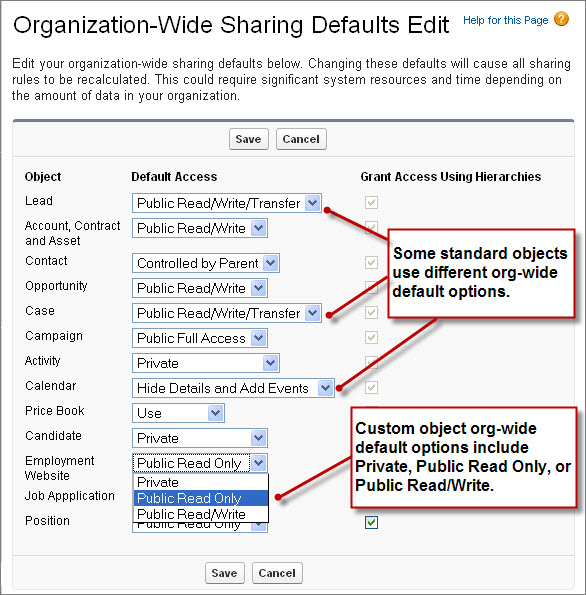
- Next to Candidate and Job Application, select Private.
- Next to Employment Website and Position, select Public Read Only.
Right about now, you're probably wondering why you can't set the org-wide defaults for the Review and Job Posting objects. The reason is that those objects are on the detail side of master-detail relationships, and, as mentioned in the last chapter, a detail record automatically inherits the sharing setting of its parent. So in our app, the Review object is automatically set to Private, and the Job Posting object is automatically set to Public Read Only.
You also might be wondering about the Grant Access Using Hierarchies column of checkboxes. Leave these selected for now. We'll discuss hierarchies in the next section.
- Click Save.
Easy! Now that we've locked down our data with org-wide defaults, users are currently allowed to work on only candidate, job application, and review records that they own, and are allowed to view position, employment website, and job posting records that anyone owns. Because those settings are way too restrictive for any user to get any benefit out of our app, now we need to use role hierarchies, sharing rules, and manual sharing to open up candidate, job application, and review record access to those employees who'll need it.