


Salesforce.com Style Guide for Documentation and User Interface Text
 j
j
No Results
Search Tips:
- Please consider misspellings
- Try different search keywords
Ellipses (...)
- Use the ellipsis in UI text to indicate that
additional information or an intermediate step is required before
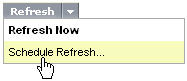
the action can be completed. For example, in the following screenshot,
when users click Schedule Refresh..., they're
prompted to fill out a form with scheduling options before scheduling
the dashboard refresh. Compare it with the Refresh Now (no ellipsis) option, which immediately executes when clicked.
 Use an ellipsis
in ghost text to indicate that users can take action.
Use an ellipsis
in ghost text to indicate that users can take action.
- Refer to user interface elements using the element's exact label (including any end punctuation, such as an ellipsis). For example: Click Add... to browse for files on your local computer.
- In a quoted passage, use an ellipsis to indicate any omission of text.