


ISVforce Workbook
 j
j
No Results
Search Tips:
- Please consider misspellings
- Try different search keywords
Step 4: Install and Test the Beta Version
Installing the beta is easy, just click the email link and provide the username and password you use for your test org.
- Log out of your dev org by clicking .
- Click the Installation URL link you received in your email.
- On the login page, enter the Username and Password of your test org.
- On the Package Installation Details page, click Continue.
- Click Next.
- On the Security Level page, Grant access to all users and click Next.
- Click Install.
- Click Deploy Now and then Deploy.
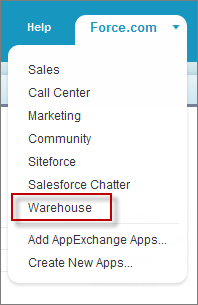
- Once the installation completes, you can select your app from
the app picker in the upper right corner.Warehouse App
- Let's test the app and see if it works. Click the Merchandise tab and add then click New to create a new record.
- In the Merchandise Name field enter Wee Jet and then click Save.
Your app installs easily and you can add the name for Merchandise records, your beta test has passed! Next you'll upload a released version of this package.
Tell Me More....
Your app doesn't do much, in fact it only has a single field. The name field is called a standard field because it is included automatically with every custom object you create. You can also create custom fields to further define your object.