


Salesforce1 App Developer Guide
 j
j
No Results
Search Tips:
- Please consider misspellings
- Try different search keywords
Creating a Flexible Page
You create a Flexible Page manually in XML, then deploy it into Salesforce either through the Force.com Migration Tool, the Force.com IDE, or Workbench.
The Flexible Page layout and style is provided by Salesforce. There’s no custom coding necessary.
Here’s a sample of what a Flexible Page XML file looks like. This is our Deliveries app starting code, which we’ll work with in the next exercise.
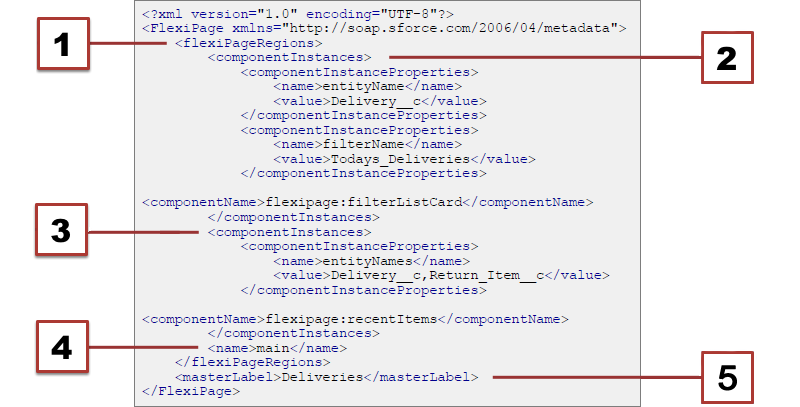
- Start of the Flexible Page region. Flexible Pages can have only one region.
- Start of the flexipage:filterListCard component
- Start of the flexipage:recentItems component
- Name of the region. Must be “main”.
- Master label of the Flexible Page.
Ready to give it a shot? Let’s create one for ourselves.