


Force.com Platform Fundamentals
 j
j
No Results
Search Tips:
- Please consider misspellings
- Try different search keywords
Newer Version Available
Workflow and Approval Processes
Three of our requirements involve automating business processes, such as triggering an alert email to a recruiter whenever a job application's status has changed, and submitting new job openings for executive approval. Once again, the Force.com platform makes these requirements easy for us to implement natively with the built-in workflow and approval process components.
- Workflow rules can assign tasks to users, update fields, or send email alerts.
- Approval processes allow users to submit sensitive records like new contracts or purchase orders to other users for approval.
For example, in our Recruiting app, we can create a workflow rule that triggers an event whenever the status of a job application has changed to Reject or Extend an Offer, as illustrated below.
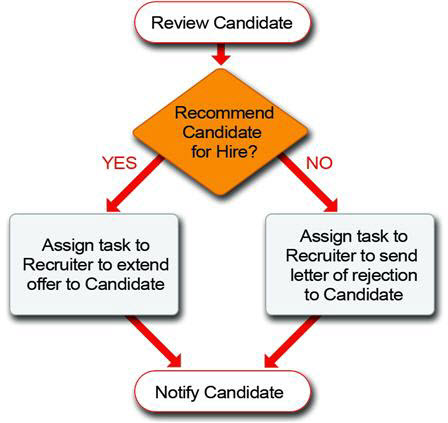
When a hiring manager makes a decision to either extend an offer to or reject the candidate, changing the status of the application triggers the appropriate task to be assigned to the recruiter for that position. Based upon the hiring manager’s decision, the recruiter performs the appropriate follow-up task.
Similarly, we can define an automatic approval process that sends all new positions to the appropriate management for approval. If the position is approved, its status automatically changes to Open - Approved and recruiters can start the hiring process. If the position is rejected, its status automatically changes to Closed - Not Approved and the position won't be filled.