


Lightning Components Developer’s Guide
 j
j
No Results
Search Tips:
- Please consider misspellings
- Try different search keywords
Newer Version Available
Event Handling Lifecycle
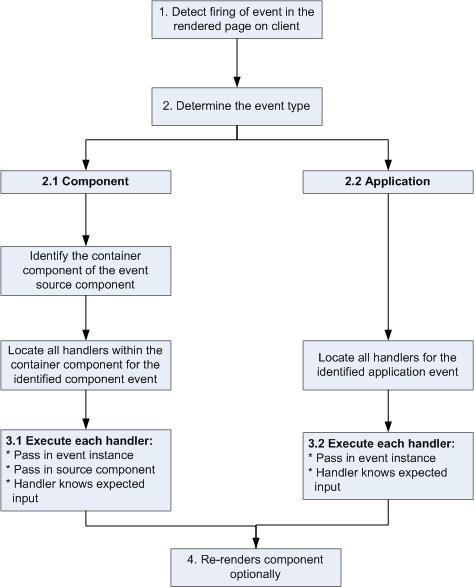
The following chart summarizes how the framework handles events.
- 1 Detect Firing of Event
The framework detects the firing of an event. For example, the event could be triggered by a button click in a notifier component.
- 2 Determine the Event Type
2.1 Component Event
The parent or container component instance that fired the event is identified. This container component locates all relevant event handlers for further processing.
2.2 Application Event
Any component can have an event handler for this event. All relevant event handlers are located.
- 3 Execute each Handler
3.1 Executing a Component Event Handler
Each of the event handlers defined in the container component for the event are executed by the handler controller, which can also:
- Set attributes or modify data on the component (causing a re-rendering of the component).
- Fire another event or invoke a client-side or server-side action.
3.2 Executing an Application Event Handler
All event handlers are executed. When the event handler is executed, the event instance is passed into the event handler.
- 4 Re-render Component (optional)
After the event handlers and any callback actions are executed, a component might be automatically re-rendered if it was modified during the event handling process.