


Lightning Components Developer’s Guide
 j
j
No Results
Search Tips:
- Please consider misspellings
- Try different search keywords
Newer Version Available
Create A Standalone Lightning App
The goal of the app is to take advantage of many of the out-of-the-box Lightning components, and to demonstrate the client and server interactions using JavaScript and Apex. As you build the app, you’ll learn how to use expressions to interact with data dynamically and use events to communicate data between components.
Make sure you’ve created the expense custom object shown in Create an Expense Object. Using a custom object to store your expense data, you’ll learn how an app interacts with records, how to handle user interactions using client-side controller actions, and how to persist data updates using an Apex controller.
After you create the app, include it in Salesforce1 by following the steps in Adding Lightning Components to Salesforce1. For packaging and distributing your apps on AppExchange, see Distributing Applications and Components.
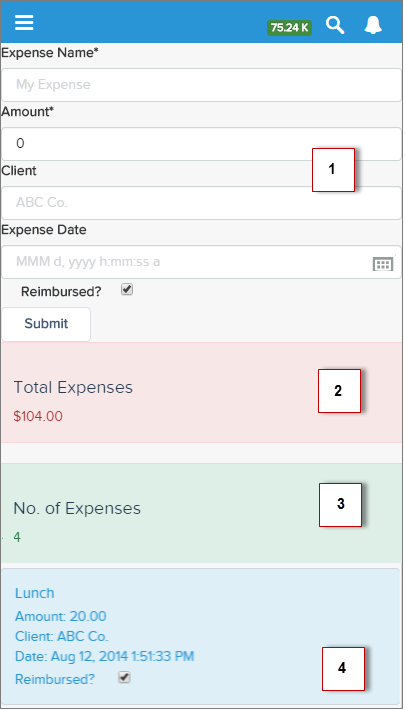
- The form contains Lightning input components (1) that update the view and expense records when the Submit button is pressed.
- Counters are initialized (2) with total amount of expenses and number of expenses, and updated on record creation or deletion.
- Display of expense list (3) uses Lightning output components and are updated as more expenses are added.
- User interaction on the expense list (4) triggers an update event that saves the record changes.
| Resources | Description |
|---|---|
| expenseTracker Bundle | |
| expenseTracker.app | The top-level component that contains all other components |
| expenseTracker.css | The styles for the app |
| Form Bundle | |
| form.cmp | A collection of Lightning input components to collect user input |
| formController.js | A client-side controller containing actions to handle user interactions on the form |
| formHelper.js | A client-side helper functions called by the controller actions |
| form.css | The styles for the form component |
| expenseList Bundle | |
| expenseList.cmp | A collection of Lightning output components to display data from expense records |
| expenseListController.js | A client-side controller containing actions to handle user interactions on the display of the expense list |
| expenseList.css | The styles for the display of the expense list |
| Apex Class | |
| ExpenseController.apxc | Apex controller that loads data, inserts, or updates an expense record |
| Event | |
| updateExpenseItem.evt | The event fired when an expense item is updated from the display of the expense list |