ISVforce Guide
 j
j
No Results
Search Tips:
- Please consider misspellings
- Try different search keywords
Newer Version Available
Installing the LMA
Before you install the LMA, you need to decide which organization is your License Management Organization (LMO). Because the LMA is an integral part of the sales, billing, and marketing of a managed package, putting the LMA in the wrong organization makes it difficult to manage licenses as a part of the sales and marketing process.
The LMA creates lead and license records when customers install a trial package. When they buy the package, those licenses are converted to paid licenses (either by site or based on a number of users). The LMA tracks who has installed a trial package, who is using it, how many licenses have been purchased, when it's up for renewal, etc. These are all important parts of the sales, billing, and marketing process ongoing in your production organization.
If you haven't already requested a CRM for ISV organization through the Partner Community, do that now. CRM for ISVs is available to eligible partners. For more information on the Partner Program, including eligibility requirements, please visit us at www.salesforce.com/partners.
TheLMA comes pre-installed with your ISV business organization. To install the LMA in a different organization, follow these steps.
- File a case in the Partner Community under the category.
- Once the case is resolved, you will receive an email with an installation URL. Log in to the organization you plan to use as your LMO and click the LMA link in the email.
- You can read the blurb about the app, then click Get It Now.
- In the pop-up, choose In my production Salesforce.
- Read and agree to the terms and conditions and then click Install.
- Verify your password and then click Submit.
- On the Package Installation Details page, click Continue.
- Click Next, Next, and Install.
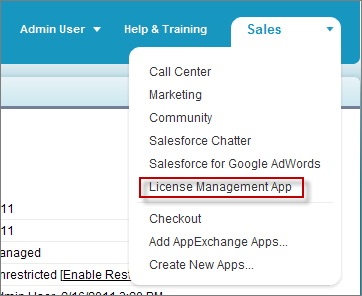
Click in the upper right corner and confirm you have the LMA installed.