


Force.com Apex Code Developer's Guide
 j
j
No Results
Search Tips:
- Please consider misspellings
- Try different search keywords
Newer Version Available
Announcements Class
Namespace
Usage
Use the ConnectApi.Announcements class to get, update, and delete announcements. Use an announcement to highlight information. Users can discuss, like, and post comments on announcements in the group feed. Group members receive an email notification when you post an announcement, same as for other posts, depending on their selected group email notification frequency. Deleting the feed post deletes the announcement.
This image of Salesforce shows an announcement displayed in yellow. Creating an announcement
also creates a feed item with the announcement text, which you can
also see in the image.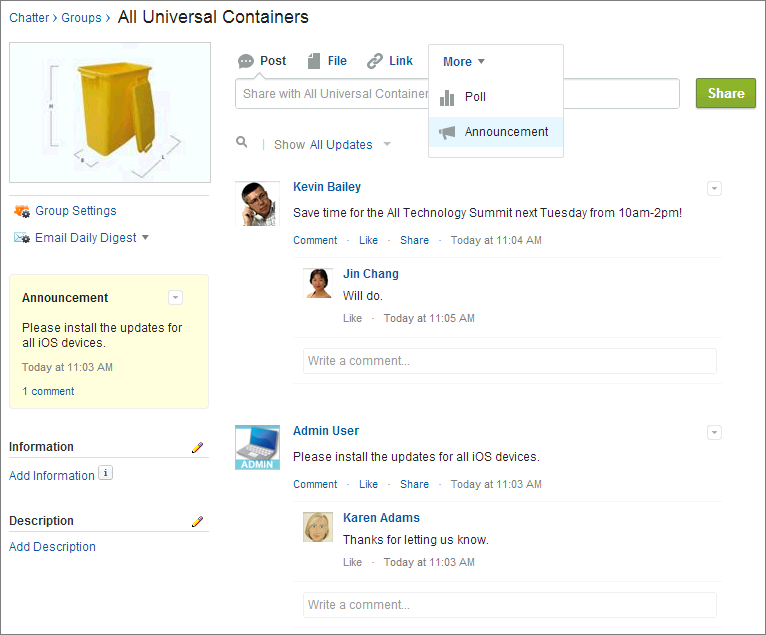
Announcements Methods
The following are methods for Announcements. All methods are static.
deleteAnnouncement(String, String)
API Version
31.0
Requires Chatter
Yes
Signature
public static void deleteAnnouncement(String communityId, String announcementId)
Parameters
Return Value
Type: Void
Usage
To get a list of announcements in a group (including announcement IDs), call getAnnouncements(String, String) or getAnnouncements(String, String, Integer, Integer).
To post an announcement to a group, call postAnnouncement(String, String, String, ConnectApi.AnnouncementInput).
getAnnouncement(String, String)
API Version
31.0
Requires Chatter
Yes
Signature
public static ConnectApi.Announcement getAnnouncement(String communityId, String announcementId)
Parameters
Return Value
Type: ConnectApi.Announcement
Usage
To get a list of announcements in a group (including announcement IDs), call getAnnouncements(String, String) or getAnnouncements(String, String, Integer, Integer).
To post an announcement to a group, call postAnnouncement(String, String, String, ConnectApi.AnnouncementInput).
updateAnnouncement(String, String, Datetime)
API Version
31.0
Requires Chatter
Yes
Signature
public static ConnectApi.Announcement udpateAnnouncement(String communityId, String announcementId, Datetime expirationDate)
Parameters
- communityId
- Type: String
- Use either the ID for a community, internal, or null.
- announcementId
- Type: String
- An announcement ID, which has a prefix of 0BT.
- expirationDate
- Type: Datetime
- The Salesforce UI displays an announcement until 11:59 p.m. on this date unless another announcement is posted first. The Salesforce UI ignores the time value in the expirationDate. However, you can use the time value to create your own display logic in your own UI.
Return Value
Type: ConnectApi.Announcement
Usage
To get a list of announcements in a group (including announcement IDs), call getAnnouncements(String, String) or getAnnouncements(String, String, Integer, Integer).
To post an announcement to a group, call postAnnouncement(String, String, String, ConnectApi.AnnouncementInput).