


Force.com Platform Fundamentals
 j
j
No Results
Search Tips:
- Please consider misspellings
- Try different search keywords
Newer Version Available
Try It Out: Create a Group
Chatter is all about sharing information and collaboration. Now that you’ve turned on feeds, one of the best ways to get people to collaborate is to create groups around common interests. Let’s create a private collaboration group for the recruiters so they can collaborate on recruiting efforts and share information within the group in a secure way.
- In Chatter, click .
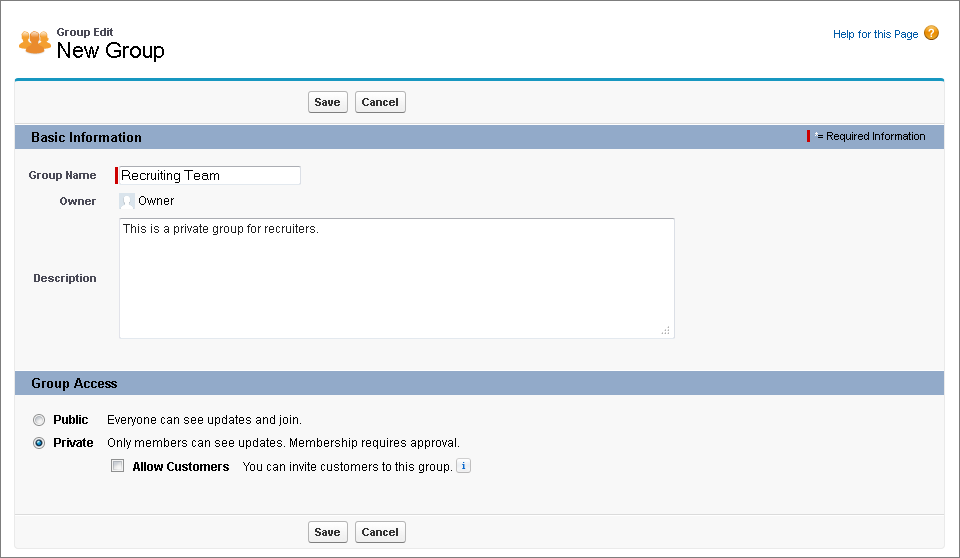
- Use a descriptive name for your group—for example “Recruiting Team”. You also have the option of adding a short description of the group.
- Select Private if you want to create a group for just the recruiters. If you don’t make the group private, any Chatter user in your organization can join. Similarly, because customers are users from outside your company, you probably don’t want to allow them to join this particular group. If it makes sense to allow customers at a later point, you can always do so by changing the group’s settings.
- Click Save.
Creating a Private Collaboration Group
You’ve created the group. Now you can simply add or invite members—in this case, recruiters—and maybe upload a snazzy picture for the group.