


Force.com Platform Fundamentals
 j
j
No Results
Search Tips:
- Please consider misspellings
- Try different search keywords
Putting it All Together
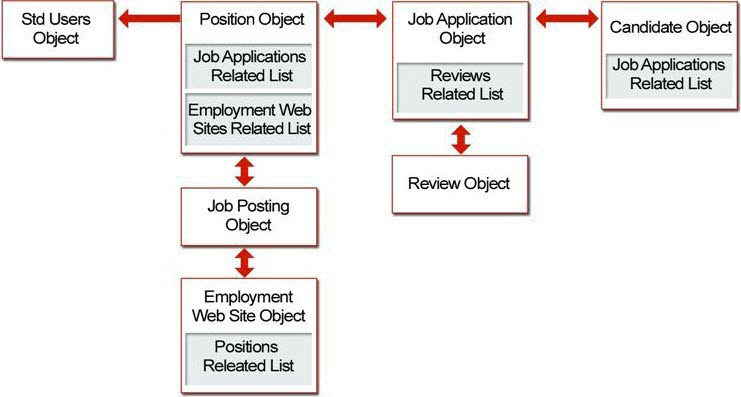
We just created several objects and a lot of relationships. The following simple diagram shows us what we've accomplished so far.
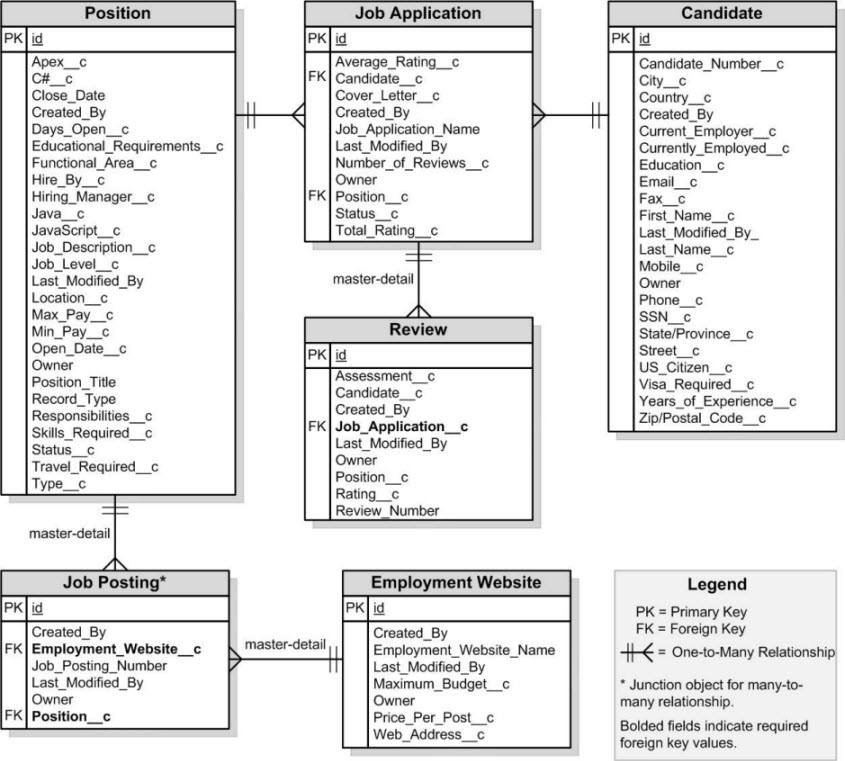
All of these relationships, objects, and fields are shown below in an entity relationship diagram. An entity relationship diagram (ERD) is a conceptual representation of structured data, and is especially useful for planning and understanding an app.
We've now built all of our Recruiting app objects and tabs, and we've defined lots of custom fields—everything from text fields and picklists to more complex formula fields and lookup relationship fields. We've created a robust user interface so that our recruiters and hiring managers can enter and retrieve data about positions and related candidates, job applications, and reviews, and we did all of this without writing a single line of code!
Remember when we assigned Phil Katz as the hiring manager for the Benefits Specialist position? Let's look at what Phil can do now: He can create and update his positions, and track which websites he's posted them on. He can look at details about any candidates who have applied for the Benefits Specialist job, and he can review their related job applications. He can also check the status of the job applications. He no longer has to go to Human Resources to search through Microsoft Word documents and spreadsheets to manage his tasks in the hiring process. The Recruiting app is well on its way to becoming a fully-functional and useful application!
However, before we leave this chapter behind, let's get ourselves prepared for the rest of this book by creating and importing some real data. It'll help us when we get to our next chapter on security and sharing if we have some records that we can work with.