


Visualforce Developer’s Guide
 j
j
No Results
Search Tips:
- Please consider misspellings
- Try different search keywords
Newer Version Available
Using a Custom Stylesheet in a Visualforce Email Template
By default, Visualforce email templates always use the standard look and feel of other Salesforce components. However, you can extend or overwrite these styles by defining your own stylesheet.
Unlike other Visualforce pages, Visualforce email templates cannot use referenced page styles or static resources. Although the CSS appears to render in the email template preview pane, it does not appear the same to the recipients of your email. You must define your style using CSS within <style> tags.
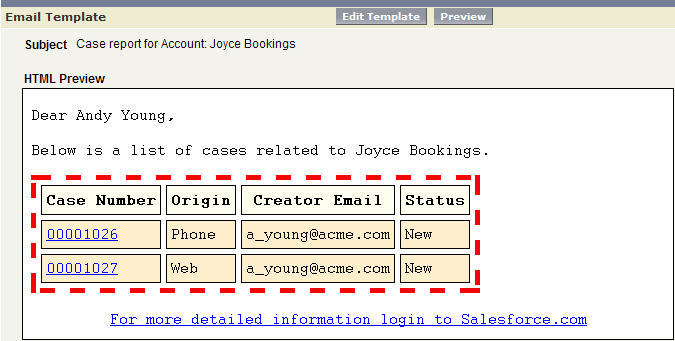
The following example changes the font of your email to Courier,
adds a border to the table, and changes the color of the table rows:
1swfobject.registerObject("clippy.codeblock-0", "9");<messaging:emailTemplate recipientType="Contact"
2	relatedToType="Account"
3	subject="Case report for Account: {!relatedTo.name}"
4	replyTo="support@acme.com">
5
6	<messaging:htmlEmailBody>
7		<html>
8			<style type="text/css">
9			body {font-family: Courier; size: 12pt;}
10
11			table {
12			border-width: 5px;
13			border-spacing: 5px;
14			border-style: dashed;
15			border-color: #FF0000;
16			background-color: #FFFFFF;
17		}
18
19		td {
20			border-width: 1px;
21			padding: 4px;
22			border-style: solid;
23			border-color: #000000;
24			background-color: #FFEECC;
25		}
26
27		th {
28			color: #000000;
29			border-width: 1px ;
30			padding: 4px ;
31			border-style: solid ;
32			border-color: #000000;
33			background-color: #FFFFF0;
34		}
35		</style>
36		<body>
37			<p>Dear {!recipient.name},</p>
38			<table border="0" >
39				<tr>
40					<th>Case Number</th><th>Origin</th>
41					<th>Creator Email</th><th>Status</th>
42				</tr>
43				<apex:repeat var="cx" value="{!relatedTo.Cases}">
44				<tr>
45					<td><a href =
46						"https://na1.salesforce.com/{!cx.id}">{!cx.CaseNumber}
47					</a></td>
48					<td>{!cx.Origin}</td>
49					<td>{!cx.Contact.email}</td>
50					<td>{!cx.Status}</td>
51				</tr>
52				</apex:repeat>
53			</table>
54		</body>
55		</html>
56	</messaging:htmlEmailBody>
57</messaging:emailTemplate>
Example of the Rendered Visualforce Email Template
Defining Visualforce Stylesheets in a Custom Component
Although you cannot reference an external stylesheet in a Visualforce email template, you can place the style definitions within a custom
component that can be referenced in other places. For example,
you can modify the previous example to place the style information
in a component named EmailStyle:
1<apex:component access="global">
2		<style type="text/css">
3		body {font-family: Courier; size: 12pt;}
4
5		table {
6			border-width: 5px;
7			border-spacing: 5px;
8			border-style: dashed;
9			border-color: #FF0000;
10			background-color: #FFFFFF;
11		}
12
13		td {
14			border-width: 1px;
15			padding: 4px;
16			border-style: solid;
17			border-color: #000000;
18			background-color: #FFEECC;
19		}
20
21		th {
22			color: #000000;
23			border-width: 1px ;
24			padding: 4px ;
25			border-style: solid ;
26			border-color: #000000;
27			background-color: #FFFFF0;
28		}
29		</style>
30</apex:component>
Then, in the Visualforce email template, you can reference just that component:
1<messaging:htmlEmailBody>
2	<html>
3	<c:EmailStyle />
4		<body>
5			<p>Dear {!recipient.name},</p>
6		...
7		</body>
8	</html>
9</messaging:htmlEmailBody>