


Salesforce1 Mobile App Developer Guide
 j
jAdd the Tab to the Navigation Menu
In this step, we’ll add the tab as a navigation
menu item. It will instantly become available to Salesforce1 app users that have access to it.
- From Setup, click .
- Select Find Warehouses and click Add to move it over to the Selected
list.
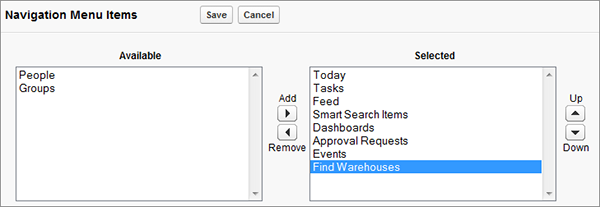
- Click Save.
When your Salesforce1 users log in, they’ll see the Find Warehouses menu item in the navigation menu. Now let’s test it out.