


Force.com Apex Code Developer's Guide
 j
jNewer Version Available
Named Credentials as Callout Endpoints
By separating the endpoint URL and authentication from the callout definition, named credentials make callouts easier to maintain. For example, if an endpoint URL changes, you update only the named credential. All callouts that reference the named credential simply continue to work.
If you have multiple organizations, you can create a named credential with the same name but with a different endpoint URL in each org. You can then package and deploy—on all the orgs—one callout definition that references the shared name of those named credentials. For example, the named credential in each org can have a different endpoint URL to accommodate differences in development and production environments. If an Apex callout specifies the shared name of those named credentials, the Apex class that defines the callout can be packaged and deployed on all those orgs without programmatically checking the environment.
Example
1HttpRequest req = new HttpRequest();
2req.setEndpoint('callout:My_Named_Credential/some_path');
3req.setMethod('GET');
4Http http = new Http();
5HTTPResponse res = http.send(req);
6System.debug(res.getBody());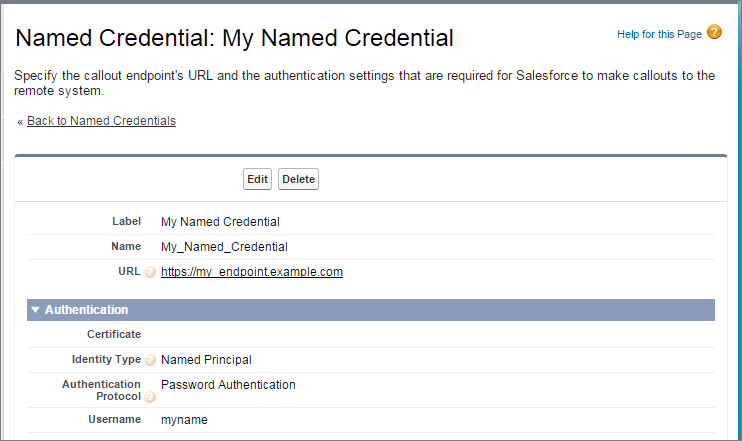 You can code the callout endpoint as the URL
instead of the named credential, but your code then handles the authentication. Our
example uses basic password authentication, but keep in mind that OAuth authentication
is much more complex and is an ideal use case for named
credentials.
You can code the callout endpoint as the URL
instead of the named credential, but your code then handles the authentication. Our
example uses basic password authentication, but keep in mind that OAuth authentication
is much more complex and is an ideal use case for named
credentials.1HttpRequest req = new HttpRequest();
2req.setEndpoint('https://my_endpoint.example.com/some_path');
3req.setMethod('GET');
4
5// Because we didn't set the endpoint as a named credential,
6// our code has to specify:
7// - The required username and password to access the endpoint
8// - The header and header information
9
10String username = 'myname';
11String password = 'mypwd';
12
13Blob headerValue = Blob.valueOf(username + ':' + password);
14String authorizationHeader = 'BASIC ' +
15EncodingUtil.base64Encode(headerValue);
16req.setHeader('Authorization', authorizationHeader);
17
18// Create a new http object to send the request object
19// A response object is generated as a result of the request
20
21Http http = new Http();
22HTTPResponse res = http.send(req);
23System.debug(res.getBody());