


Force.com Platform Fundamentals
 j
jTry It Out: Enable Feed Tracking on Positions and Job Applications
The recruiters at Universal Containers want to know when a position's status or location changes. Hiring managers want to know when a job application is submitted. Let's track these fields for them in Chatter.
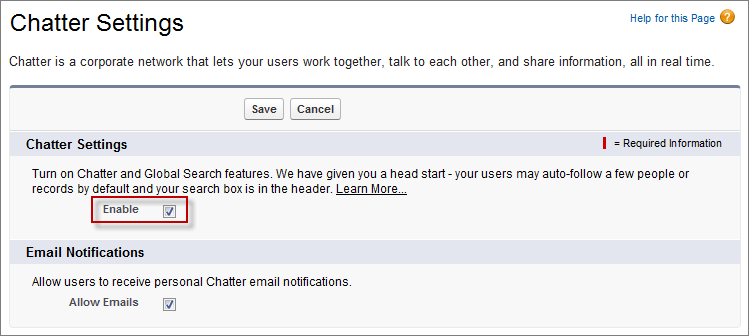
To enable Chatter for your organization:
- From Setup, enter Chatter Settings in the Quick Find box, then select Chatter Settings.
- Click Edit.
- Select Enable.
- Click Save.
Chatter Settings
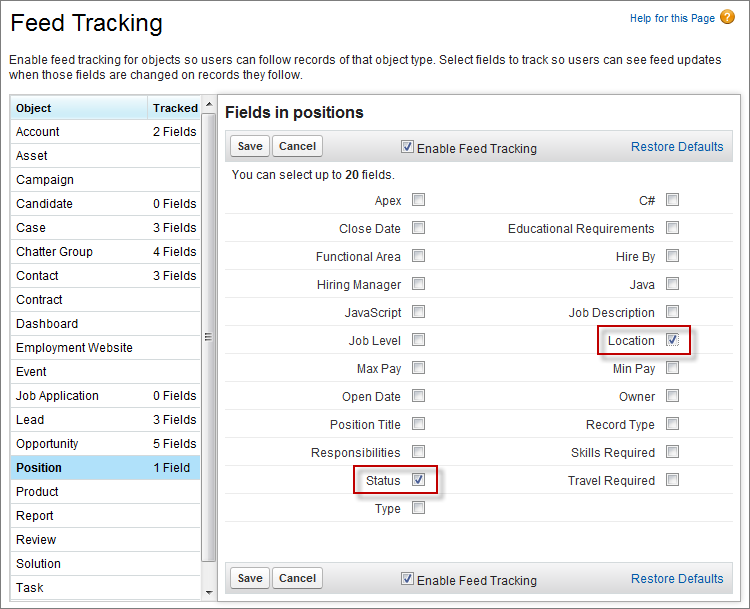
Now, let's track changes to the Status and Location fields for positions:
- From Setup, enter Feed Tracking in the Quick Find box, then select Feed Tracking.
- Select the Position object.
- Select the Enable Feed Tracking checkbox.
- Select the Status and Location fields. If either of these fields changes for a position, that position's feed is updated, alerting the recruiters following it.
- Click Save.
Feed Tracking for Positions
Similarly, the hiring manager wants to be notified when a Job Application's Status changes. Let's track that field:
- From Setup, enter Feed Tracking in the Quick Find box, then select Feed Tracking.
- Select the Job Application object.
- Select Enable Feed Tracking.
- Select the Status field. When the value changes—for instance, from New to Review Resume—the Job Application feed is updated, and hiring managers following that application are notified.
- Click Save.
While we’re at it, let’s enable the rest of our custom objects for feed tracking. Repeat the steps you did for the Position and Job Application objects to enable Candidate, Employment Website, Job Posting, and Review for feed tracking.