


Force.com Platform Fundamentals
 j
jNewer Version Available
Planning the Mass Update Status Feature
The objective is simple: create a way to update the Status field on multiple job applications in a single operation. We just need to work out a few logistics to make sure the implementation goes smoothly. For example, where in our app will users go to access the Mass Update Status functionality? And how will they perform the actual update?
When designing a new feature, it's important to consider the context in which users will access it. Since the purpose of the Mass Update Status feature is to update the Status field on multiple job applications for a single position, it's most likely that users will want to perform this operation while viewing a position record. Therefore, it makes the most sense to provide access to the Mass Update Status feature from position records.
So where exactly on a position record should we provide access to the feature? Well, back in Expanding the Simple App Using Relationships, we added a Job Applications related list to our position records that made it easy for users to quickly identify all of the job applications submitted for a position. We could leverage that list by adding a checkbox next to each job application so that users can select the group of job applications they want to update. Then we could add an Update Status custom list button that lets users update the Status fields on all of the selected job applications in one fell swoop.
- Open a position record and scroll down to the Job Applications related list.
- In the Job Applications related list, select the checkboxes next
to the job applications you want to update.Job Applications Related List
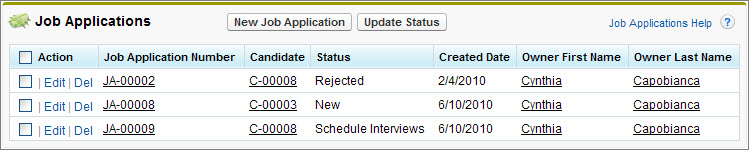
- Click the Update Status button.
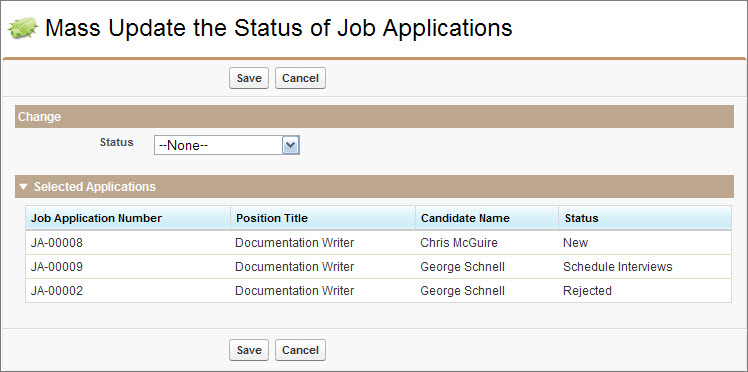
- Choose a value for the Status field.
- Click Save.
It may sound like this will take an astounding effort to implement, but it's really quite simple. All you need to do is create the Mass Update Status page with some basic Visualforce markup, and add a custom list button to the Job Applications related list on position records. You'll be done before you know it!