


Force.com Platform Fundamentals
 j
jOrg-Wide Defaults in Our Recruiting App
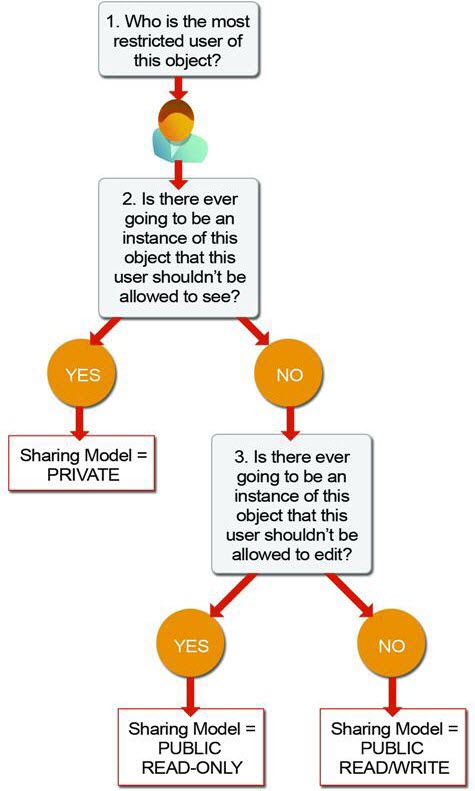
- Who is the most restricted user of this object?
- Is there ever going to be an instance of this object that this user shouldn't be allowed to see?
- Is there ever going to be an instance of this object that this user shouldn't be allowed to edit?
Based on our answers to these questions, we can determine the sharing model that we need for that object as illustrated in the following diagram.
* Only for those records that are associated with a position to which the hiring manager/interviewer has been assigned
** Only for those records that the interviewer owns
- 1. Who is the most restricted user of this object?
- A member of the Standard Employee profile. All that they're allowed to do is view a position.
- 2. Is there ever going to be an instance of this object that this user shouldn't be allowed to see?
- No. Although the values for the minimum and maximum pay are hidden from standard employees, they're still allowed to view all position records.
- 3. Is there ever going to be an instance of this object that this user shouldn't be allowed to edit?
- Yes. Standard employees aren’t allowed to edit any position record.
According to our flowchart, answering “Yes” to question #3 means that the sharing model for the Position object should be set to Public Read-Only.
The same is true for the Employment Website and Job Posting objects, except hiring managers are the most restricted users instead of standard employees. (Standard employees have no permissions on these objects, but of the users that do have permissions, hiring managers are most restricted.) We want to allow hiring managers to view all employment website and job posting records without being able to edit them, so the answer to the second question is “No” while the answer to the third question is “Yes;” therefore, the sharing model for the Employment Website and Job Posting objects should be Public Read-Only.
Going through the rest of our recruiting objects required permissions, we can easily figure out their sharing models, too. The Standard Employee profile is the most restricted user for each object, and there are going to be candidate, job application, and review records that particular employees won't be able to view. Consequently, the sharing model for the Candidate, Job Application, and Review objects should all be set to Private.