Skip Navigation

Force.com IDE Developer Guide

control-j is the search shortcutj
Winter '23 (API version 56.0)
Summer '22 (API version 55.0)
Spring '22 (API version 54.0)
Winter '22 (API version 53.0)
Summer '21 (API version 52.0)
Spring '21 (API version 51.0)
Winter '21 (API version 50.0)
Summer '20 (API version 49.0)
Spring '20 (API version 48.0)
Winter '20 (API version 47.0)
Summer '19 (API version 46.0)
Spring '19 (API version 45.0)
Winter '19 (API version 44.0)
Summer '18 (API version 43.0)
Spring '18 (API version 42.0)
Winter '18 (API version 41.0)
Summer '17 (API version 40.0)
Spring '17 (API version 39.0)
Winter '17 (API version 38.0)
Summer '16 (API version 37.0)
Spring '16 (API version 36.0)
Winter '16 (API version 35.0)
Force.com IDE UI Overview
Force.com Toolbar Buttons
Package Explorer
Force.com Context (Right-Click) Menu
Force.com IDE Editors
Schema Explorer
Force.com Wizards
Force.com Views (Tabs)
Getting Started with the Force.com IDE
Developing with the Force.com IDE
Testing Code with the Force.com IDE
Deploying Code with the Force.com IDE
Getting Started with the Apex Debugger
Useful References
PDF
Force.com IDE UI Overview/Package Explorer

Package Explorer

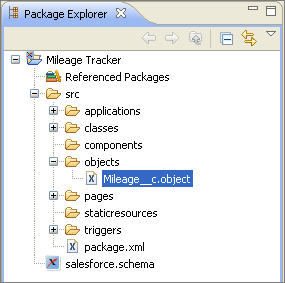
The Package Explorer provides a hierarchical tree view of the projects and files in your workspace, and works just like the standard Eclipse Project Explorer. The Force.com IDE provides additional menu options; for details, see Force.com Context (Right-Click) Menu.The Package Explorer tree view with the src/objects folder open and the Mileage custom object highlightedFor information on standard project folders and files, see Force.com Project Basics.
Salesforce logo