The framework uses events to communicate data between components. Events are usually triggered by a user action.
Actions
User interaction with an element on a component or app. User actions trigger events, but events aren’t always explicitly triggered by user actions. This type of action is not the same as a client-side JavaScript controller, which is sometimes known as a controller action. The following button is wired up to a browser onclick event in response to a button click.
1<lightning:button label = "Click Me" onclick = "{!c.handleClick}" />
Clicking the button invokes the handleClick method in the component’s client-side controller.
Events
A notification by the browser regarding an action. Browser events are handled by client-side JavaScript controllers, as shown in the previous example. A browser event is not the same as a framework component event or application event, which you can create and fire in a JavaScript controller to communicate data between components. For example, you can wire up the click event of a checkbox to a client-side controller, which fires a component event to communicate relevant data to a parent component.
Another type of event, known as a system event, is fired automatically by the framework during its lifecycle, such as during component initialization, change of an attribute value, and rendering. Components can handle a system event by registering the event in the component markup.
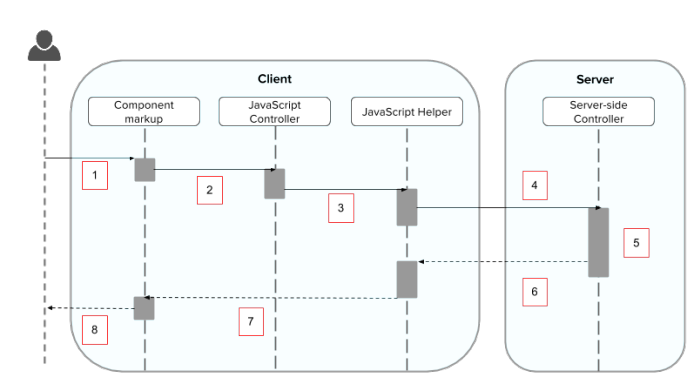
The following diagram describes what happens when a user clicks a button that requires the component to retrieve data from the server.
User clicks a button or interacts with a component, triggering a browser event. For example, you want to save data from the server when the button is clicked.
The button click invokes a client-side JavaScript controller, which provides some custom logic before invoking a helper function.
The JavaScript controller invokes a helper function. A helper function improves code reuse but it’s optional for this example.
The helper function calls an Apex controller method and queues the action.
The Apex method is invoked and data is returned.
A JavaScript callback function is invoked when the Apex method completes.
The JavaScript callback function evaluates logic and updates the component’s UI.


 j
j