


Force.com IDE Developer Guide
 j
jFix the Problem
By now you’ve discovered how to fix the problem in
AccountViewerController.cls. But you can’t save changes to code
while a debugging session is in process. Terminate the debugging session, and then fix
the code.
Complete these steps to modify your code to decrement the iterator
i when removing an item from
listToReduce.
-
In the Debug perspective of the Force.com IDE, click one of the top two levels
of the stack trace in the Debug pane.
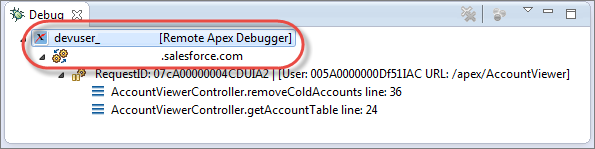
-
To stop your debugging session, click the terminate icon (
 ).
).
-
To decrement the value of i after an account is removed from
listToReduce, modify
AccountViewerController.cls.

- Save your changes.
- Reload your Visualforce page: https://your_salesforce_instance/apex/AccountViewer
- Select Hide Cold Accounts.
- Disable the breakpoint so that you don’t accidentally hit it during future debugging sessions. Right-click the breakpoint and select Disable Breakpoint, or hold down Shift and double-click the breakpoint. If you prefer to remove the breakpoint, right-click it and select Toggle Breakpoint, or double-click it without pressing Shift.
- Celebrate! You’ve successfully debugged your code.