


Chatter REST API Developer Guide
 j
jUnderstanding the Web Server OAuth Authentication Flow
Typically this flow is used by web applications that can confidentially store the client secret. A critical aspect of the Web server flow is that the application must be able to protect the consumer secret.
The following is the general flow. The individual step descriptions follow.
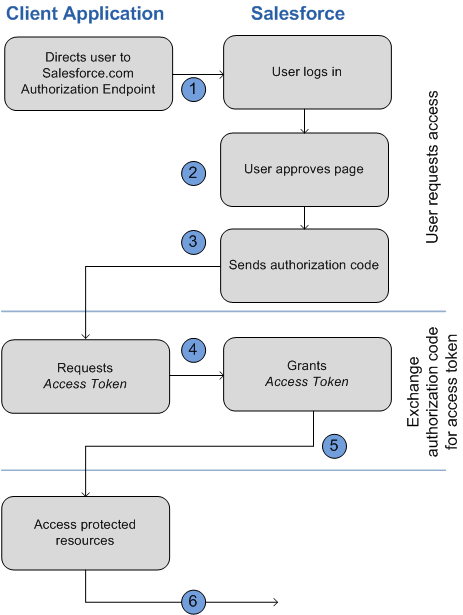
The following is a general description of the OAuth web-server flow:
- To request authorization for a resource, the client application redirects the end user’s browser to a web page hosted on the resource owner’s authorization server. In this case, it is the Salesforce login page.
- End users log in to Salesforce to authenticate themselves. Because the resource owner (Salesforce) hosts this web page and the end user interacts directly with the web page, the client web application never finds out the user’s login credentials. The end user also grants authorization to the client application.
- Salesforce sends the authorization code back to the client application using the specified callback URL.
- After obtaining the authorization code, the client application passes back the authorization code to obtain an access token.
- After validating the authorization code, Salesforce passes back a response token. If there was no error, the response token includes an access code, a refresh token, and additional information.
- The protected resources are Chatter REST API endpoints.
Using the Web Server Flow with Chatter REST API and Salesforce
The following provides specific details for the OAuth Web-server
flow when used with Salesforce and Chatter REST API:
- Direct the client’s web browser to the page https://login.instance_name/services/oauth2/authorize, with
the following request parameters:
Parameter Description response_type Must be code for this authentication flow client_id The Consumer Key value from the connected app defined for this application redirect_uri The Callback URL value from the connected app defined for this application You can also include the following optional request parameters:Parameter Description state Specifies URL-encoded state data to be returned in the callback URL after approval. immediate Determines whether the user is prompted for login and approval. Values are either true or false. Default is false. - If set to true, and if the user is logged in and has previously approved the application, the approval step is skipped.
- If set to true and the user is not logged in or has not previously approved the application, the session is immediately terminated with the immediate_unsuccessful error code.
display Indicates the type of web pages that is provided. Valid values are: - page—Full-page authorization screen. This is the default value if none is specified.
- popup—Compact dialog optimized for modern web browser popup windows.
- touch—mobile-optimized dialog designed for modern smartphones such as Android and iPhone.
- mobile—mobile optimized dialog designed for less capable smartphones such as BlackBerry OS 5.
- After successfully being logged in, the user is asked to authorize the application. If the user has already authorized the application, this step is skipped.

- After Salesforce confirms that the client
application is authorized, the end user’s web browser is redirected to the callback
URL. The callback URL is specified by the redirect_uri
parameter, appended with the following values in its query string.
It is expected that the client application server hosts the redirect_uri web page.
Parameter Description code The authorization code that is passed to get the access and refresh tokens state The state value that was passed in as part of the initial request, if applicable. - The client application server must extract the authorization code and pass it in a request to
Salesforce for an access token, using
POST against this URL:
https://login.instance_name/services/oauth2/token
with the following query parameters.
Parameter Description grant_type Value must be authorization_code for this flow. client_id Consumer key from the connected app definition. client_secret Consumer secret from the connected app definition. redirect_uri URI to redirect the user to after approval. This URI must match the value in the Callback URL field in the connected app definition exactly, and is the same value sent by the initial redirect. code Authorization code obtained from the callback after approval. format Expected return format. This parameter is optional. The default is json. Values are: - urlencoded
- json
- xml
- If this request is successful, the server returns a response body
holding the following:
Parameters Description access_token Session ID that you can use for making Chatter REST API requests. This session ID cannot be used in the user interface. Treat this session ID like a user's session and diligently protect it. refresh_token Token that can be used in the future to obtain new access tokens (sessions). instance_url URL indicating the instance of the user's organization, for example, https://instance_name. id Identity URL that can be used to both identify the user and query for more information about the user. Can be used in an HTTP request to get more information about the end user. signature Base64-encoded HMAC-SHA256 signature signed with the consumer's private key containing the concatenated ID and issued_at. This signature can be used to verify that the identity URL was not modified since the server sent it.. issued_at When the signature was created.