


Force.com SOQL and SOSL Reference
 j
jNewer Version Available
Understanding Relationship Names, Custom Objects, and Custom Fields
This topic explains how relationship names for custom objects and custom fields are created and used.
When you create a new custom relationship in the Salesforce user interface, you are asked to specify the plural version of the object name, which you use for relationship queries:
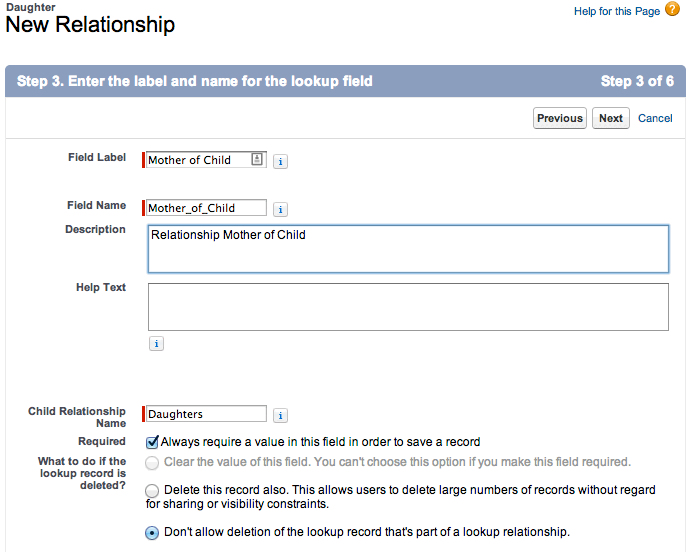
Notice that the Child Relationship Name (parent to child) is the plural form of the child object name, in this case Daughters.
Once the relationship is created, notice that it has an API Name, which is the name of the custom field you created, appended by __c (underscore-underscore-c):
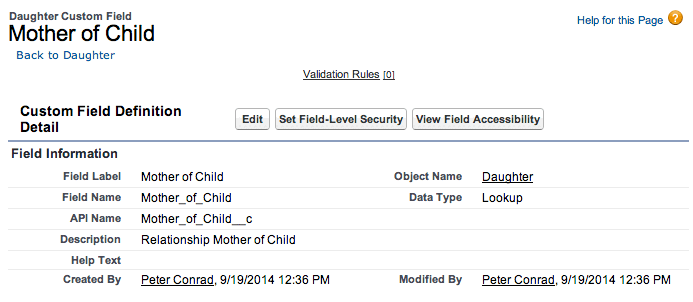
When you refer to this field via the API, you must use this special form of the name. This prevents ambiguity in the case where Salesforce can create a standard object with the same name as your custom field. The same process applies to custom objects—when they are created, they have an API Name, the object named appended by __c, which must be used.
When you use a relationship name in a query, you must use the relationship names without the __c. Instead, append an __r (underscore underscore r).
For example:
- When you use a child-to-parent relationship, you can use dot
notation:
1SELECT Id, FirstName__c, Mother_of_Child__r.FirstName__c
2FROM Daughter__c
3WHERE Mother_of_Child__r.LastName__c LIKE 'C%'
This query returns the ID and first name of daughter objects, and the first name of the daughter's mother if the mother's last name begins with 'C.'
- Parent-to-child relationship queries do not use dot
notation:
1SELECT LastName__c,
2  (
3    SELECT LastName__c
4    FROM Daughters__r
5  )
6FROM Mother__c
The example above returns the last name of all mothers, and for each mother returned, the last name of the mother's daughters.