


Chatter REST API Developer Guide
 j
jUser-Agent OAuth Authentication Flow
The following is the general flow. The individual step descriptions follow.
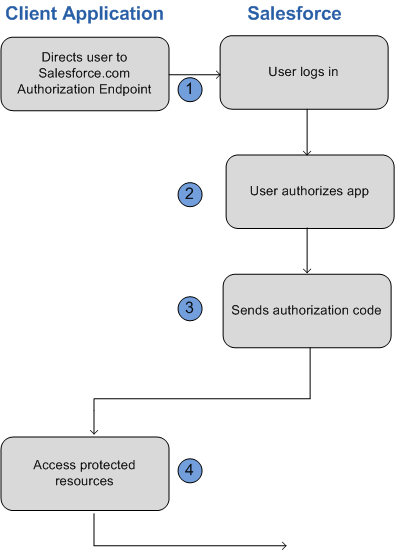
- To request authorization for a resource, the client application redirects the end-user’s browser to a Web page hosted on the resource owner’s authorization server. In this case, it’s the Salesforce login page.
- The end-user logs into Salesforce to
authenticate themselves. Since this Web page is hosted by the resource
owner (Salesforce) and interacted with directly by the end user, the client Web
application never finds out the user’s login credentials.
If the client application is running in the browser already, the browser can just be redirected. If the client application is a mobile app, a browser must be opened (such as an UIWebView in iOS). The end-user uses this web page to authenticate themselves and then grant authorization to the client application.
- Once authorization has been granted, the authorization server redirects the end-user’s Web browser to a redirection URL. This URL can be used by the client application to retrieve the access and refresh tokens.
- The protected resources are Chatter REST API resources.
Using the User-Agent Flow with Chatter REST API and Salesforce
- Direct the client’s Web browser to the page https://login.instance_name/services/oauth2/authorize, with
the following request parameters:
Parameter Description response_type Must be token for this authentication flow client_id The Consumer Key value from the connected app defined for this application redirect_uri The Callback URL value from the connected app defined for this application You can also include the following optional request parameters:Parameter Description display Indicates the type of Web page that’s provided. Valid values are: - page—Full-page authorization screen. This is the default value if none is specified.
- popup—Compact dialog optimized for modern Web browser popup windows.
- touch—mobile-optimized dialog designed for modern smartphones such as Android and iPhone.
- mobile—mobile optimized dialog designed for older smartphones such as BlackBerry OS 5.
scope Specifies what data your app can access. You do not have to specify any value to access Chatter REST API If you specify any values, you must include the chatter_api value. state Specifies URL-encoded state data to be returned in the callback URL after approval. - After successfully logging in, the user is asked to authorize the application. Note that if the user has already authorized the application, this step is skipped.
- Once Salesforce has confirmed that the client application is authorized, the
end-user’s Web browser is redirected to the callback URL specified
by the redirect_uri parameter,
appended with the following values after the hash sign (#). This is
not a query string.
Parameters Description access_token Session ID that you can use for making Chatter REST API requests. This session ID cannot be used in the user interface. Treat this like a user's session and diligently protect it. expires_in Amount of time the access token is valid, in seconds. refresh_token Token that can be used in the future to obtain new access tokens (sessions). The refresh token is only returned if the redirect URI is https://login.instance_name/services/oauth2/success or used with a custom protocol that is not HTTPS. The following additional parameters are returned; however, they aren't used with this flow and Chatter REST API:- instance_url
- id
- signature
- issued_at
- If the client application is a Web app, the redirection Web page
that it uses may include JavaScript that the client application can
manipulate in order to retrieve the access and refresh tokens.
Alternatively, a client application (native or web) may use the page https://login.instance_name/services/oauth2/success as their callback URL. Instead of actually loading the page on redirect, they should intercept the redirection URI and extract the parameters values. Note that the refresh_token parameter values are only provided if the redirection URI is this URI or if the redirection URI uses a custom protocol.
Once the client application has retrieved the access and refresh tokens, it can use them to make requests to Chatter REST API.