


Lightning Components Developer Guide
 j
jNewer Version Available
Lightning Bundle Configurations Available in the Developer Console
Configurations make it easier to create a component or application for a specific
purpose, like a Lightning Page or Lightning Communities Page, or a quick action or navigation
item in Lightning Experience or Salesforce1. The New Lightning Bundle
panel in the Developer Console offers a choice of
component configurations when you create a Lightning component or application
bundle.
Configurations add the interfaces required to support using the component in the desired
context. For example, when you choose the Lightning Tab
configuration, your new component includes implements="force:appHostable" in the <aura:component> tag.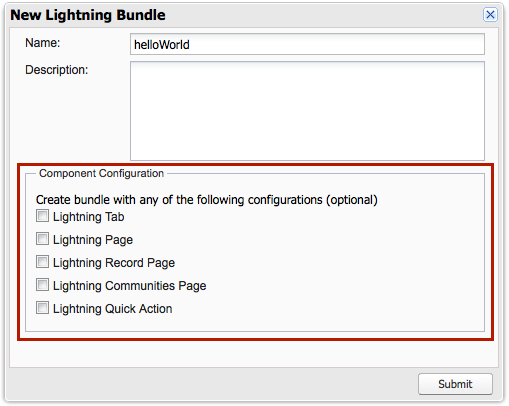
Using configurations is optional. You can use them in any combination, including all or none.
The following configurations are available in the New Lightning Bundle panel.
| Configuration | Markup | Description |
|---|---|---|
| Lightning component bundle | ||
| Lightning Tab | implements="force:appHostable" | Creates a component for use as a navigation element in Lightning Experience or Salesforce1. |
| Lightning Page | implements="flexipage:availableForAllPageTypes" and access="global" | Creates a component for use in Lightning pages or the Lightning App Builder. |
| Lightning Record Page | implements="flexipage:availableForRecordHome, force:hasRecordId" and access="global" | Creates a component for use on a record home page in Lightning Experience. |
| Lightning Communities Page | implements="forceCommunity:availableForAllPageTypes" and access="global" | Creates a component that’s available for drag and drop in the Community Builder. |
| Lightning Quick Action | implements="force:lightningQuickAction" | Creates a component that can be used with a Lightning quick action. |
| Lightning application bundle | ||
| Lightning Out Dependency App | extends="ltng:outApp" | Creates an empty Lightning Out dependency app. |