


Salesforce DX Setup Guide (Beta)
 j
jNewer Version Available
Install the Salesforce DX CLI on the Windows 10 Subsystem for Linux
The Windows Subsystem for Linux (WSL) allows you to run native Linux command-line tools
on Windows 10 alongside your traditional Windows desktop.
- From the Run dialog box (Windows key + R), run optionalfeatures.exe.
-
In Windows Features, select Windows Subsystem for Linux.
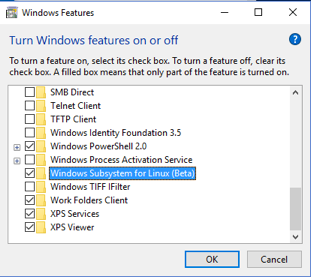
-
From the command prompt, enter bash,
which triggers the installation of Ubuntu. At the prompt, enter y to agree to install the components.
1> bash -
When the Ubuntu install is finished, create the directory /mnt/c/ProgramFilesLinux.
1$ mkdir /mnt/c/ProgramFilesLinux -
Change to the new directory.
1$ cd /mnt/c/ProgramFilesLinux -
Run wget with the download URL of the latest Linux (amd64) tarball. Find the
appropriate URL in this manifest file.
1$ wget https://developer.salesforce.com/media/salesforce-cli/sfdx-v5.7.6-d42cf65-darwin-amd64.tar.xz -
Unpack the contents.
1$ tar xvf sfdx-v5.7.6-d42cf65-darwin-amd64.tar.xz -
Change to the sfdx directory.
1$ cd sfdx -
Run the install script.
1$ ./install -
Install Git.
1$ sudo apt-get install git