


Analytics SAQL Reference
 j
jNewer Version Available
Query Performance
What Happens Behind the Scenes
SAQL stands for Salesforce Analytics Query Language. Most actions you take in Analytics results in one or more SAQL queries. Every lens, dashboard, and explorer action generates and executes a SAQL statement to build the data needed for the visualization.
-
It auto-facets the compact steps. In other words, it links different widgets that relate to each other.
-
It resolves bindings and templates.
-
Every step is converted to a SAQL query.
The SAQL query is then sent to the query engine for execution. The resulting data is passed to the charting library, which renders it using corresponding widget definitions.

Developers can write SAQL to access Analytics data, either via the Analytics REST API, or by creating/editing SAQL queries contained in the dashboard JSON.
A SAQL query loads an input dataset, operates on it, and outputs a results dataset. Each SAQL statement (a reserved keyword such as filter, group, order, and so on) has an input stream, an operation, and an output stream. Statements can span multiple lines and must end with a semicolon.
Each query line is assigned to a named stream. A named stream can be used as input to any subsequent statement in the same query. The only exception to this rule is the last line in a query, which you don’t need to assign explicitly.
A query typically goes through several steps, or layers, on its quest to return the requested data as JSON. The query engine code where this journey starts is designed to execute extremely quickly, and the data is also very efficiently indexed, so query operations (such as filter, group, and foreach) are highly optimized.
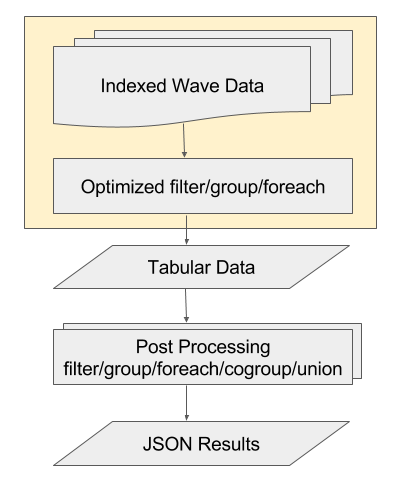
After that, the data is essentially in tabular form, so any major query operations—filter, (co)group, foreach, or union—are less optimized and require more processing; a more "brute force" approach.
A common use of SAQL is to create derived measures or dimensions. This is a fancy way of saying that you can create new columns using calculations based on existing columns. These calculations may be very simple—perhaps just adding two measures or concatenating two dimensions—or they can be very complex.
The following topics highlight common causes of problematic query design.