


Lightning Components Developer Guide
 j
jNewer Version Available
Deleting Records
Create an Apex controller to delete a specified record with the delete operation. The following Apex controller deletes an expense object record.
1@AuraEnabled
2public static Expense__c deleteExpense(Expense__c expense) {
3    // Perform isDeletable() check here
4    delete expense;
5    return expense;
6}
Depending on how your components are set up, you might need to create an event to tell another component that a record has been deleted. For example, you have a component that contains a sub-component that is iterated over to display the records. Your sub-component contains a button (1), which when pressed fires an event that’s handled by the container component (2), which deletes the record that’s clicked on.
1<aura:registerEvent name="deleteExpenseItem" type="c:deleteExpenseItem"/>
2<lightning:button label="Delete" onclick="{!c.delete}"/>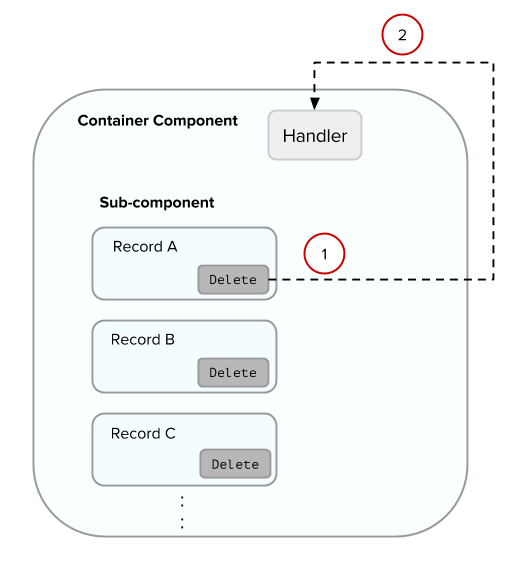
Create a component event to capture and pass the record that’s to be deleted. Name the event deleteExpenseItem.
1<aura:event type="COMPONENT">
2    <aura:attribute name="expense" type="Expense__c"/>
3</aura:event>
Then, pass in the record to be deleted and fire the event in your client-side controller.
1delete : function(component, evt, helper) {
2    var expense = component.get("v.expense");
3    var deleteEvent = component.getEvent("deleteExpenseItem");
4    deleteEvent.setParams({ "expense": expense }).fire();
5}
In the container component, include a handler for the event. In this example, c:expenseList is the sub-component that displays records.
1<aura:handler name="deleteExpenseItem" event="c:deleteExpenseItem" action="c:deleteEvent"/>
2<aura:iteration items="{!v.expenses}" var="expense">
3    <c:expenseList expense="{!expense}"/>
4</aura:iteration>
And handle the event in the client-side controller of the container component.
1deleteEvent : function(component, event, helper) {
2    // Call the helper function to delete record and update view
3    helper.deleteExpense(component, event.getParam("expense"));
4}
Finally, in the helper function of the container component, call your Apex controller to delete the record and update the view.
1deleteExpense : function(component, expense, callback) {
2    // Call the Apex controller and update the view in the callback
3    var action = component.get("c.deleteExpense");
4    action.setParams({
5        "expense": expense
6    });
7    action.setCallback(this, function(response) {
8        var state = response.getState();
9        if (state === "SUCCESS") {
10            // Remove only the deleted expense from view
11            var expenses = component.get("v.expenses");
12            var items = [];
13            for (i = 0; i < expenses.length; i++) {
14                if(expenses[i]!==expense) {
15                    items.push(expenses[i]);
16                }
17            }
18            component.set("v.expenses", items);
19            // Other client-side logic
20        }
21    });
22    $A.enqueueAction(action);
23}
The helper function calls the Apex controller to delete the record in the database. In the callback function, component.set("v.expenses", items) updates the view with the updated array of records.