


Salesforce App Developer Guide
 j
jTest the Compact Layout
When you customize a compact layout and assign it as the default, as we just did, the changes are reflected in Salesforce immediately.
- Open Salesforce on your mobile device.
-
Tap
 to access the navigation menu.
- In the Recent section, tap Merchandise. You may have to tap More... to find it.
- Tap the iPhone 6 item.
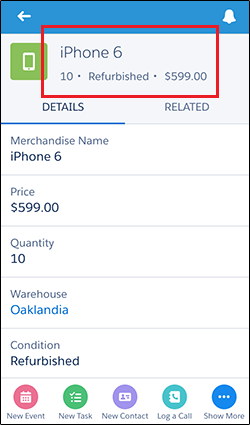
As you can see, the record highlights area has the fields from our newly-created custom compact layout. Instead of seeing just the merchandise name, as on the system default layout, the Acme Wireless mobile technicians can now see much more: that there are ten refurbished iPhone 6s in stock at the warehouse, and they cost $599.00 each.