


Salesforce Security Guide
 j
jUpload Your Tenant Secret
Once you have your tenant secret, upload it to Salesforce so that the Shield Platform Encryption key management machinery can use it to derive your
org-specific data encryption key.
| Available as an add-on subscription in: Enterprise, Performance, and Unlimited Editions. Requires purchasing Salesforce Shield. Available in Developer Edition at no charge for orgs created in Summer ’15 and later. |
| Available in both Salesforce Classic and Lightning Experience. |
| User Permissions Needed | |
|---|---|
| To manage tenant secrets: |
Manage Encryption Keys ANDManage Certificates |
- In Setup, use the Quick Find box to go to the Platform Encryption setup page.
- Click Upload Tenant Secret.
-
In the Upload Tenant Secret section, attach both the encrypted tenant secret and the hashed plaintext tenant secret.
Click Upload.
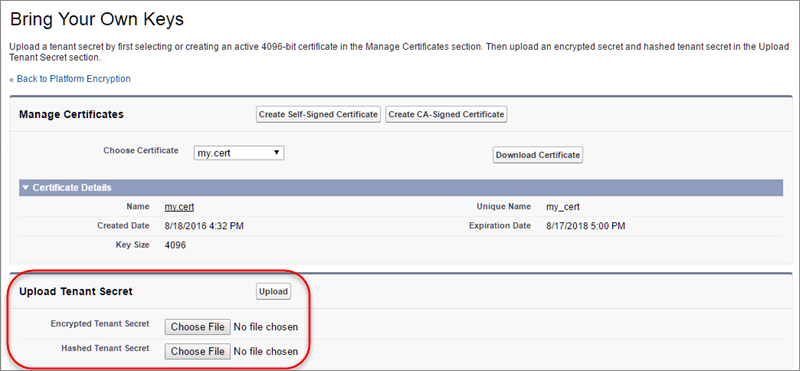
This tenant secret automatically becomes the active tenant secret.

Your tenant secret is now ready to be used for key derivation. From here on, the Salesforce key derivation server will use the tenant secret you generated to derive the org-specific key that the app server will use to encrypt and decrypt your users’ data.
-
Export your tenant secret and back it up as
prescribed in your organization’s security policy.
You’ll have to reimport the secret if you need to restore it. The exported secret is different from the key you uploaded. It is encrypted with a different key and has additional metadata embedded in it. See Back Up Your Tenant Secret in the Salesforce Help.