As we mentioned, a database table presents your information in
rows and columns. Let's take a look at how a table of positions might
look:
Position Information in a Table
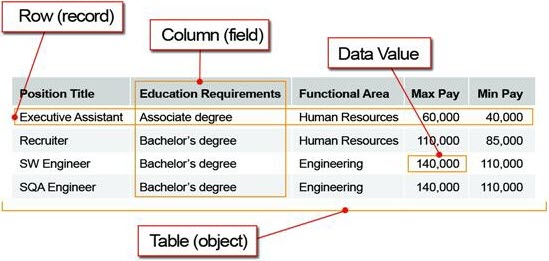
Each row in the table represents the information about a specific instance of the object, for
example, the Recruiter position or the SW Engineer position. In standard Lightning platform
terminology, we call this a
record. For every object you want to track in your app,
you'll have multiple records to represent each individual item about which you're storing
information. It's common for users who are new to the platform to confuse the meanings of object and
record. It'll make your development a lot easier if you remember that an object is a category of
information, such as a position or candidate, and the record is a single instance of an object, such
as a SW Engineer.
As a side note here, we'll mention that the platform includes a set of built-in
objects when you first start using it; we call these standard objects. One example of a
standard object is the User object, which stores information about each person who is a user of the
app, like our hiring managers. You can also build your own objects to store information that's
unique to your app; we call these custom objects. Both standard objects and custom
objects are not really all that different—one kind is prebuilt for you, and the other you
build yourself. We'll talk more about these later as you start to build your app.
Now
let's look at the columns in the table. Each column lists a particular
piece of information such as the Position Title or Max Pay. We refer
to these as fields. Every object has a set of fields
that you use to enter the information about a particular record. For
each field in the table, a single item of data that you enter, such
as Human Resources in the Functional Area, is referred to as a data value.
Just like objects, fields come in two varieties: standard and custom.
The standard fields are the ones that are built into the platform
and automatically added for you. The custom fields are the ones you
define to store specific pieces of information that are unique to
your app. Fundamentally, there is no difference between standard and
custom fields. Both are simply columns in the database table. We'll
talk more about standard and custom fields later when you begin building
your app.


 j
j