


Lightning Components Developer Guide
 j
jSummer '26 (API version 67.0)
Spring '26 (API version 66.0)
Winter '26 (API version 65.0)
Summer '25 (API version 64.0)
Spring '25 (API version 63.0)
Winter '25 (API version 62.0)
Summer '24 (API version 61.0)
Spring '24 (API version 60.0)
Winter '24 (API version 59.0)
Summer '23 (API version 58.0)
Spring '23 (API version 57.0)
Winter '23 (API version 56.0)
Summer '22 (API version 55.0)
Spring '22 (API version 54.0)
Winter '22 (API version 53.0)
Summer '21 (API version 52.0)
Spring '21 (API version 51.0)
Winter '21 (API version 50.0)
Summer '20 (API version 49.0)
Spring '20 (API version 48.0)
Winter '20 (API version 47.0)
Summer '19 (API version 46.0)
Spring '19 (API version 45.0)
Winter '19 (API version 44.0)
Summer '18 (API version 43.0)
Spring '18 (API version 42.0)
Winter '18 (API version 41.0)
Summer '17 (API version 40.0)
Spring '17 (API version 39.0)
Winter '17 (API version 38.0)
Summer '16 (API version 37.0)
Spring '16 (API version 36.0)
Winter '16 (API version 35.0)
Summer '15 (API version 34.0)
Spring '15 (API version 33.0)
Winter '15 (API version 32.0)
Actions and Events
Handling Events with Client-Side Controllers
Application Event Propagation
Create Custom Application Events
Fire Application Events
Application Event Example
Event Handling Lifecycle
Advanced Events Example
Firing Lightning Events from Non-Lightning Code
Events Fired During the Rendering Lifecycle
Events Handled in the Salesforce mobile app and Lightning Experience
System Events
Newer Version Available
Application Events
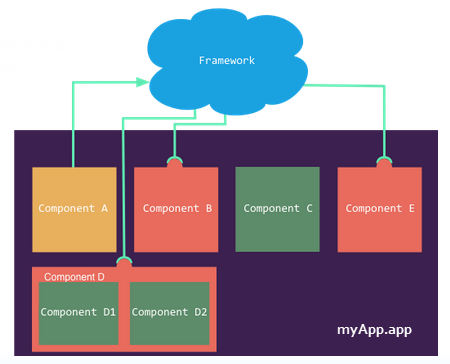
Application events follow a traditional
publish-subscribe model. An application event is fired from an instance of a component. All
components that provide a handler for the event are notified.
-
Application Event Propagation
The framework supports capture, bubble, and default phases for the propagation of application events. The capture and bubble phases are similar to DOM handling patterns and provide an opportunity for interested components to interact with an event and potentially control the behavior for subsequent handlers. The default phase preserves the framework’s original handling behavior. -
Create Custom Application Events
Create a custom application event using the <aura:event> tag in a .evt resource. Events can contain attributes that can be set before the event is fired and read when the event is handled. -
Fire Application Events
Application events follow a traditional publish-subscribe model. An application event is fired from an instance of a component. All components that provide a handler for the event are notified. -
Handling Application Events
Use <aura:handler> in the markup of the handler component.