Analytics SAQL Reference
 j
jNewer Version Available
Enable SAQL Logs in the Browser
If you’re using Google Chrome to work with SAQL and Einstein Analytics, you can turn on SAQL logs.
Turning on SAQL logs in the browser
prints queries in the Developer Tools Console. This lets you see what SAQL is generated by
Einstein Analytics dashboards and lenses. This action doesn’t change server-side
logs.
- In Google Chrome, open an Einstein Analytics dashboard.
- In Google Chrome, open Developer Tools.
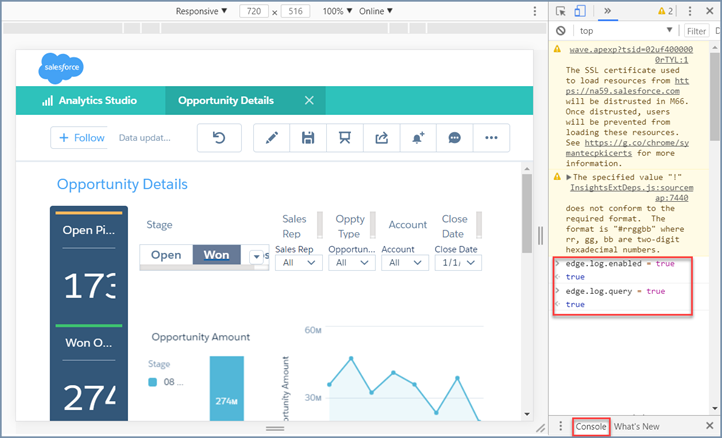
- In Developer Tools, select Console.
- In the Einstein Analtyics dashboard, elect the explore (wave.apexp) frame.
- In the developer tools console, enter edge.log.enabled = true
- In the developer tools console, enter edge.log.query = true
SAQL logs are enabled. The logs are displayed when a query is sent from the dashboard or
lens, for example when you drill into a chart.