


Analytics SAQL Reference
 j
jNewer Version Available
fill
Syntax
1result = fill resultSet by (datecols, [partition]);-
dateCols are the date fields to check, plus the date column type string. For example, to fill gaps in the dates for the close date month and year, use dateCols=(CloseDate_Year, CloseDate_Month, "Y-M"). Allowed values are:
- YearField, MonthField, "Y-M"
- YearField, QuarterField, "Y-Q"
- YearField, "Y"
-
partition (optional) the dimension field used to partition the data stream. For example, partition='Type'
Usage
fill uses the specified date field in a data stream to fill any gaps in the specified date fields. For example, suppose that you have a data stream of closed accounts grouped by year and month. Nobody closed an account in September so no row exists for that month. These gaps in your dates can cause problems when graphing or using statements like timeseries. fill creates a row for September that contains null data, ensuring that at least one row for every month exists in your result set.
Use fill with timeseries or other statements that require a complete set of date values.
Example
Suppose that you manage a chain of apparel stores. You want to analyze total sales by month. However, in July and August 2017, your stores shut down for renovations and you had no sales for those months. Use fill to add rows with the missing dates:
1q = load "data";
2q = foreach q generate 'Amount' as 'Amount',  'Date_Year' as 'Date_Year', 'Date_Month' as 'Date_Month';
3q = fill q by (dateCols=(Date_Year, Date_Month, "Y-M"));
fill added rows with null data for July and August 2017.

Example
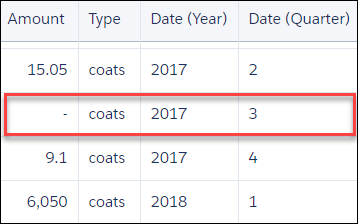
Suppose that you want to analyze future sales for each type of apparel that you sell. However, your store did not sell any coats in the third quarter of 2017. Group your data by type then use fill to add rows with the missing dates.
1q = load "data";
2q = foreach q generate 'Amount' as 'Amount', 'Type' as 'Type', 'Date_Year' as 'Date_Year', 'Date_Quarter' as 'Date_Quarter';
3q = fill q by (dateCols=(Date_Year, Date_Quarter, "Y-Q"), partition='Type');
fill added rows with null data for the third quarter of 2017.
Example
1q = load "TouristData";
2q = group q by ('Visit_Year', 'Visit_Month');
3q = foreach q generate 'Visit_Year', 'Visit_Month', sum('NumTourist') as 'sum_NumTourist';
4
5-- use fill() to generate null rows for any missing dates. Then you can use timeseries().
6q = fill q by (dateCols=('Visit_Year','Visit_Month', "Y-M"));
7
8q = timeseries q generate 'sum_NumTourist' as Tourists with (length=12,  dateCols=('Visit_Year','Visit_Month', "Y-M"));
9q = foreach q generate 'Visit_Year' + "~~~" + 'Visit_Month' as 'Visit_Year~~~Visit_Month', Tourists;