


Analytics Extended Metadata (XMD) Reference
 j
jNewer Version Available
Format Measures
Formatting a Measure
In this example lens, the values in the Sales column don’t include decimals or currency
symbols. 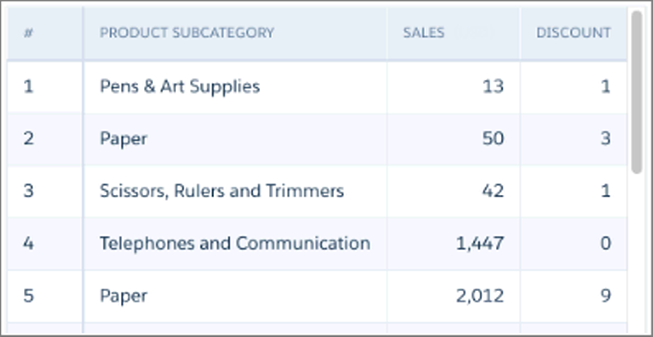
1"measures" : [
2    {
3      "field": "Sales",
4      "format": {
5        "customFormat": "[\"$#,###,###.##\",1]"
6      },
7      "label": "Sales (USD)",
8      "showInExplorer": true
9    }
10],
The field now has the label “Sales (USD)” and its values include a currency symbol and two
decimal places.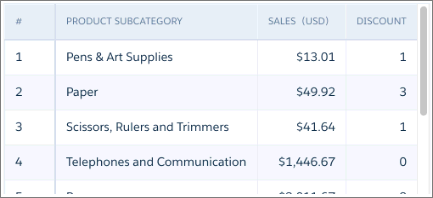
Formatting a Derived Measure
The following SAQL query contains a derived measure that calculates the average revenue per
employee. As shown, the values in this derived field aren’t formatted. 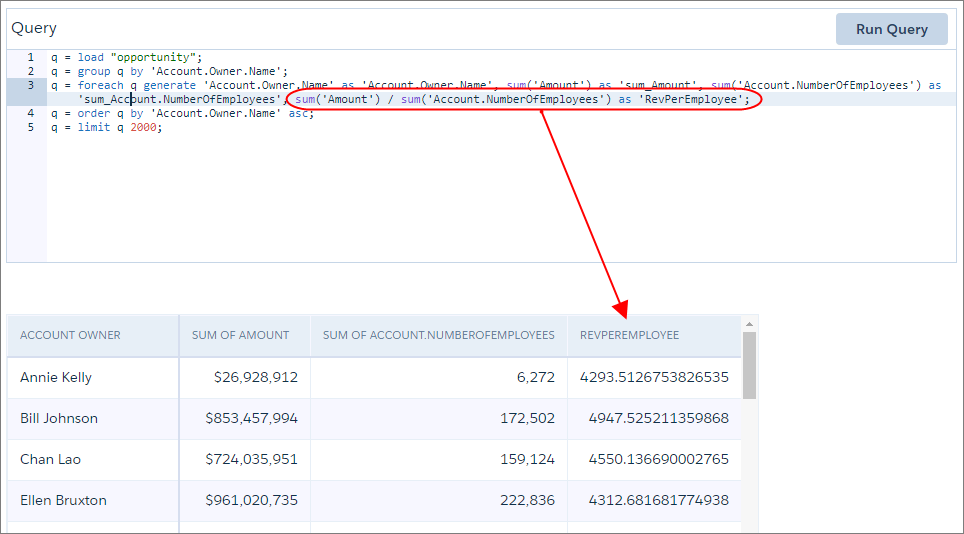
1"derivedMeasures": [
2  {
3    "field": "RevPerEmployee",
4    "format": {
5      "customFormat": "[\"$#,###.##\",1]"
6    },
7    "label": "Revenue Per Employee",
8    "showInExplorer": true
9  }
10],
The field now has the label “Revenue Per Employee” and its values include a currency symbol
and a grouping separator.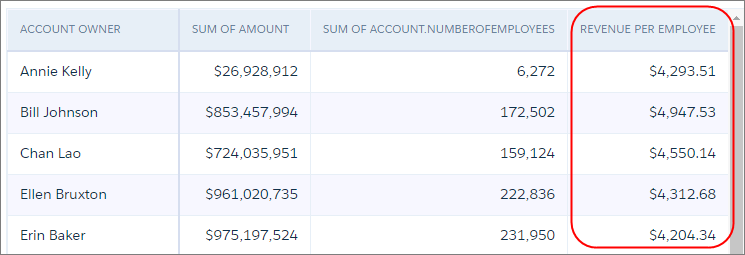
More Formatting Examples
| Goal | XMD |
|---|---|
|
Display 500000 as $500000 (prefix with “$”) |
|
|
Display 500000 as $500,000 (prefix with “$”, include grouping separator) |
|
|
Display 500000 as $500,000.00 (prefix with “$”, include grouping separator, apply 2 decimal places) |
|
|
Display 500000 as –$500,000.00USD (prefix with “–$”, include grouping separator, apply 2 decimal places, suffix with “USD”) |
|
|
Display Canadian currency code as a suffix (include grouping separator, apply 2 decimal places, suffix with “CAD”) |
|
For more information about using symbols in the customFormat field, see Measures and Derived Measures in XMD.