


Salesforce DX Developer Guide
 j
jNewer Version Available
Create a Salesforce DX Project
A Salesforce DX project has a specific structure and a configuration file that identifies
the directory as a Salesforce DX project.
You can create a project with minimal (empty) or expanded (standard) scaffolding. For
Spring ’19 (v45), the default is empty (maintaining the
command’s previous behavior). In Summer ’19 (v46), the default is
standard, which provides extended scaffolding to facilitate
moving source to and from your orgs.
- Change to the directory where you want the DX project located.
-
Create the DX project.
If you don’t indicate an output directory, the project directory is created in the current location. You can also specify the default package directory to target when syncing source to and from the scratch org. If you don’t indicate a default package directory, this command creates a default package directory, force-app.
1force:project:create -n MyProject --template standardThe default --template value, empty, creates a project with these sample configuration files to get you started.
- .forceignore
- config/project-scratch-def.json
- sfdx-project.json
If you select expanded scaffolding (--template standard), you get a complete directory structure that takes the guesswork out of where to put your source. It also provides these files that are especially helpful when using Salesforce Extensions for VS Code.
- .gitignore: Makes it easier to start using Git for version control.
- .prettierrc and .prettierignore: Make it easier to start using Prettier to format your Aura components.
- .vscode/extensions.json: Causes Visual Studio Code, when launched, to prompt you to install the recommended extensions for your project.
- .vscode/launch.json: Configures Replay Debugger, making it more discoverable and easier to use.
- .vscode/settings.json: By default, this file has one setting, for push or deploy on save, which is set to false. You can change this value or add other settings.
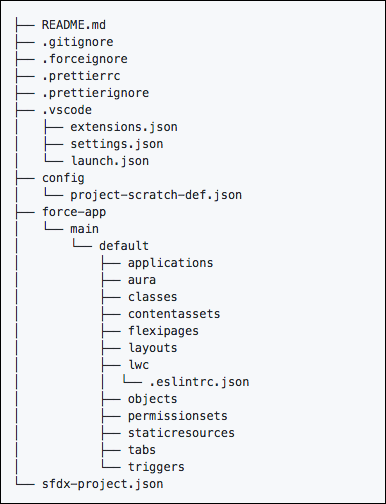
Example
1sfdx force:project:create --projectname mywork --template standard1sfdx force:project:create --projectname mywork --defaultpackagedir myappNext steps:
- (Optional) Register the namespace with the Dev Hub org.
- Configure the project (sfdx-project.json). If you use a namespace, update this file to include it.
- Create a scratch org definition that produces scratch orgs that mimic the shape of another org you use in development, such as sandbox, packaging, or production. The config directory of your new project contains a sample scratch org definition file (project-scratch-def.json).