Apex Developer Guide
 j
jNewer Version Available
Salesforce Connect
| Available in: both Salesforce Classic (not available in all orgs) and Lightning Experience (not for high-data-volume external objects) |
| Available in: Developer Edition Available for an extra cost in: Enterprise, Performance, and Unlimited Editions |
Traditionally, we’ve recommended importing or copying data into your Salesforce org to let your users access that data. For example, extract, transform, and load (ETL) tools can integrate third-party systems with Salesforce. However, doing so copies data into your org that you don’t need or that quickly becomes stale.
- You have a large amount of data that you don’t want to copy into your Salesforce org.
- You need small amounts of data at any one time.
- You want real-time access to the latest data.
Even though the data is stored outside your org, Salesforce Connect provides seamless integration with the Lightning Platform. External objects are available to Salesforce tools, such as global search, lookup relationships, record feeds, and the Salesforce app. External objects are also available to Apex, SOSL, SOQL queries, Salesforce APIs, and deployment via the Metadata API, change sets, and packages.
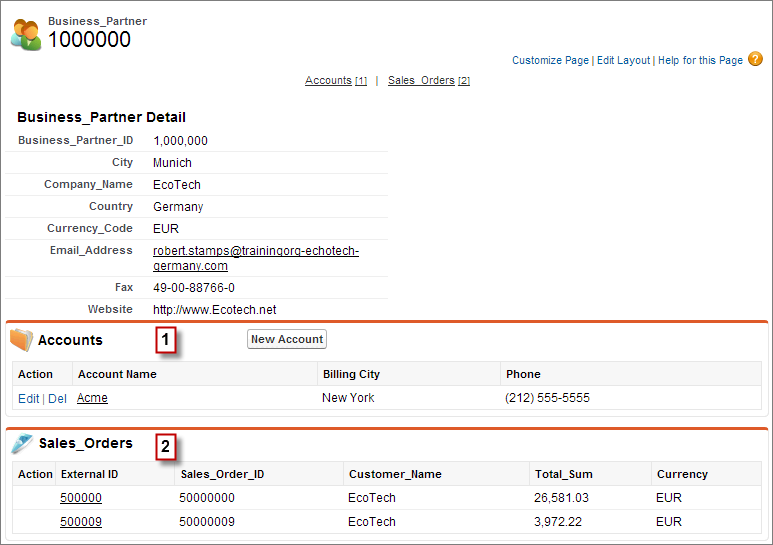
For example, suppose that you store product order information in a back-office ERP system. You want to view those orders as a related list on each customer record in your Salesforce org. Salesforce Connect enables you to set up a lookup relationship between the customer object (parent) and the external object (child) for orders. Then you can set up the page layouts for the parent object to include a related list that displays child records.
Going a step further, you can update the orders directly from the related list on the customer record. By default, external object records are read only. But you can define the external data source to enable writable external objects.
For information about using Apex DML write operations on external object records, see the Lightning Platform Apex Code Developer's Guide.
Example
- Account standard object (1)
- Sales_Order external object (2)