


Salesforce DX Developer Guide
 j
jNewer Version Available
Limitations for Salesforce DX
For the latest known issues, visit the Trailblazer Community’s Known Issues page.
Salesforce CLI
- Authorization Fails If Using auth:web:login with Client Secret
-
Description: If you run force:auth:web:login with a client ID and client secret, you
can’t use Salesforce CLI to issue commands to the scratch org because the
authorization file isn’t properly created.
Workaround: Use the web-based flow without client ID and client secret, or use the JWT-based flow to authorize to the org. See Authorization in the Salesforce DX Developer Guide for instructions on Dev Hub and scratch org authorization methods.
- Windows Defender Suspends CLI Installation
-
Description: When you are installing the Salesforce CLI on Windows,
you see a Windows Defender warning. This message is expected because we
updated the installer’s code signing certificate.
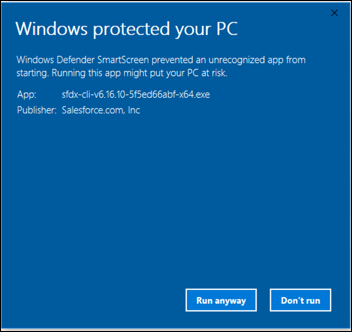
Workaround: To ignore this message, click Run anyway.
- Can’t Import Record Types Using the Salesforce CLI
-
Description: We don't support RecordType when running the data:tree:import
command.
Workaround: None.
- Limited Support for Shell Environments on Windows
-
Description: Salesforce CLI is tested on the Command Prompt (cmd.exe) and Powershell. There are known
issues in the Cygwin and Min-GW environments, and with Windows Subsystem for
Linux (WSL). These environments might be tested and supported in a future
release. For now, use a supported shell instead.
Workaround: None.
- The force:apex:test:run Command Doesn’t Finish Executing
-
Description: In certain situations, the force:apex:test:run command doesn’t finish executing. Examples
of these situations include a compile error in the Apex test or an Apex test
triggering a pre-compile when another is in progress.
Workaround: Stop the command execution by typing control-C. If the command is part of a continuous integration (CI) job, try setting the environment variable SFDX_PRECOMPILE_DISABLE=true.
Dev Hub and Scratch Orgs
- Salesforce CLI Sometimes Doesn’t Recognize Scratch Orgs with Communities
-
Description: Sometimes, but not in all cases, the Salesforce CLI
doesn’t acknowledge the creation of scratch orgs with the Communities
feature. You can’t open the scratch org using the CLI, even though the
scratch org is listed in Dev Hub.
Workaround: You can try this workaround, although it doesn’t fix the issue in all cases. Delete the scratch org in Dev Hub, then create a new scratch org using the CLI. Deleting and recreating scratch orgs counts against your daily scratch org limits.
- Error Occurs If You Pull a Community and Deploy It
-
Description: The error occurs because the scratch org doesn’t have
the required guest license.
Workaround: In your scratch org definition file, if you specify the Communities feature, also specify the Sites feature.
Source Management
- ERROR: No Results Found for force:source:status After Deleting a Custom Label
-
Description: The force:source:status command returns a No Results
Found error after you delete a custom label in a scratch
org.
Workaround: Option #1: If you have only one or two scratch orgs and you can easily identify the affected scratch org by its generated username, use this workaround. In the Your DX project/.sfdx/org directory, delete only the folder of the affected scratch org.
Option #2: If you have several scratch orgs associated with your DX project and you don’t know which scratch org’s local data to delete, use this workaround. Delete the Your DX project/.sfdx/org directory. This directory contains source tracking information for all scratch orgs related to the project. When you run the next source-tracking command for this or another scratch org (source:push, source:pull, or source:status), the CLI reconstructs the source tracking information for that org.
After you delete the directory (after option #1 or option #2), run force:source:status again.
- ERROR: Entity of type 'RecordType' named 'Account.PersonAccount' cannot be found
-
Description: Although you can turn on Person Accounts in your scratch
org by adding the feature to your scratch org definition, running source:push or source:pull results in an error,
Workaround: None.
- force:source:convert Doesn’t Add Post-Install Scripts to package.xml
-
Description: If you run force:source:convert, package.xml does not include the post
install script.Workaround: To fix this issue, choose one of these methods:
- Manually add the <postInstallClass> element to the package.xml in the metadata directory that force:source:convert produces
- Manually add the element to the package in the release org or org to which you are deploying the package.
- Must Manually Enable Feed Tracking in an Object's Metadata File
-
Description: If you enable feed tracking on a standard or custom
object, then run force:source:pull,
feed tracking doesn't get enabled.
Workaround: In your Salesforce DX project, manually enable feed tracking on the standard or custom object in its metadata file (-meta.xml) by adding <enableFeeds>true</enableFeeds>.
- Unable to Push Lookup Filters to a Scratch Org
-
Description: When you execute the force:source:push command to push the source of a relationship
field that has a lookup filter, you sometimes get the following error:
duplicate value found: <unknown> duplicates value on record with id: <unknown> at line num, col num.
Workaround: None.
Deployment
- Compile on Deploy Can Increase Deployment Times in Scratch Orgs
-
Description: If your deployment times for Apex code are slow, your
scratch org might have the CompileOnDeploy preference set to true. Workaround:To turn it off, set it to false (the default) or delete the setting from the scratch org definition.
1{
2  "orgName": "ekapner Company",
3  "edition": "Developer",
4  "features": [],
5  "settings": {
6    "orgPreferenceSettings": {
7      "s1DesktopEnabled": true,
8      "compileOnDeploy": false
9    }
10  }
11}
Managed First-Generation Packages
- When You Install a Package in a Scratch Org, No Tests Are Performed
-
Description: If you include tests as part of your continuous
integration process, those tests don’t run when you install a package in a
scratch org.
Workaround: You can manually execute tests after the package is installed.
- New Terminology in CLI for Managed Package Password
-
Description: When you use the CLI to add an installation key to a package version or
to install a key-protected package version, the parameter name of the key is
--installationkey. When you view a
managed package version in the Salesforce user interface, the same package
attribute is called “Password”. In the API, the corresponding field name,
“password”, is unchanged.
Workaround: None.
Managed Second-Generation Packages
- Unable to Specify a Patch Version for Managed Packages
-
Description: The four-part package version number includes a patch segment, defined
as major.minor.patch.build. However, you can’t create a patch for a
second-generation managed package. Package creation fails if you set a patch
number in the package descriptor. We plan to provide this functionality for
managed packages in the Winter ’20 release.
Workaround: Always set the patch segment of the version number, to 0. For example, 1.2.0.1 is valid but 1.2.1.1 is not.
- Protected Custom Metadata and Custom Settings are Visible to Developers in a Scratch Org If Installed Packages Share a Namespace
-
Description: Use caution when you store secrets in your
second-generation packages using protected custom metadata or protected
custom settings. You can create multiple second-generation packages with the
same namespace. However, when you install these packages in a scratch org,
these secrets are visible to any of your developers that are working in a
scratch org with a shared namespace. In the future, we might add a
“package-protected” keyword to prevent access to package secrets in these
situations.
Workaround: None.
Unlocked Packages
- Protected Custom Metadata and Custom Settings are Visible to Developers in a Scratch Org If Installed Packages Share a Namespace
-
Description: Use caution when you store secrets in your unlocked
packages using protected custom metadata or protected custom settings. You
can create multiple unlocked packages with the same namespace. However, when
you install these packages in a scratch org, these secrets are visible to
any of your developers that are working in a scratch org with a shared
namespace. In the future, we might add a “package-protected” keyword to
prevent access to package secrets in these situations.
Workaround: None.