


REST API Developer Guide
 j
jNewer Version Available
How Are Apps Authenticated with the Web Server OAuth Authentication Flow?
In this flow, the client application requests the authorization server to redirect the user to another web server or resource. The web server or resource authorizes the user, and sends the application an authorization code. The application uses the authorization code to request an access token. The following shows the steps for this flow.
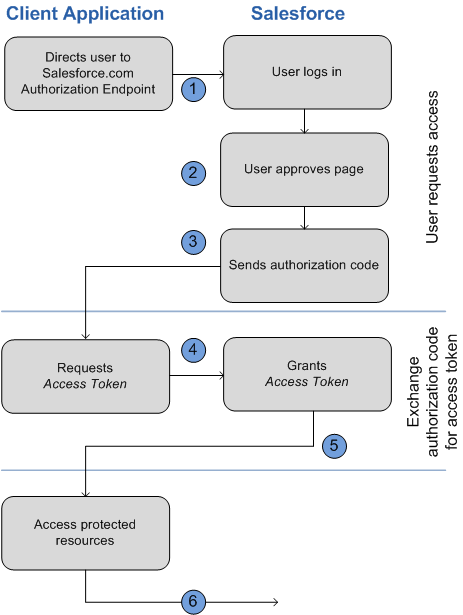
- The application redirects the user to the appropriate Salesforce authorization endpoint,
such as https://login.salesforce.com/services/oauth2/authorize. The following parameters are required:
The following parameters are optional:This example shows an authorization URL:
Parameter Description code_challenge Specifies the SHA256 hash value of the code_verifier value in the token request to help prevent authorization code interception attacks. The hash value must be base64url encoded as defined here: https://tools.ietf.org/html/rfc4648#section-5. - If the code_challenge value is provided in the authorization request and a code_verifier value is provided in the token request, Salesforce compares the code_challenge to the code_verifier. If the code_challenge is invalid or doesn’t match, the login fails with the invalid_request error code.
- If the code_challenge value is provided in the authorization request, but a code_verifier value is not provided in the token request, the login fails with the invalid_grant error code.
display Changes the login page’s display type. Valid values are: - page—Full-page authorization screen. This value is the default if none is specified.
- popup—Compact dialog optimized for modern web browser popup windows.
- touch—Mobile-optimized dialog designed for modern mobile devices such as Android and iPhone.
- mobile—Mobile optimized dialog designed for mobile devices such as BlackBerry OS 5 that don’t support touch screens.
immediate Determines whether the user is prompted for login and approval. Values are either true or false. Default is false. - If set to true, and if the user is currently logged in and has previously approved the application, the approval step is skipped.
- If set to true and the user is not logged in or has not previously approved the application, the session is immediately terminated with the immediate_unsuccessful error code.
login_hint Provides a valid username value to pre-populate the login page with the username. For example:login_hint=username@company.com. If a user already has an active session in the browser, then the login_hint parameter does nothing; the active user session continues. nonce Specifies a value to be returned in the response; this parameter is useful for detecting "replay" attacks. Optional with the openid scope for getting a user ID token. prompt Specifies how the authorization server prompts the user for reauthentication and reapproval. This parameter is optional. The only values Salesforce supports are: - login—The authorization server must prompt the user for reauthentication, forcing the user to log in again.
- consent—The authorization server must prompt the user for reapproval before returning information to the client.
1?prompt=login%20consentscope Specifies what data your application can access. See “Scope Parameter Values” in Salesforce Help for more information. state Specifies any additional URL-encoded state data to be returned in the callback URL after approval. 1https://login.salesforce.com/services/oauth2/authorize?response_type=code 2&client_id=3MVG9lKcPoNINVBIPJjdw1J9LLM82HnFVVX19KY1uA5mu0QqEWhqKpoW3svG3X 3HrXDiCQjK1mdgAvhCscA9GE&redirect_uri=https%3A%2F%2Fwww.mysite.com%2F 4code_callback.jsp&state=mystate - The user logs into Salesforce with their credentials. The user is interacting with the authorization endpoint directly, so the application never sees the user’s credentials. After successfully logging in, the user is asked to authorize the application. If the user has already authorized the application, this step is skipped.
- After Salesforce confirms that the client application is authorized, the end
user’s web browser is redirected to the callback URL specified by the redirect_uri parameter. Salesforce appends authorization
information to the redirect URL with the following values:
This example shows a callback URL with authorization information:
1https://www.mysite.com/authcode_callback?code=aWekysIEeqM9PiT 2hEfm0Cnr6MoLIfwWyRJcqOqHdF8f9INokharAS09ia7UNP6RiVScerfhc4w%3D%3D - The application extracts the authorization code and passes it in a request to Salesforce
for an access token. This request is a POST request sent to the appropriate Salesforce
token request endpoint, such as https://login.salesforce.com/services/oauth2/token. The following parameters are required:
The following parameters are optional:This example shows an access token POST request that sends the client_id and client_secret in the body.
Parameter Description client_assertion Instead of passing in client_secret you can choose to provide a client_assertion and client_assertion_type. If a client_secret parameter is not provided, Salesforce checks for the client_assertion and client_assertion_type automatically. The value of client_assertion must be a typical JWT bearer token, signed with the private key associated with the OAuth consumer’s uploaded certificate. Only the RS256 algorithm is supported. For more information on using client_assertion, see the OpenID Connect specifications for the private_key_jwt client authentication method. client_assertion_type Provide this value when using the client_assertion parameter. The value of client_assertion_type must be urn:ietf:params:oauth:client-assertion-type:jwt-bearer. code_verifier Specifies 128 bytes of random data with high enough entropy to make it difficult to guess the value to help prevent authorization code interception attacks. The value also must be base64url encoded as defined here: https://tools.ietf.org/html/rfc4648#section-5. - If the code_verifier value is provided in the token request and a code_challenge value is in the authorization request, Salesforce compares the code_verifier to the code_challenge. If the code_verifier is invalid or doesn’t match, the login fails with the invalid_grant error code.
- If the code_verifier value is provided in the token request, but a code_challenge value was not provided in the authorization request, the login fails with the invalid_grant error code.
format Expected return format. The default is json. Values are: - urlencoded
- json
- xml
- Accept: application/x-www-form-urlencoded
- Accept: application/json
- Accept: application/xml
1POST /services/oauth2/token HTTP/1.1
2Host: login.salesforce.com
3grant_type=authorization_code&code=aPrxsmIEeqM9PiQroGEWx1UiMQd95_5JUZ
4VEhsOFhS8EVvbfYBBJli2W5fn3zbo.8hojaNW_1g%3D%3D&client_id=3MVG9lKcPoNI
5NVBIPJjdw1J9LLM82HnFVVX19KY1uA5mu0QqEWhqKpoW3svG3XHrXDiCQjK1mdgAvhCs
6cA9GE&client_secret=1955279925675241571&
7redirect_uri=https%3A%2F%2Fwww.mysite.com%2Fcode_callback.jsp
Instead of sending client credentials as parameters in the body of the POST request, Salesforce supports the HTTP Basic authentication scheme. The scheme requires the client_id and client_secret in the authentication header of the request as follows:
Authorization: Basic64Encode(client_id:secret)
The client_id and client_secret are separated with a colon (:). For more information, see The OAuth 2.0 Authorization Framework.
This example shows an access token POST request that uses HTTP Basic authentication scheme (rather than sending client credentials in the POST request’s body).
1POST /services/oath2/token HTTP/1.1 2Host: login.salesforce.com 3Authorization: Basic client_id=3MVG9lKcPoNINVBIPJjdw1J9LLM82HnFVVX19KY1uA5mu0 4QqEWhqKpoW3svG3XHrXDiCQjK1mdgAvhCscA9GE&client_secret=1955279925675241571 5 6grant_type=authorization_code&code=aPrxsmIEeqM9PiQroGEWx1UiMQd95_5JUZ 7VEhsOFhS8EVvbfYBBJli2W5fn3zbo.8hojaNW_1g%3D%3D& 8redirect_uri=https%3A%2F%2Fwww.mysite.com%2Fcode_callback.jsp - If this request is successful, the server returns a response body that contains the following:
This example shows a JSON response body:
1{"id":"https://login.salesforce.com/id/00Dx0000000BV7z/005x00000012Q9P", 2"issued_at":"1278448101416", 3"refresh_token":"5Aep8614iLM.Dq661ePDmPEgaAW9Oh_L3JKkDpB4xReb54_ 4pZebnUG0h6Sb4KUVDpNtWEofWM39yg==", 5"instance_url":"https://yourInstance.salesforce.com/", 6"signature":"CMJ4l+CCaPQiKjoOEwEig9H4wqhpuLSk4J2urAe+fVg=", 7"access_token":"00Dx0000000BV7z!AR8AQP0jITN80ESEsj5EbaZTFG0R 8NBaT1cyWk7TrqoDjoNIWQ2ME_sTZzBjfmOE6zMHq6y8PIW4eWze9JksNEkWUl.Cju7m4"} - The application uses the provided access token and refresh token to access protected user data.