


Lightning Communities Developer Guide
 j
jNewer Version Available
ExperienceBundle for Lightning Communities (Pilot)
Pilot Limitations
- Unlocked packages and managed packages aren’t supported.
- The CMS Collection, CMS Connect (JSON), and CMS Single Item components aren’t included in ExperienceBundle.
ExperienceBundle Structure
When you retrieve ExperienceBundle, the data is stored in a three-level folder structure.
The experiences folder contains a folder for each Lightning community
in your org. Each community_name
folder—customer_service in this example—contains
subfolders that define the community and represent the different elements that you access in
Community Builder. Each subfolder has .json files that contain the properties that you can
edit on your local machine or scratch org and then deploy.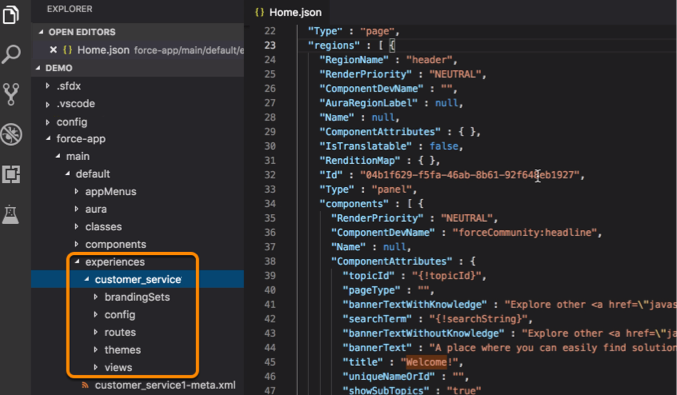
| Folder | Contents |
|---|---|
| brandingSets | branding_set_name.json defines the community’s branding set properties. |
| config |
|
| routes | Contains one file per page, named page_name.json, which defines the URL and other route-related information. |
| themes | Contains one file per theme, named theme_name.json, which defines the theme. |
| variations |
Contains one file per variation, named
experienceVariation_name.json. You can use an experience variation to change the default behavior of a Lightning community based on the audience, such as branding, page variations, or component visibility. |
| views | Contains one file per view, named view_name.json. Each file defines an SPA view, which is equivalent to a page to the end user. A view consists of regions that contain other regions or components in the rendered page. |
For a complete definition of ExperienceBundle and the files it includes, see the Metadata API Developer Guide.
Enable the ExperienceBundle Metadata Type
After you enable ExperienceBundle, Metadata API calls (retrieve and deploy) and Salesforce DX operations (pull, push, and status) use the ExperienceBundle type instead of SiteDotCom.
If you use change sets to deploy your community, the list of dependencies includes two items of type Site.com—MyCommunityName and MyCommunityName1. MyCommunityName1 now represents ExperienceBundle instead of SiteDotCom.
- From Setup, enter Communities Settings in the Quick Find box, and then select Communities Settings.
- Select Enable ExperienceBundle Metadata API.
- Save your changes.
Alternatively, you can enable this feature when creating a scratch org using a scratch org definition file. (See the Metadata Coverage report.)
1{
2    "orgName": "Sample Org",
3    "edition": "developer",
4    "features": [
5        "COMMUNITIES"
6    ],
7    "settings": {
8        "experienceBundleSettings": {
9            "enableExperienceBundleMetadata": true
10        },
11        "communitiesSettings": {
12            "enableNetworksEnabled": true
13        }
14    }
15}
Retrieve and Deploy ExperienceBundle Using Metadata API
In Metadata API, a manifest file defines the components that you’re trying to retrieve. This example shows a package.xml manifest file for retrieving a Lightning community using ExperienceBundle instead of SiteDotCom.
1<?xml version="1.0" encoding="UTF-8"?>
2<Package xmlns="http://soap.sforce.com/2006/04/metadata">
3    <types>
4        <members>*</members>
5        <name>CustomSite</name>
6    </types>
7    <types>
8        <members>*</members>
9        <name>ExperienceBundle</name>
10    </types>
11    <types>
12        <members>*</members>
13        <name>Network</name>
14    </types>
15    <version>46.0</version>
16</Package>
After you retrieve the .zip file, unzip it to access and edit the files.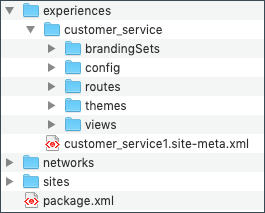
Retrieve and Deploy ExperienceBundle with Salesforce DX
Salesforce Developer Experience (DX) is a set of tools that streamlines the entire development lifecycle. It improves team development and collaboration, facilitates automated testing and continuous integration, and makes the release cycle more efficient and agile.
- Retrieve all the communities in your org using sfdx force:source:pull
- Deploy updates using sfdx force:source:push
- Check for conflicts or changes on the server using force:source:status